A QuickBooks Desktop payroll subscription is a separate, recurring add-on fee on top of the Desktop software itself, and it has to stay active or payroll stops calculating, filing, and paying correctly. In 2026 that add-on costs more than it used to, Intuit raised prices again on February 1, and if you let it lapse the software keeps running but payroll quietly breaks underneath it.
Here is what you are actually paying for, what happens the day the subscription expires, and what your real options are if you want off the subscription treadmill without abandoning Desktop entirely.
Why Payroll Needs Its Own Subscription, Even Though Desktop Is “Perpetual”
QuickBooks Desktop Pro Plus, Premier Plus, and Enterprise are not perpetual licenses anymore. Since 2022 they have all been annual subscriptions in their own right (Intuit stopped selling one-time-purchase Desktop licenses years ago). Payroll sits on top of that as a second subscription, because payroll is not really software you own, it is a service: Intuit has to keep pushing current federal and state tax tables, run your direct deposits through its bank network, and file and pay your payroll taxes electronically.
That is the part reluctant upgraders trip over. You can keep an old Desktop company file open and functional for years past its official support date (we cover what still works in that scenario in our guide to running QuickBooks Desktop without a subscription). Payroll does not tolerate that the same way. The tax tables are only good until they are not, and Intuit will not push new ones to a lapsed subscription.
What QuickBooks Desktop Payroll Costs in 2026
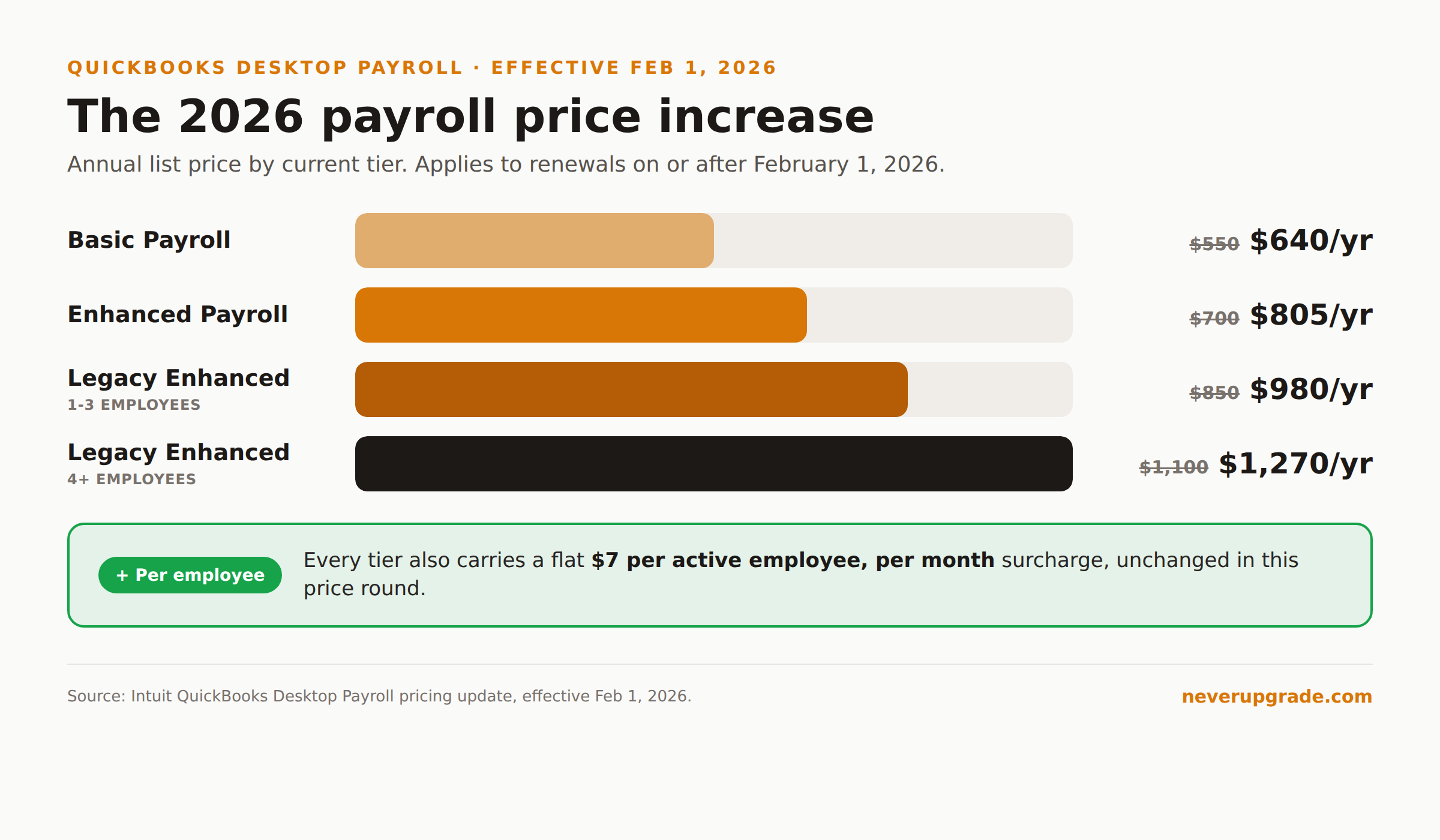
Pricing depends on which payroll tier you are on. As of the February 1, 2026 price change (it applies to anyone whose renewal falls on or after that date):
- Basic Payroll: $640/year, up from $550
- Enhanced Payroll: $805/year, up from $700
- Per-employee surcharge: $7/month per active employee on both tiers, unchanged
If you are still on a legacy Enhanced Payroll plan (the older per-seat structure Intuit has been phasing out), the increase looks like this:
- Enhanced, Unlimited (4+ employees): $1,270/year, up from $1,100
- Enhanced, Limited (1-3 employees): $980/year, up from $850
Desktop itself went up in the same round: Pro Plus and Mac Plus rose from $999 to $1,149 for a single user ($200 to $230 per additional seat), and Premier Plus rose from $1,399 to $1,609 ($300 to $345 per seat). Add payroll on top and a small shop with two or three employees on Premier Plus with Enhanced Payroll is now clearing $2,500 a year before it has sent a single invoice.
Intuit stopped selling new standalone Desktop Plus subscriptions in 2024. If you are not already grandfathered in, “add payroll to my existing Desktop Plus plan” is not an option anymore. It’s Enterprise or QuickBooks Online instead, both meaningfully more expensive than a legacy Pro Plus renewal (our breakdown of QuickBooks Desktop Enterprise pricing has the current tiers if that’s the path you’re being pushed toward).
What Stops Working the Day Your Payroll Subscription Lapses
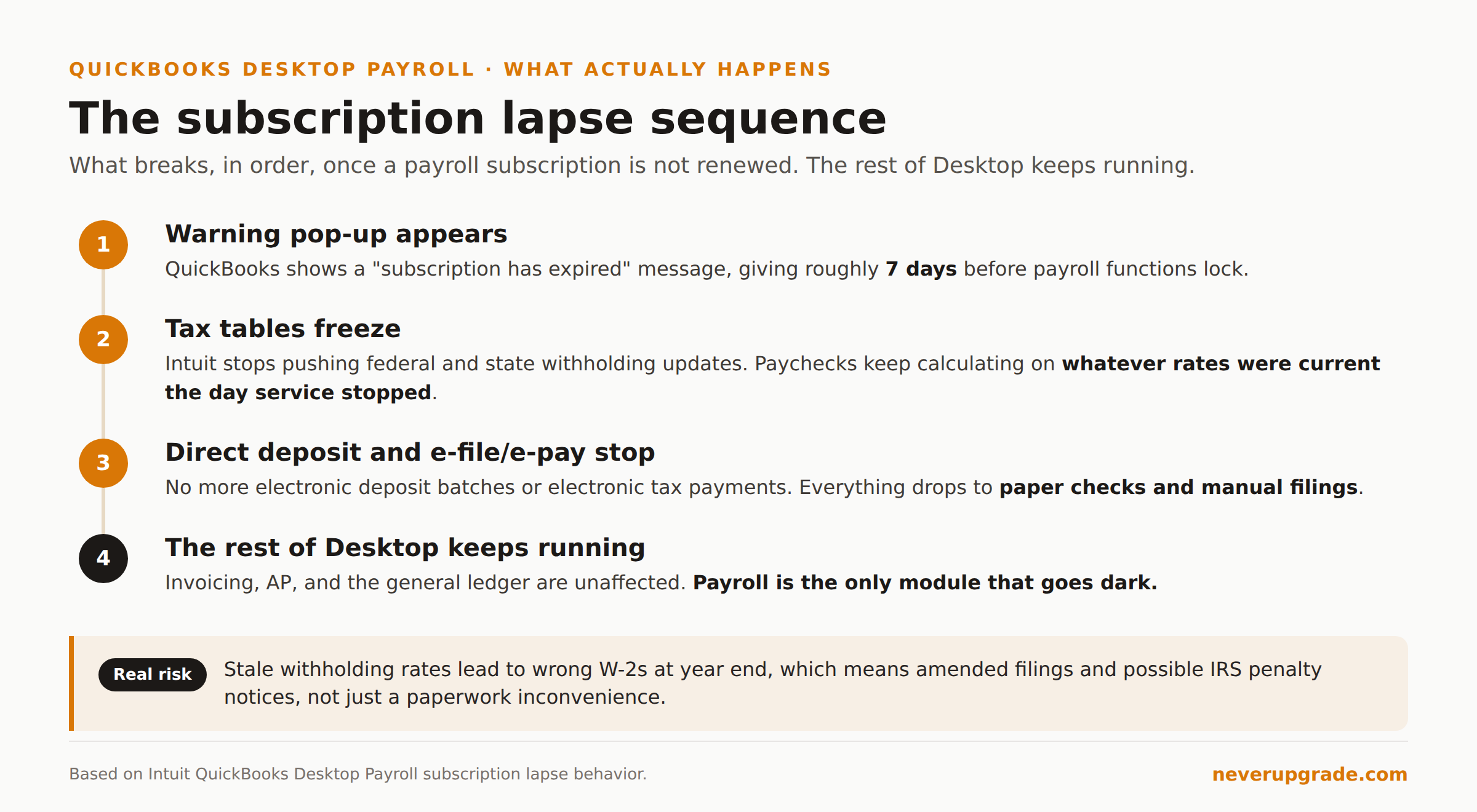
This is the part that catches people off guard, because the software does not just shut off. Here is the actual sequence:
- You get a warning first. A “subscription has expired” pop-up appears in QuickBooks, typically giving you about seven days before payroll functions actually lock.
- Tax tables freeze. Once the subscription is fully lapsed, Intuit stops pushing updated federal and state withholding tables. Your software keeps calculating payroll using whatever rates were current the day service stopped, not the day you run the next paycheck.
- Direct deposit and e-pay/e-file stop. You cannot push a direct deposit batch or electronically file and pay payroll taxes through a lapsed subscription. Everything drops to manual: paper checks, manual tax deposits, manual filings.
- The rest of Desktop keeps running. Invoicing, AP, the general ledger, reports: none of that depends on the payroll subscription. Payroll is the only module that goes dark.
The frozen tax tables are the real risk here, not the inconvenience of writing paper checks. Run payroll for a few pay periods on stale withholding rates and you are looking at incorrect W-2s at year end, which means amended filings and, in the worst case, IRS penalty notices. If you are going to let anything lapse on purpose, do it at a clean tax-year boundary, not mid-quarter.
One thing to check before you touch any of this: back up your company file. Payroll changes, subscription downgrades, and version migrations are exactly the kind of operation that goes sideways on an old file. A local backup takes two minutes and costs nothing.
Avoiding the Surprise Renewal Jump
A few practical moves if you want to stay on Desktop payroll but stop getting blindsided by price changes:
- Check your renewal date now, not when the charge hits. Log into the Customer Account Management Portal (CAMPs) or your billing settings inside QuickBooks and confirm exactly when your current term ends.
- Downgrade before renewal, not after. If you are on legacy Enhanced and don’t need the per-seat structure, moving to current Basic or Enhanced pricing sometimes costs less, but Intuit will not proactively suggest the cheaper option.
- Audit your active employee count. The $7/month per-employee surcharge adds up fast if you have seasonal or terminated employees still marked active in the system. That is pure waste.
- Get the renewal notice in writing and set your own calendar reminder 30 days out. Grace periods after a missed payment exist but are not guaranteed to be generous, and you do not want to find out how generous mid-payroll-run.
Alternatives If You Want to Drop the Payroll Subscription Entirely
If the annual increases have you looking for an exit, you have real options, and none of them require abandoning your Desktop company file for day-to-day accounting.
- Standalone payroll services like Gusto, OnPay, Patriot Payroll, and SurePayroll run payroll independently and let you export a journal entry summary into QuickBooks Desktop. You lose the one-click integration, but for a shop under 15 employees the manual journal entry is a five-minute monthly task, not a burden.
- Payroll Mate and similar dedicated payroll software are built specifically for small businesses that want to calculate payroll locally and export to QuickBooks, without an ongoing per-employee cloud subscription.
- A payroll service bureau or your accountant can run payroll entirely outside QuickBooks for a flat fee, which is often cheaper than Intuit’s subscription once you are past 5 or 6 employees, especially if you are already paying for tax filing help.
- Manual payroll is technically still possible for a one or two person business willing to calculate withholding by hand from IRS Circular E, but the compliance risk (missed rate changes, late filings) makes this the option we recommend least, even for holdouts.
The honest tradeoff: dropping Intuit’s payroll subscription saves real money, but every alternative above shifts either the integration work or the compliance responsibility onto you. If your payroll is complex (multi-state, union rules, tipped employees) the subscription is probably still the cheaper option once you price in your own time.
FAQ
Is QuickBooks Desktop payroll still available in 2026?
Yes. Existing subscribers can renew Basic and Enhanced Payroll, and Enterprise still bundles payroll options. Intuit stopped selling new standalone Desktop Plus subscriptions in 2024, but current subscribers are not locked out, they just pay the current (higher) renewal rates.
Can I subscribe to QuickBooks payroll without a Desktop Plus subscription?
No. Desktop payroll is an add-on to an active Desktop Plus or Enterprise subscription. If your Desktop subscription itself has lapsed, you cannot run payroll on top of it regardless of whether you pay the payroll fee separately.
Is QuickBooks Desktop payroll going away in 2026?
Not in 2026 specifically. Support for QuickBooks Desktop 2023 ends May 31, 2026, and Desktop 2024 is the final version, with support running through September 30, 2027. Payroll for supported versions continues on the current subscription pricing; it is the underlying software versions that are being phased out on a rolling schedule, not payroll itself.
If you’re deciding whether Desktop is still the right call at all, our guide on what QuickBooks Desktop support actually still covers walks through the version-by-version timeline in more detail.