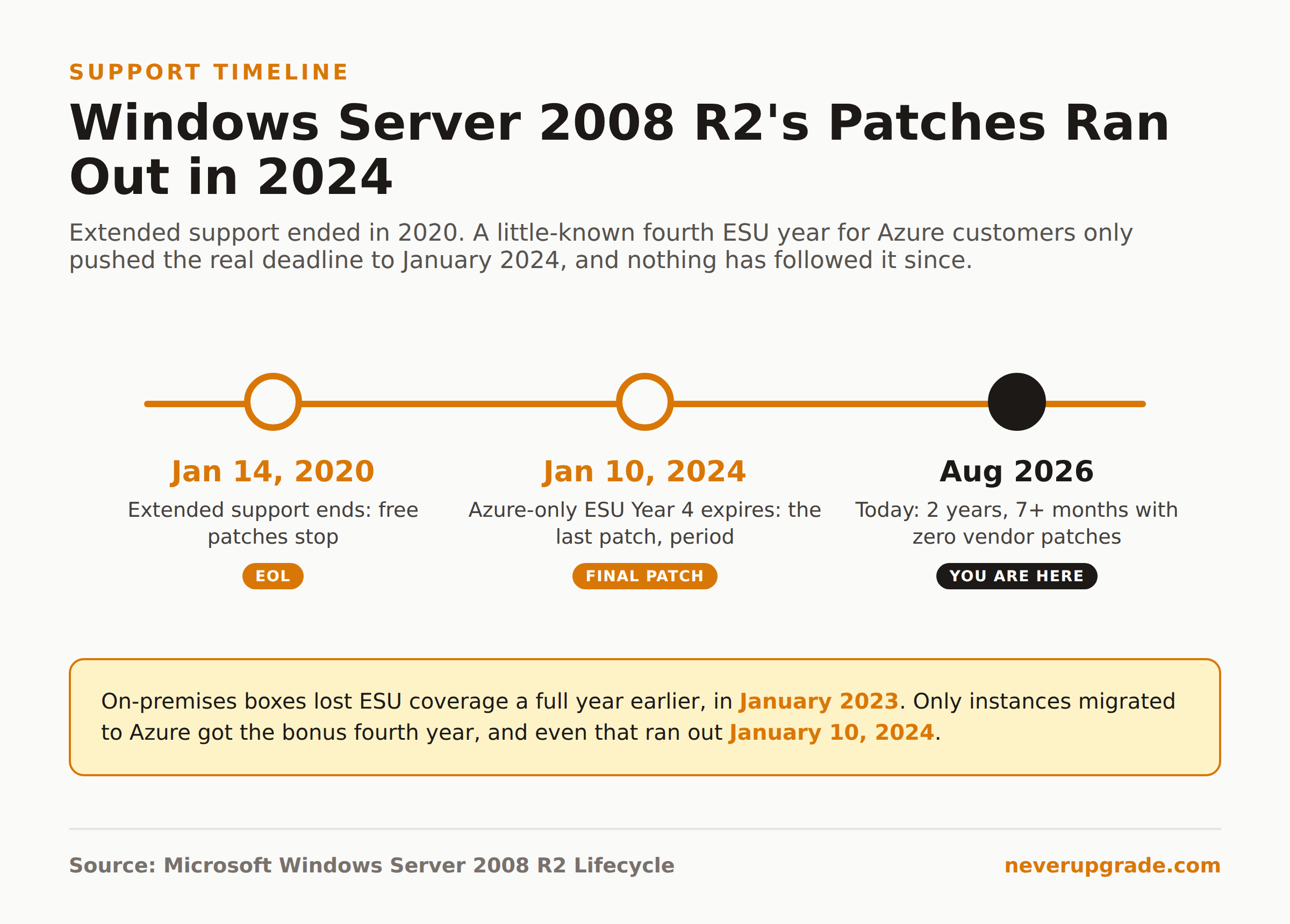
Windows Server 2008 R2 end of life is not a future date you need to plan around. It already happened, twice over: extended support ended January 14, 2020, and the last paid Extended Security Updates, available only to Azure customers, ran out January 10, 2024. If a 2008 R2 box is still online today, every vulnerability found since then, and there have been plenty, has gone unpatched. That is not a compliance footnote. It is an open door, and it has been open for over two and a half years.
The actual end of life date, and the ESU tail nobody remembers
Windows Server 2008 R2 shipped October 22, 2009. Here is the full support timeline, straight from Microsoft’s own lifecycle data:
- Mainstream support ended: January 14, 2015
- Extended support ended: January 14, 2020
- ESU Year 1 (on-premises or Azure): January 15, 2020 to January 13, 2021
- ESU Year 2: January 13, 2021 to January 12, 2022
- ESU Year 3: January 12, 2022 to January 11, 2023
- ESU Year 4, Azure only: January 11, 2023 to January 10, 2024
That last row is the one people miss. Microsoft quietly extended a fourth ESU year, but only for instances running on Azure. If your 2008 R2 server was sitting on-premises or on non-Azure hardware, you lost patch coverage in January 2023, a full year earlier than anyone who’d migrated to an Azure VM. Either way, the clock ran out. Nobody, anywhere, on any licensing tier, has been able to buy a security patch for this OS since January 10, 2024.
If you’ve seen a different date floating around, ignore it. There’s no such thing as a “final premium assurance” extension past 2024. Microsoft’s own lifecycle page for Windows Server 2008 R2 lists exactly the six milestones above and nothing after them.
What’s still running 2008 R2 in 2026, and why nobody replaced it
We still hear from readers running this OS in production, and the reasons are consistent enough to categorize:
A line-of-business app with no supported successor. Custom software built by a vendor that folded, or an in-house tool written by someone who left the company a decade ago, tied to a specific 32-bit driver or a .NET Framework version that never got tested on anything newer.
Manufacturing and lab equipment controllers. The server isn’t running a website, it’s running the PC that talks to a CNC machine or a piece of lab hardware whose control software was certified once, years ago, and re-certifying it against a newer OS costs more than the machine is worth.
A domain controller nobody wants to touch. Demoting and retiring an old DC that still holds FSMO roles is real, deliberate work, and it’s exactly the kind of project that gets bumped every sprint in favor of something with a deadline.
“It just works,” until it’s the only server left. Small shops running file and print services on a box that’s been stable for fifteen years have a rational reason to leave it alone, right up until it’s the one machine standing between them and a breach notification letter.
None of these are stupid reasons. They’re the normal, human reasons systems drift past their support window. But rational-sounding reasons don’t patch vulnerabilities.
The real exposure of a 15-year-old unpatched server OS
Here’s what “no updates since January 2024” actually means in practice. Every Patch Tuesday since then has shipped fixes for supported Windows Server versions, and every one of those disclosures is a roadmap for what an attacker can try against the older, structurally similar 2008 R2 kernel. Some of those bug classes apply directly. Microsoft isn’t checking, and isn’t going to.
Worth knowing: Microsoft has broken its own “no more patches” rule for 2008 R2 exactly once, for CVE-2019-0708, the wormable RDP vulnerability known as BlueKeep. In May 2019 they shipped an out-of-band patch for it on out-of-support systems including Server 2008 and 2008 R2, specifically because it was rated capable of self-propagating the way WannaCry did. That was a one-time emergency exception during the extended-support window, not a standing policy, and it happened while the OS was still eligible for support. Five years past the actual end of ESU, there is no reason to expect that kind of rescue again.
Add the protocol-level baggage: SMBv1 still enabled by default on plenty of these boxes, TLS defaults that predate modern cipher suite guidance, and RDP configurations that were reasonable in 2012 and are a liability now. None of that is exotic. It’s the same short list of “please turn this off” items security teams have been flagging for a decade, still sitting there because touching the box feels riskier than leaving it alone.
Isolating or virtualizing a 2008 R2 box you cannot retire yet
If migration genuinely isn’t happening this quarter, here’s how to cut exposure on what you’ve got. Before you touch anything: back up the server, including a full system state backup if it’s a domain controller, and confirm the backup actually restores before you start disabling services on a production box.
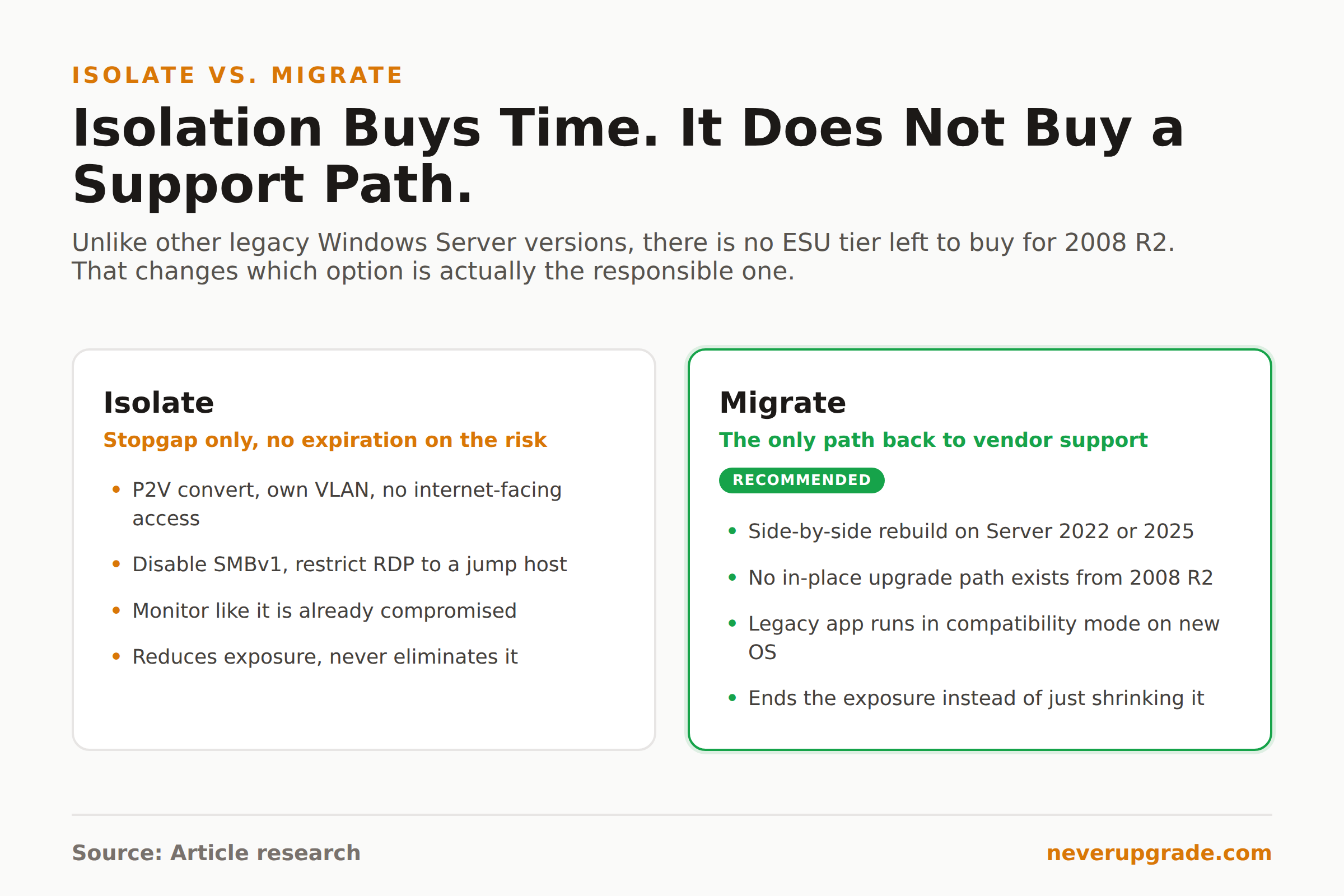
- Convert it to a VM if it’s still on physical hardware. A P2V conversion means a dead motherboard or failed disk controller doesn’t turn into an emergency rebuild of an OS whose install media you may have trouble finding. Snapshot before every change so you can roll back in minutes, not hours.
- Cut network access to the bare minimum. Put it on its own VLAN or security group, allow inbound traffic only from the specific hosts that need it, and remove it from any subnet with general user or internet-facing traffic. No exceptions for “just in case.”
- Disable SMBv1 and tighten RDP. If nothing on the box actually needs SMBv1 (check first, some ancient LOB apps do), turn it off. Restrict RDP to a jump host, not direct access from anywhere on the network.
- Strip Active Directory privileges to the minimum the box needs. If it’s not a DC, it shouldn’t be sitting on an account with domain admin rights left over from a setup script five sysadmins ago. Audit and prune.
- Monitor it like it’s already compromised. Watch for outbound connections you don’t recognize, new local accounts, and unusual process activity. You’ve lost the vendor’s patches, not your own visibility.
- Document the compensating controls. If you’re under any compliance framework, an unsupported server with no ESU option fails an audit outright unless you can show active, specific mitigations in writing. Write it down before the auditor asks.
This buys time. It does not buy safety. There’s a real difference, and pretending otherwise is how “temporary” isolation turns into a five-year policy.
Why this is the one case where migration beats hardening
We generally don’t tell readers to rush an upgrade. Most end-of-life software has a legitimate holding pattern: keep paying for ESU, isolate the box, wait out your hardware refresh cycle on your own schedule. Windows Server 2008 R2 is the exception, and here’s the honest reason why.
Every other server OS we cover has a paid path back into vendor support: buy ESU, keep getting patches, migrate when it’s convenient. That path closed for 2008 R2 in January 2024. There is no invoice you can send Microsoft to get a patch for it. Hardening buys you a smaller attack surface on a system with zero remaining official recourse, forever, not until some ESU renewal date. If the box touches production data, a network with other machines on it, or anything internet-adjacent, isolation is a stopgap, not a strategy.
Since there’s no supported in-place upgrade path from 2008 R2 to any currently maintained release, the honest migration plan is a side-by-side rebuild: stand up a new server on Windows Server 2022 or 2025, migrate the roles and data over, cut across during a maintenance window, and decommission the old box instead of leaving it running “just in case” for another six months. If the blocker is a legacy application, virtualizing that app in compatibility mode on the new OS is usually less work than most teams assume, and it’s real work that ends, unlike hardening, which doesn’t.
We walked through a very similar decision, one version newer, in Windows Server 2012 R2 After End of Life: Your 2026 Survival Plan, including a step-by-step Azure migration path in Migrating Windows Server 2012 R2 to Azure: A Step-by-Step ESU Play. If your 2008 R2 box is the older sibling of a 2012 R2 migration you’ve already been putting off, plan both moves together. Doing two overdue migrations as one project is consistently cheaper than doing them as two separate fire drills.
FAQ
Is Windows Server 2008 R2 still supported in 2026?
No. Extended support ended January 14, 2020, and even the Azure-only Extended Security Updates program, the last available patch source, expired January 10, 2024. There is no ESU tier, paid or otherwise, currently available for this OS.
Can you still get security updates for Windows Server 2008 R2?
No, not through any official Microsoft channel. The only exception in this OS’s history was a one-time out-of-band emergency patch for the BlueKeep RDP vulnerability (CVE-2019-0708) in May 2019, issued while the OS was still within its support and ESU window. No similar exception has happened since ESU ended in 2024, and none is expected.
Can I upgrade Windows Server 2008 R2 directly to Windows Server 2019 or 2022?
No in-place upgrade path exists from 2008 R2 to a currently supported release. The realistic path is a side-by-side migration: build a new server on a supported version, move roles and data over, then retire the old box, rather than attempting an in-place upgrade that Microsoft doesn’t support.
If there’s one number to remember from all of this, it’s not the 2020 end-of-support date. It’s January 10, 2024, the day the last patch of any kind for Windows Server 2008 R2 stopped existing. Everything since then has been running on borrowed time with no vendor safety net at all.