QuickBooks Desktop pricing in 2026 depends on three things stacked on top of each other: which edition you are on (Pro Plus, Premier Plus, or Enterprise), how many users need access, and whether you are paying for payroll separately. A single-user Pro Plus renewal runs $1,149 a year. Add a second seat, Enhanced Payroll, and you are past $2,000 before you have sent one invoice.
Here is what each piece actually costs after the February 1, 2026 price increase, and where the real money goes once you stop looking at the “starting at” number.
Why There Is No Single QuickBooks Desktop Price Anymore
Intuit used to sell one number per edition. That stopped in 2022, when Desktop moved to subscription-only pricing, and it got messier in 2024, when Intuit quit selling new Pro Plus and Premier Plus subscriptions to anyone who was not already a customer. Existing subscribers keep renewing. Everyone else gets funneled to Enterprise or QuickBooks Online.
So “QuickBooks Desktop pricing” is really four separate line items that may or may not apply to you:
- The edition license itself (Pro Plus, Premier Plus, or Enterprise)
- Extra user seats, billed per seat, not per bundle
- Payroll, which is a completely separate subscription
- Add-ons like cloud hosting or advanced payments processing
Miss one of those and whatever number you budgeted is wrong. We will go through each.
Pro Plus and Premier Plus Pricing
If you are already a subscriber, Intuit will keep renewing you. Here is what that costs as of the February 2026 increase:
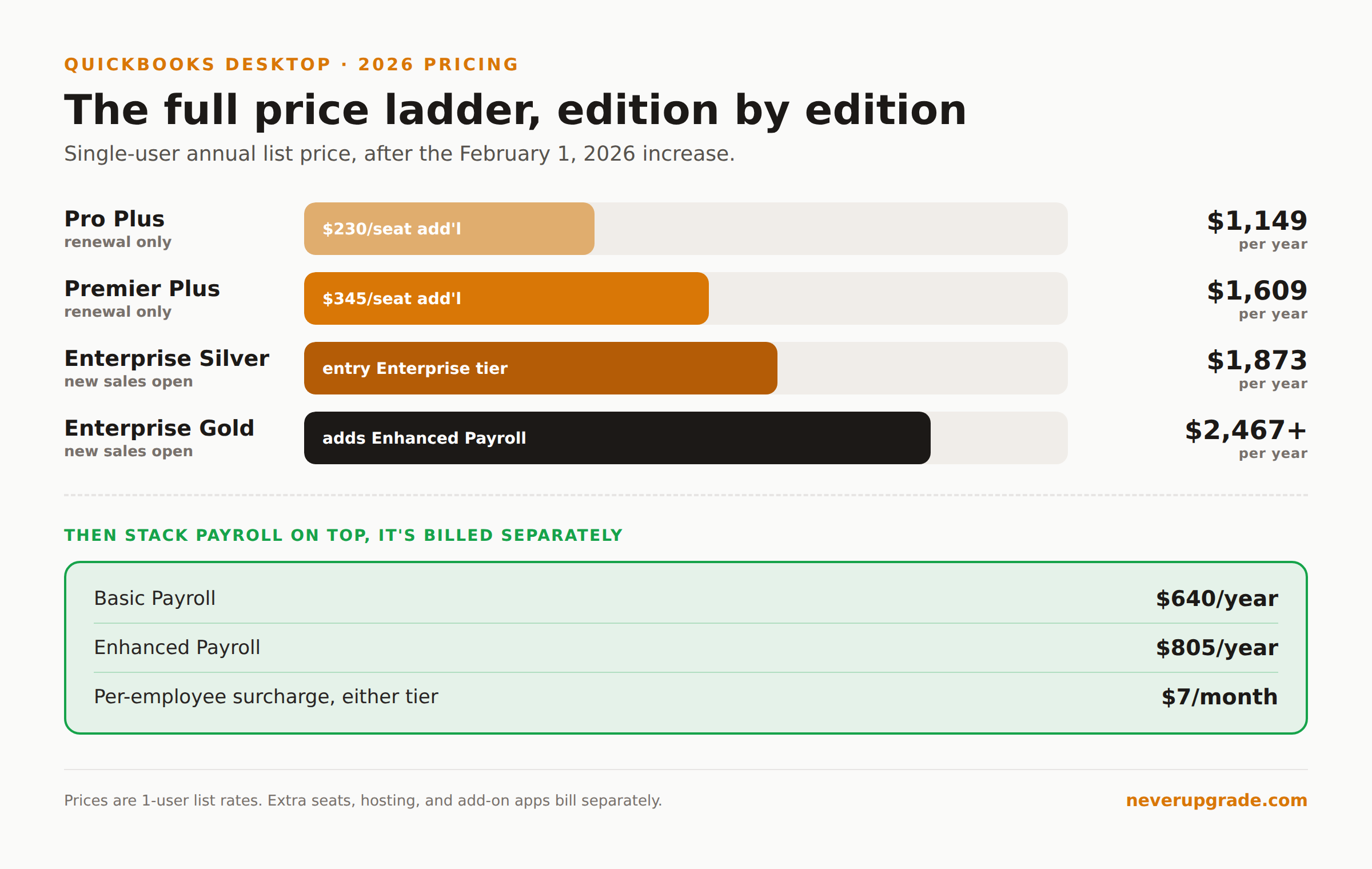
| Edition | Single user | Additional seat |
|---|---|---|
| Pro Plus / Mac Plus | $1,149/year | $230/seat |
| Premier Plus | $1,609/year | $345/seat |
Both jumped about 15 percent from their prior rates ($999 and $1,399). That is the fourth or fifth increase since the 2022 subscription switch, and there is no sign the trend reverses.
The catch that trips people up: this pricing only exists for renewals. If you canceled and want back in, or you never had a Desktop subscription, Pro Plus and Premier Plus are not for sale to you. Intuit closed new sales in July 2024. Your only new-purchase path is Enterprise.
Enterprise Tier Pricing
Enterprise is the one edition Intuit still sells to new customers, and the pricing reflects that captive position:
| Tier | 1-user annual price (2026) |
|---|---|
| Silver | $1,873 |
| Gold | $2,467 and up |
| Platinum / Diamond | Custom quote only |
Multi-user pricing scales fast: a 6-user Silver plan runs roughly $6,608 a year. Platinum and Diamond add advanced inventory, assembly builds, and (on Diamond) integrated time tracking and Assisted Payroll, but Intuit does not publish flat rates for either tier anymore, it routes you to a sales call.
One thing worth flagging because it is easy to miss: Intuit’s own Enterprise pricing page advertises Gold, Platinum, and Diamond at “starting at $19/mo.” That is a discounted first-year promotional rate, not the ongoing annual cost shown above. Nobody renews at $19 a month. Read that number as a lead-generation hook, not a budget line.
If Enterprise is where you are headed, our deeper breakdown of QuickBooks Desktop Enterprise pricing covers hosting fees and which tier actually fits which shop.
Payroll Add-On Pricing
Payroll is not bundled into any Desktop edition. It is a second subscription with its own renewal date:
| Payroll tier | Annual price (2026) | Per-employee fee |
|---|---|---|
| Basic | $640/year | $7/employee/month |
| Enhanced | $805/year | $7/employee/month |
Those went up 15 to 16 percent in the same February round as the edition pricing. If you are still on a legacy per-seat Enhanced plan, the numbers are different again, and stale tax tables on a lapsed payroll subscription cause real problems, not just an inconvenience. That is a big enough topic that we gave it its own full breakdown of QuickBooks Desktop payroll subscription costs.
The Real All-In Cost for a Typical Small Shop
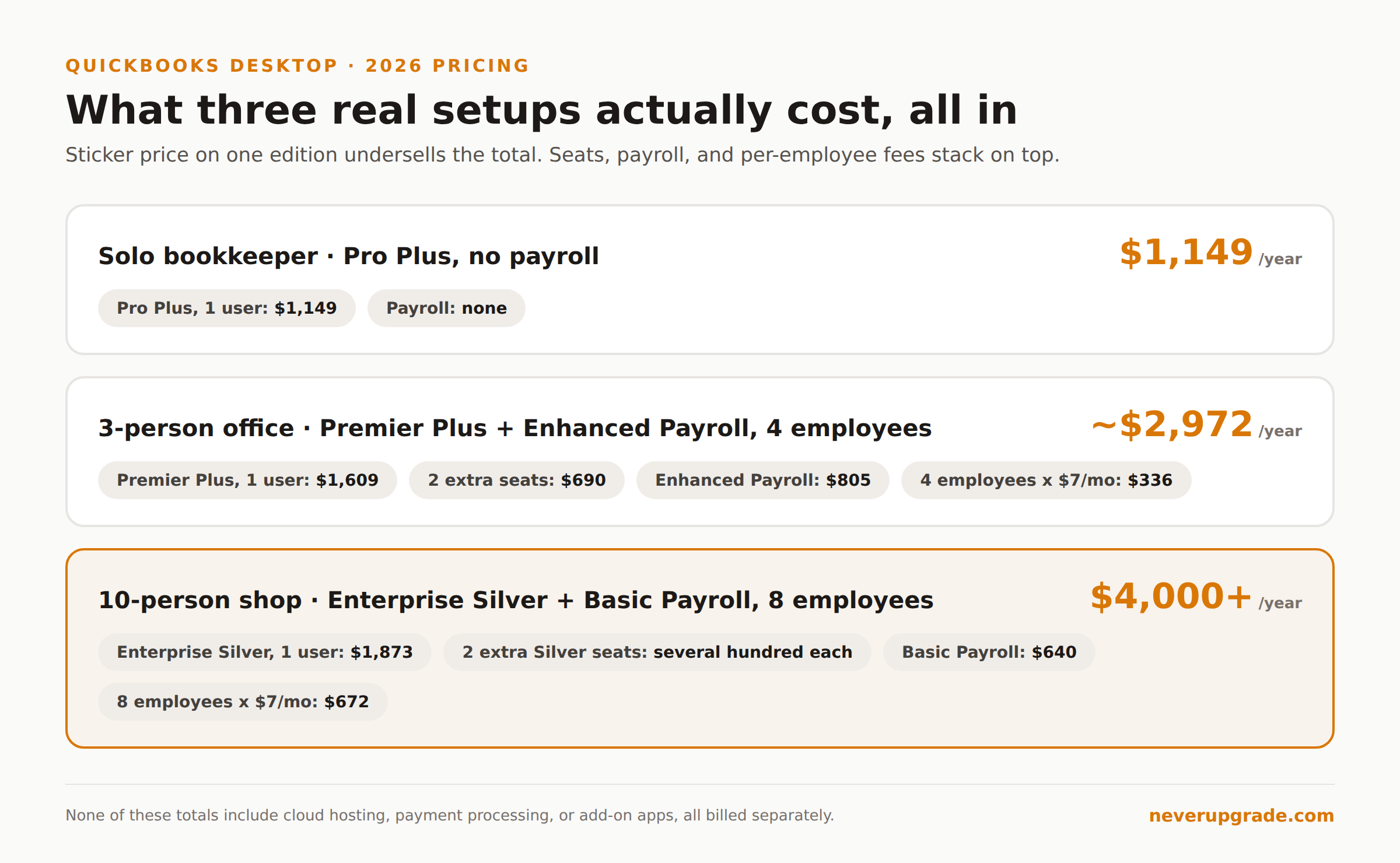
Put the pieces together and the sticker price on any one edition undersells what you actually pay. Three common setups:
- Solo bookkeeper, Pro Plus, no payroll: $1,149/year. The floor.
- Three-person office, Premier Plus, Enhanced Payroll, 4 employees: $1,609 + (2 x $345 seats) + $805 + ($7 x 4 x 12) = roughly $2,972/year.
- Ten-person shop, Enterprise Silver, 3 users, Basic Payroll, 8 employees: call it $1,873 base plus two extra Silver seats (Intuit prices these per-tier, expect several hundred dollars each), plus $640 payroll plus $672 in per-employee fees, landing north of $4,000/year before any add-ons.
None of those totals include cloud hosting, advanced payments processing, or add-on apps, all of which are billed separately and all of which show up on the same monthly statement. If a vendor or a “QuickBooks pricing” article quotes you a single number, ask what it excludes. Usually it is everything above.
How to Cut the Bill Without Losing Functionality
A few moves that actually reduce the number without downgrading your workflow:
- Audit your active seat count before renewal. Seats billed to employees who left months ago are pure waste, and Intuit will not flag it for you.
- Check whether you need Enhanced Payroll or just Basic. If you are not running direct deposit or need e-file for a handful of states, Basic at $640 covers the core functions for $165 a year less.
- Confirm your Enterprise tier matches what you use. Gold’s payroll bundle and Platinum’s advanced inventory are wasted spend if you never touch those features. Silver plus a standalone payroll subscription is sometimes cheaper than Gold’s bundle, depending on employee count.
- Lock in your renewal date and shop the decision 60 days out, not the week the charge hits. Once it renews you are committed for another year.
Before you touch tier or seat changes on a live company file, back up the file first. Downgrades and re-licensing are exactly the kind of operation that occasionally corrupts an old file, and a backup costs you two minutes.
FAQ
Is QuickBooks Desktop being discontinued in 2026?
No. Intuit continues to support and renew existing Pro Plus, Premier Plus, and Enterprise subscribers. What ended is new sales of Pro Plus and Premier Plus to customers who were not already subscribed, which happened back in July 2024.
Can I still buy QuickBooks Desktop new in 2026?
Only Enterprise. Pro Plus and Premier Plus are renewal-only products now; there is no way to start a new subscription to either one, even if you are willing to pay full price.
What is the cheapest way to stay on QuickBooks Desktop?
If you already have a Pro Plus subscription, keep renewing it. At $1,149 a year for one user, it is meaningfully cheaper than any new Enterprise tier. If you need a fresh purchase and do not need Enterprise-scale inventory, QuickBooks Online is usually cheaper than Enterprise for a small operation, though it is a different product with a different workflow.
Whatever tier you land on, treat the sticker price as the starting point, not the total. Seats, payroll, and add-ons are where the real annual number lives.