QuickBooks Desktop support in 2026 splits into two very different worlds. If you pay for a current subscription (Pro Plus 2024, Premier Plus 2024, Mac Plus 2024, or any Enterprise 24.0 seat), you get full phone support, payroll, bank feeds, and security patches. Everything older has already gone dark: QuickBooks Desktop 2023 lost payroll, payments, bank feeds, and live support on May 31, 2026, which is now behind us, and non-subscription versions from 2021 and earlier have been dark for years. This guide tells you exactly what Intuit will and will not do for your specific version, and how to keep the file usable when the phone line goes cold.
Which QuickBooks Desktop versions still get official support
Intuit’s support policy is not “we support QuickBooks Desktop.” It is version-by-version, and the cutoff moves every May.
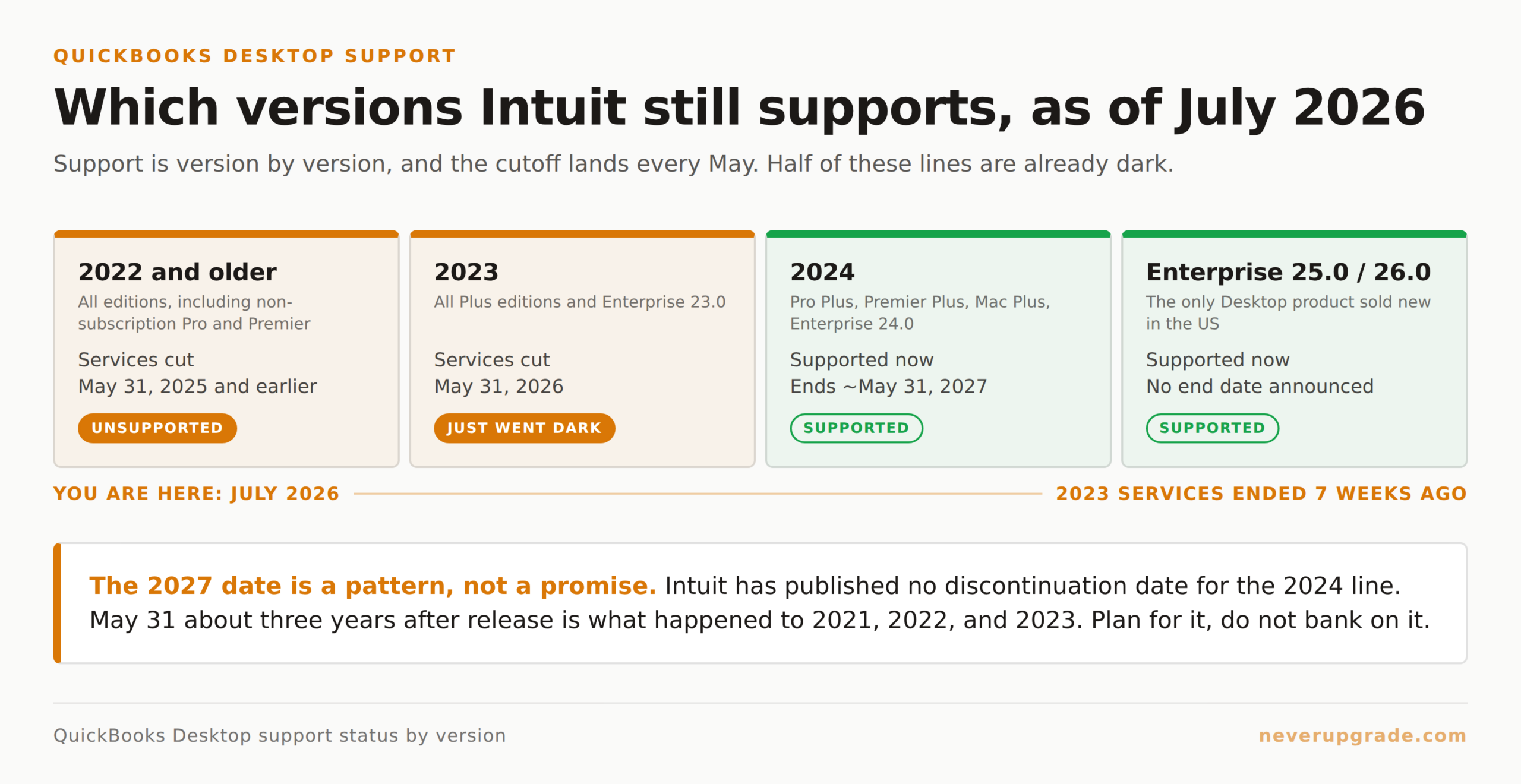
Here is the map as of July 2026:
- QuickBooks Desktop 2024 (Pro Plus, Premier Plus, Mac Plus, Enterprise 24.0): fully supported. Payroll, payments, bank feeds, live phone/chat support, and critical security updates all work. Expect services to run through roughly May 31, 2027, but treat that as a projection rather than a promise: Intuit has published no discontinuation date for the 2024 line. The May 31 cutoff about three years after release is a pattern (2021 ended May 2024, 2022 ended May 2025, 2023 ended May 2026), not a commitment.
- QuickBooks Desktop Enterprise 25.0 and 26.0: fully supported. Enterprise is now Intuit’s only “sold as new” desktop product in the US.
- QuickBooks Desktop 2023 (all Plus editions and Enterprise 23.0): unsupported as of May 31, 2026. Payroll, direct deposit, payments, bank feeds, and live technical support ended on that date, roughly seven weeks ago. The software still opens and posts transactions locally. If you are still on 2023 and have not noticed anything wrong yet, read the payroll section below: this is exactly the failure that hides.
- QuickBooks Desktop 2022 and older: unsupported. Services were cut off May 31, 2025 (for 2022), May 31, 2024 (for 2021), and so on. No security updates, no payroll, no bank feeds. Intuit’s live agents will not troubleshoot these versions.
Two things people get wrong. “Unsupported” does not mean “broken”: a QuickBooks Pro 2019 file opens on Windows 11 and lets you enter transactions, print invoices, and run reports. What you lose is anything that talks to an Intuit server. Second, “supported” does not automatically mean free phone help. Intuit’s policy limits free technical support to 12 months after product registration unless you have an active Plus or Enterprise subscription. Bought a one-time license in 2019 and registered it then? Your 12 months ran out in 2020, no matter what the version’s “support” status says today.
The subscription-only wall, explained
The single biggest change in the last two years was not technical. It was commercial. On September 30, 2024 (extended from an original deadline of July 31), Intuit stopped selling new subscriptions to QuickBooks Desktop Pro Plus, Premier Plus, Mac Plus, and Enhanced Payroll to US customers. Enterprise remains the only Desktop product you can start fresh with. If you did not have an active subscription by that date, you cannot go to the store and start one now. You can buy QuickBooks Online. You can buy Enterprise. You cannot buy new Pro Plus.
Existing subscribers are grandfathered. If your Pro Plus, Premier Plus, or Mac Plus subscription was active on September 30, 2024, Intuit says you can renew it indefinitely and keep receiving updates and support. In practice, “indefinitely” means “until Intuit decides otherwise,” so keep a copy of that grandfather clause in your records.
The practical effect is a hard fork:
- If you are on a current Plus subscription, you have real support. Your job is to keep that subscription active without a lapse pushing you into “new subscriber” territory.
- If you own a boxed or license-key version (Pro 2019, Premier 2020, Pro 2021), the software is yours forever, but Intuit will not sell you the on-ramp back to services. You either stay put (accept the service losses), buy Enterprise (large jump in cost), or migrate to Online.
There is no middle path Intuit will sell you. Anyone who says they can “reactivate” your Pro 2019 to modern payroll is running a scam: fake support numbers, phishing sites styled to look like Intuit, remote-access takeovers. The only legitimate QuickBooks phone numbers begin with 800-446-8848 (general customer service) and 888-692-3612 (Enterprise sales). Numbers from third-party ad results are usually not Intuit.
What breaks first when your version is discontinued
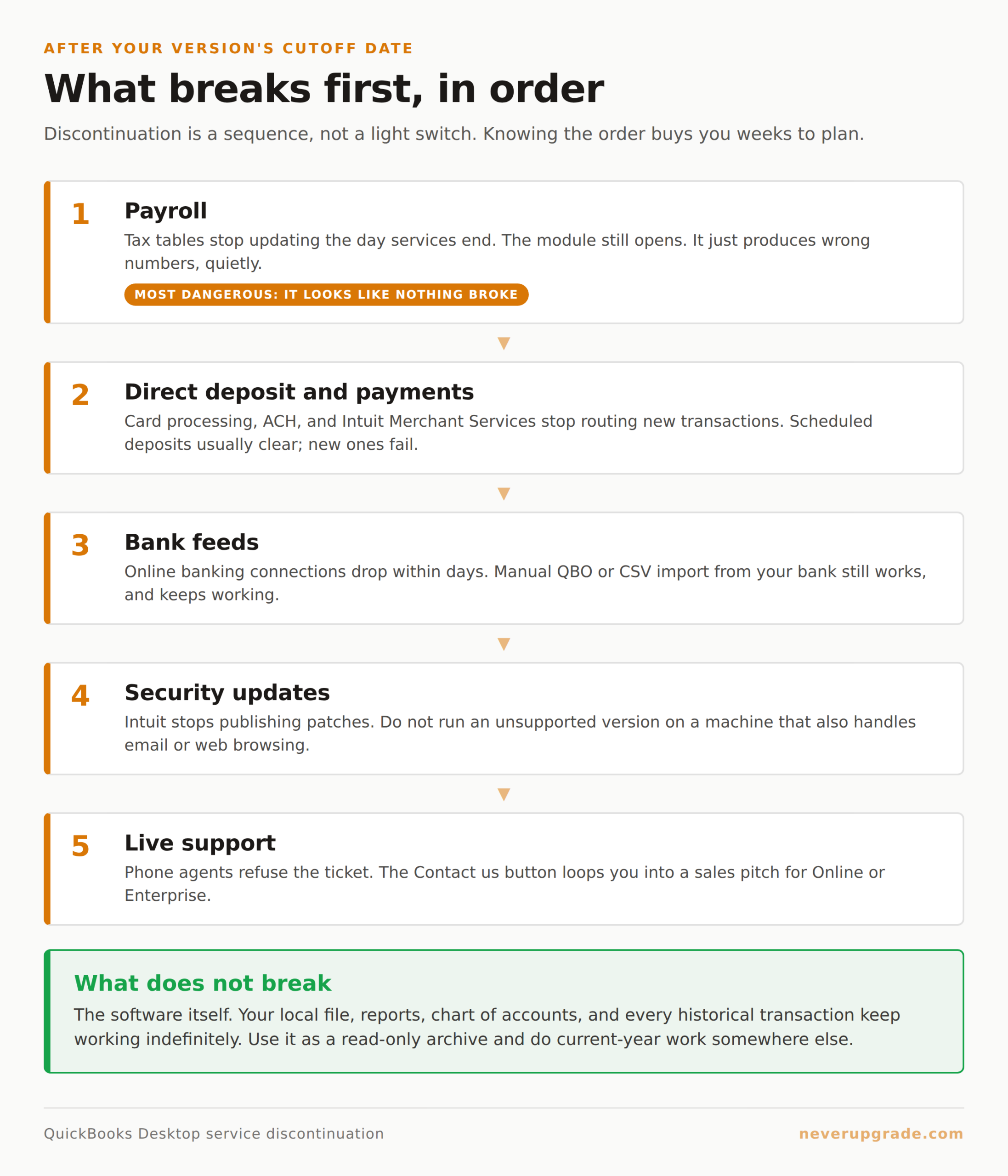
Discontinuation is not a light switch on May 31. It is a sequence, and knowing the order buys you weeks to plan.
Here is what happens in roughly this order after your version’s cutoff date:
- Payroll first. Payroll subscriptions stop pulling updated tax tables the day services end. The payroll module still appears inside QuickBooks; it just produces wrong numbers. That is the most dangerous failure mode because it looks like nothing broke. Turn off automatic payroll runs before your cutoff if you plan to stay on an unsupported version.
- Direct deposit and payments. Credit card processing, ACH, and Intuit Merchant Services stop routing new transactions. Existing scheduled deposits usually clear; new ones fail. Refunds queued after the cutoff can hang in limbo. Move merchant processing to a standalone provider (Stripe, Square, or a bank ACH portal) two to four weeks before the cutoff and reconcile manually.
- Bank feeds. Online banking connections stop within days of the cutoff. Some banks drop the Intuit feed even earlier depending on when the API partnership renewed. Manual QBO/CSV import from your bank’s website still works and will keep working. Mild inconvenience, not a crisis.
- Security updates. Intuit stops publishing patches. The QuickBooks database engine, PDF component (Microsoft XPS), and ActiveX controls are the surfaces historically exploited. Do not run an unsupported version on a machine that also handles email or general web browsing.
- Live support. Phone agents refuse the ticket. The support article for your version stays online, but the “Contact us” button loops you into a sales pitch for Online or Enterprise instead of routing you to a tech.
Notice what does not break: the software itself. Your local file, your reports, your chart of accounts, your historical transactions. Those work. Every accountant we have talked to who runs a “backup” copy of an unsupported version says the same thing: use it as a read-only archive, do current-year work somewhere else.
How to get help when Intuit won’t
Once Intuit closes the ticket, you have four real sources, roughly in order of usefulness.
QuickBooks ProAdvisors. Independent accountants and bookkeepers certified by Intuit. Many still support clients on discontinued Desktop versions. Search the directory at proadvisor.intuit.com. Rates run about 100 to 250 dollars per hour, but a good one can solve a data-file problem in an hour that an Intuit phone agent would take four calls to fail at.
The QuickBooks Community forums. Intuit’s own forums at quickbooks.intuit.com/community are heavily astroturfed by “helpful” replies steering everyone toward Online, but useful answers do surface. Search first, post second. Include your exact version (Help menu, then F2 or Ctrl+1 for the Product Information window) and the exact error code. Real answers come from other users, not Intuit staff.
Third-party technical communities. The /r/QuickBooks subreddit and AccountingWeb forums have people running Pro Plus and Enterprise on unsupported setups every day. They will answer things Intuit will not: how to run QB 2019 on Windows 11, how to point an old QBW file to a new SQL Server, how to strip a corrupted transaction out of a data file. Search for your error message first.
File repair specialists. For real data-file damage (QBW won’t open, File Doctor can’t fix it, verify errors persist after rebuild), a small industry of specialists exists. E-Tech, Fast Fix My File, and a few others charge a flat fee per file (typically 200 to 400 dollars). We have used two of these outfits successfully on files Intuit’s own tech marked “unrecoverable.” Ask for a written diagnostic first. Never wire money to a random number that answered “QuickBooks Support.”
The one thing we would not do: pay Intuit for a one-off “premium care” call to unbrick an unsupported version. The resolution rate on end-of-life versions is low and the fee is not refundable if they can’t solve it.
The community support map: where to look for which problem
Different sources are good at different things. Rough map based on what we see actually get answered:
- “How do I reinstall QB 2019 on a new Windows 11 machine?” Reddit and AccountingWeb, plus the archived Intuit knowledge base article for your version. You do not need Intuit for this, and calling them will end in an upsell.
- “My payroll tax tables are out of date.” No fix exists for unsupported versions. You need a current subscription or you switch to another payroll provider (Gusto, ADP, Rippling) that produces the numbers you paste into QB manually.
- “My QBW file won’t open, verify data shows errors.” ProAdvisor first, then a paid file-repair specialist if the ProAdvisor can’t fix it. Intuit’s own File Doctor is worth a run before either.
- “I’m on Enterprise, service is ‘active,’ but bank feeds broke.” This is the case where Intuit is still on the hook. Call 888-692-3612 with your license number and Enterprise version. Enterprise support is materially better than Pro Plus support.
- “Someone claiming to be Intuit called me.” Hang up. Intuit almost never makes outbound calls. This is one of the more common scam vectors targeting small-business owners running Desktop.
The one case where you should actually upgrade
We are the last people to push an upgrade for its own sake. But there is one clear case where staying put is genuinely reckless: you run payroll on a discontinued version and you have employees.
Payroll tax calculations depend on tax tables Intuit updates several times a year. When services end, the tables freeze. A frozen table produces wrong federal withholding, wrong FICA on employees who cross the annual wage base, and wrong state unemployment insurance rates. Wrong withholding is a payroll tax filing problem, and the IRS and your state Department of Revenue do not accept “my software was discontinued” as a defense. Penalties for underwithholding start at roughly 15 percent of the underpayment and compound.
If you have payroll and your version is going dark, you have two acceptable paths: renew or upgrade your QuickBooks so payroll keeps working, or move payroll to a dedicated provider and let QuickBooks be a general ledger only. What you cannot safely do is run frozen tax tables into 2026 and hope nobody notices.
Everything else in QuickBooks Desktop can survive an unsupported version indefinitely with reasonable precautions. Payroll cannot. That is the line.
Frequently asked questions
Does QuickBooks Desktop 2023 stop working on May 31, 2026?
No, and it did not stop working when that date passed. The software itself continues to open and function locally. What ended on May 31, 2026 is Intuit’s connected services: payroll tax tables, direct deposit, Intuit Payments, bank feeds, live technical support, and security updates. Your data file, reports, and existing transactions remain fully accessible.
Can I still buy QuickBooks Desktop Pro Plus in 2026?
Not as a new US subscriber. Intuit stopped selling new subscriptions for Pro Plus, Premier Plus, and Mac Plus on September 30, 2024. Existing subscribers can continue to renew. New customers who need a QuickBooks Desktop product can only buy Enterprise, which starts at a materially higher price point.
Is it safe to keep running an unsupported QuickBooks Desktop version?
For general bookkeeping (invoices, bills, reports, historical data), yes, with two precautions: run it on a machine that does not also handle general web browsing or email, and keep verified backups off that machine. For active payroll, no. The frozen tax tables produce filings that put you on the wrong side of IRS penalties. Separate payroll from QuickBooks if you plan to stay on an unsupported version.
What to do next
Confirm your exact version and its support status. Open QuickBooks, press F2 (or Ctrl+1 on Mac), and write down the product name, version, and release number. Compare against the timeline above. If you are on QuickBooks Desktop 2023 and running payroll, you crossed the line on May 31, 2026, and your tax tables have been frozen for about seven weeks: check your last two payroll runs against a current withholding table today, not next quarter. If you are on 2022 or earlier, you crossed it years ago, and the question is only how to make the current setup safer, not how to keep Intuit’s phone open.
We publish version-specific troubleshooting for exactly this kind of holdout scenario.