Windows 10 end of support arrived on October 14, 2025. Nine months later, the sky has not fallen. Your PC still boots, your line-of-business apps still run, and Microsoft has quietly handed consumers a second year of free security patches that almost nobody asked about. Here is what changed, what did not, and the one deadline that actually matters now.
We have spent the last nine months watching clients panic, ignore the whole thing, or land somewhere sensible in between. This is the honest field report.
What Windows 10 end of support actually changed
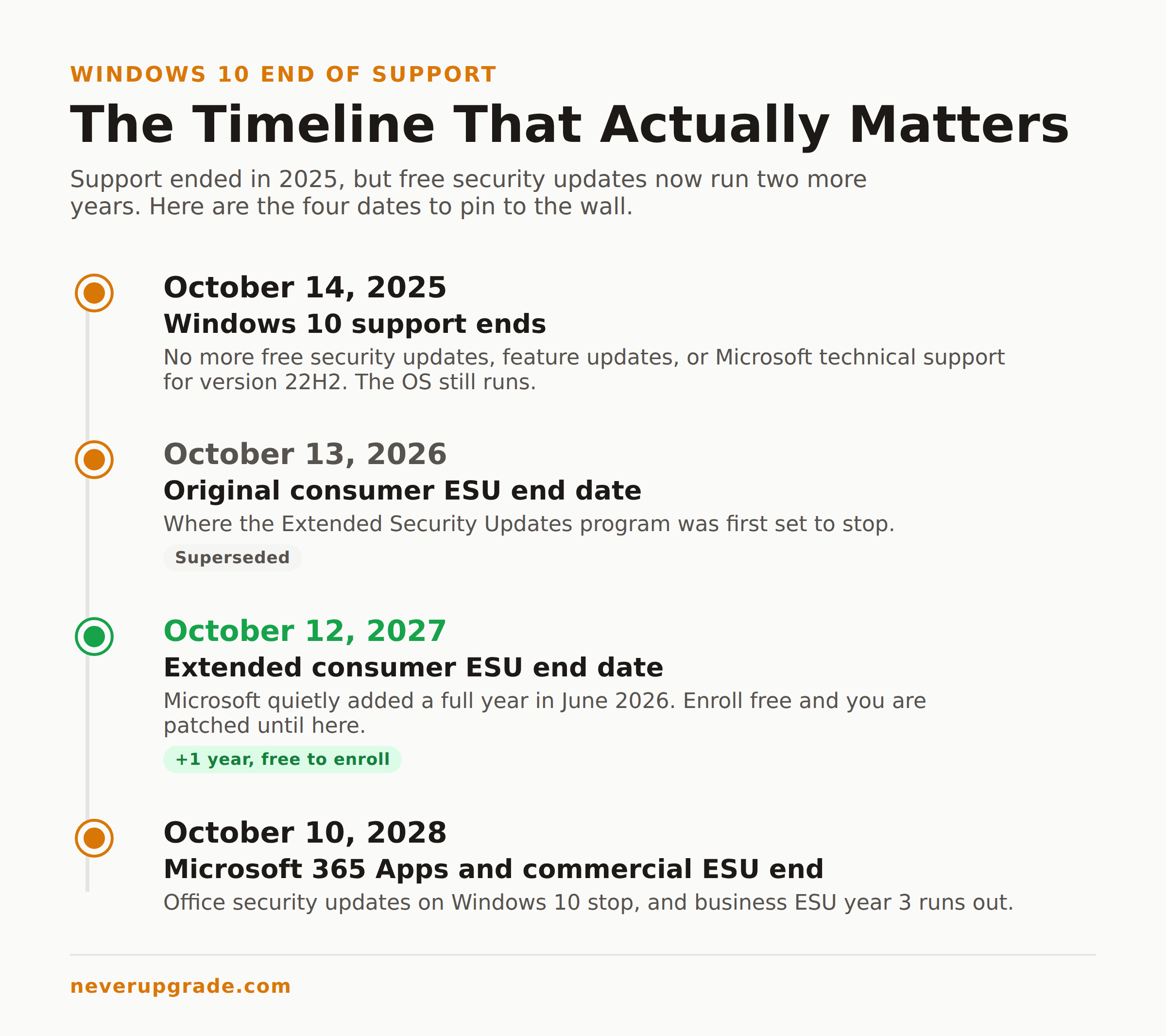
On the cutoff date, three things stopped for Windows 10 version 22H2:
- Free monthly security updates through Windows Update.
- Feature and quality updates.
- Free technical support from Microsoft.
Notice what is not on that list: your computer. Windows 10 did not phone home and brick itself on October 14. It boots the same as it did on the 13th. Drivers still load, Chrome still updates itself, your accounting software still opens.
That gap between “unsupported” and “unusable” is the whole reason this site exists. The two words are not synonyms, and Microsoft’s marketing works hard to blur them.
The real risk is narrow but real: any security hole discovered after the cutoff stays open on an un-patched machine forever. For a kiosk with no internet, that is close to a non-issue. For the laptop you use for online banking, it is a genuine problem you need to close. So the question was never “is Windows 10 dead.” It was “which of my machines actually need the patches.”
Staying versus leaving: what nine months of data shows
Here is the part the upgrade-now headlines skipped. Most people stayed.
Walk into any dental office, machine shop, or two-person law firm and you will still find Windows 10 running the front desk. The migration to Windows 11 that was supposed to be a stampede has looked more like a slow trickle, and a lot of that is hardware: millions of otherwise-fine PCs fail the TPM 2.0 and CPU checks Windows 11 demands, so “just upgrade” means “just buy a new computer.”
The people who left mostly had a concrete reason: a compliance auditor who checks the OS version, a cyber-insurance policy with a supported-software clause, or a genuinely dead 2015-era machine. The people who stayed did the sensible thing and bought themselves time instead. If you are still weighing it, we wrote a full and unsentimental risk assessment for running Windows 10 in 2026 that walks through exactly which machines are fine to keep and which ones are not.
The lesson from nine months out: the smart holdouts did not do nothing. They enrolled in Extended Security Updates and moved on with their lives.
Windows 10 end of life extended support, now through 2027
This is the news that changed the whole calculation, and Microsoft buried it.
When the ESU program launched, consumer coverage was supposed to run a single year, ending October 13, 2026. Then in late June 2026, with no press event and barely a blog note, Microsoft extended the consumer program by another full year. Consumer Extended Security Updates now run through October 12, 2027.
For a home or small-office user, getting on it is almost free:
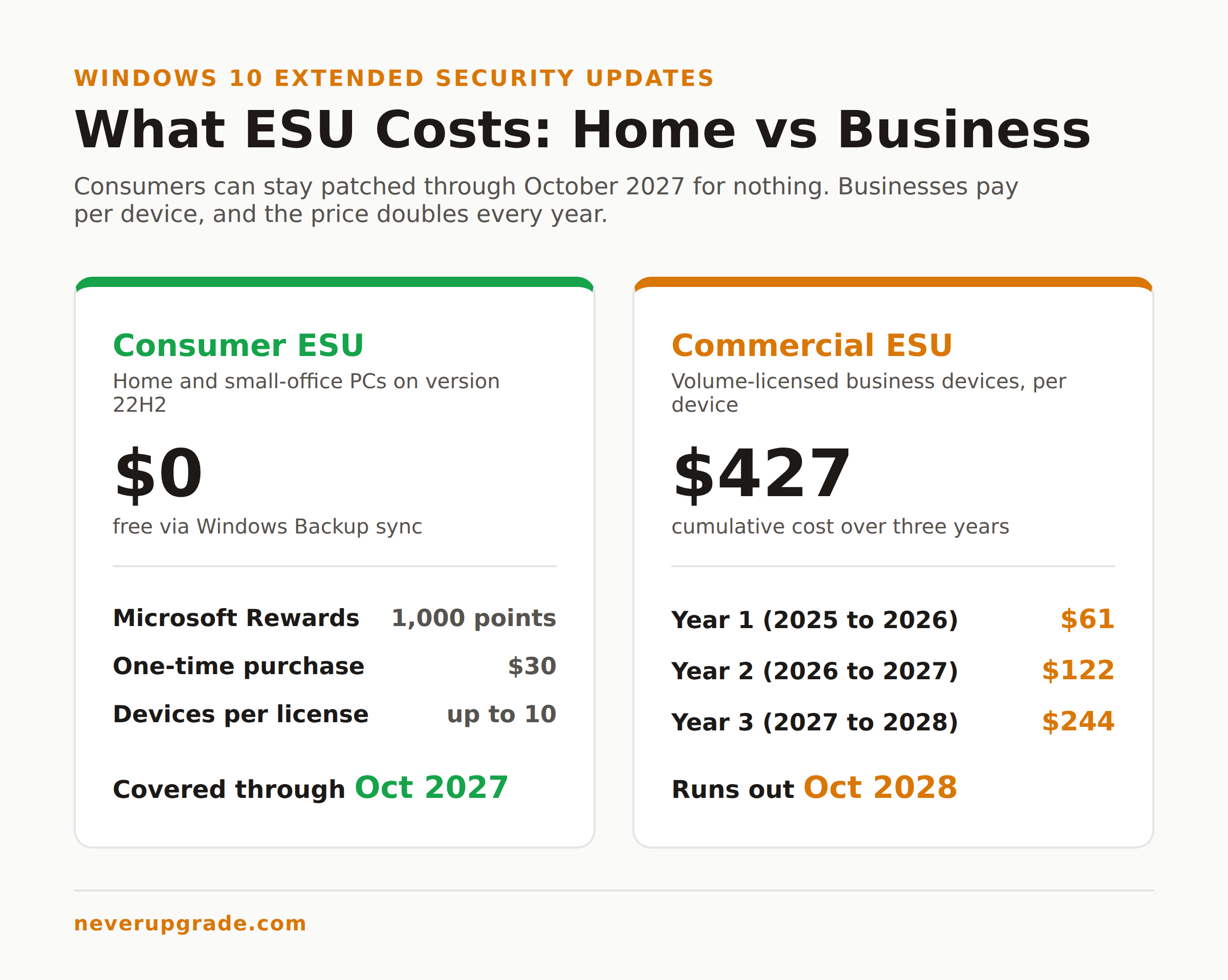
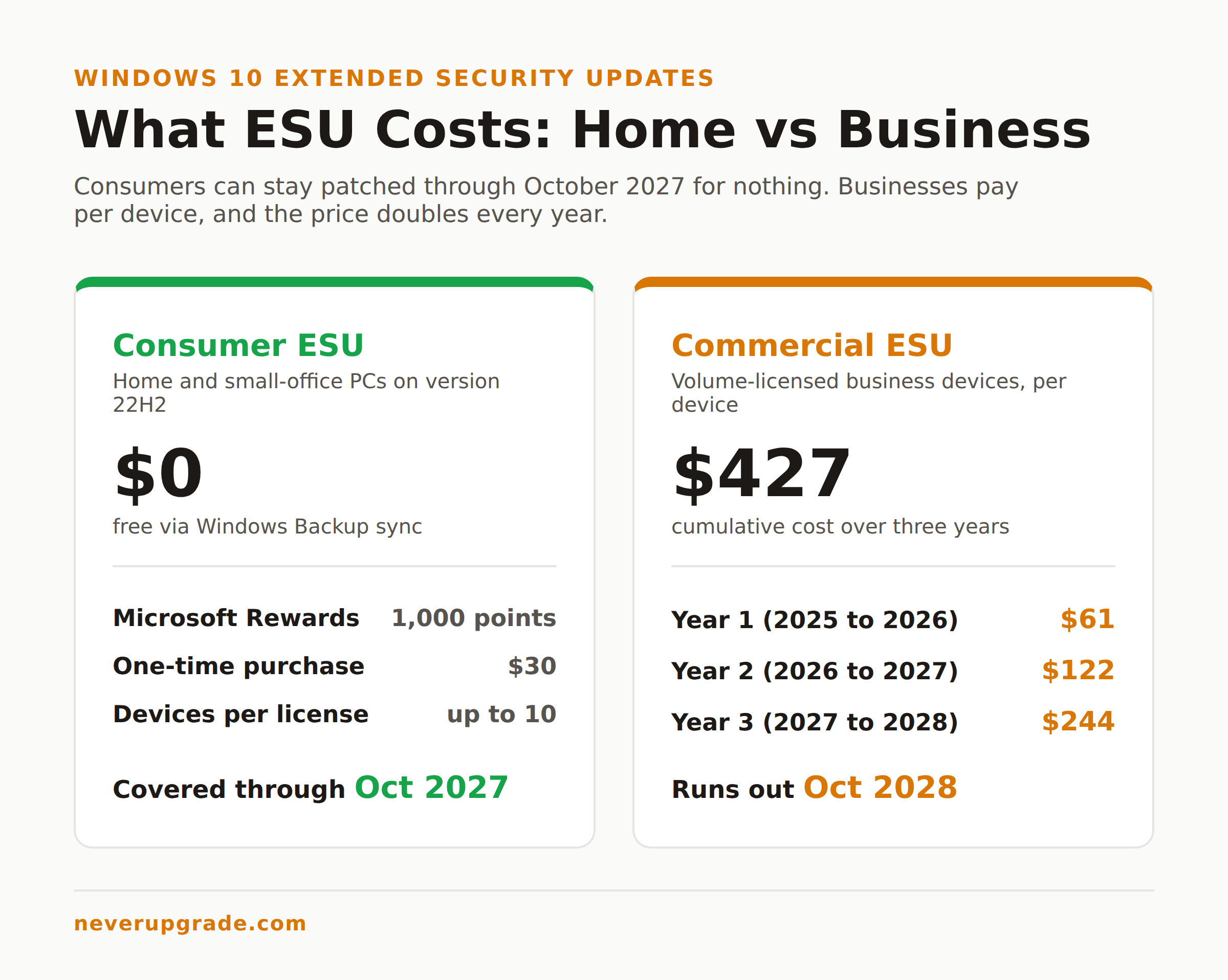
- No cost: turn on Windows Backup and sync your PC settings to a Microsoft account.
- 1,000 Microsoft Rewards points: if you have been hoarding them from Bing searches.
- $30 one time: a single flat fee, no subscription, plus tax.
One license covers up to 10 devices tied to the same Microsoft account, so a family or a small shop can protect the whole fleet for one $30 payment or for nothing. You need Windows 10 version 22H2 (Home, Pro, Pro Education, or Workstation) with the latest updates installed first. If you want the click-by-click version, our step-by-step ESU enrollment walkthrough has the screenshots.
Businesses on the volume-licensing track pay a different, steeper toll. Commercial ESU runs three years and the price doubles every year: $61 per device for year one, $122 for year two, $244 for year three. It is cumulative, so if you skip year one and buy in during year two, you owe for both. Ride it the full three years and you are at $427 per device by October 2028. At that point you are spending real money to avoid buying a real computer, and we will tell you plainly when the math has tipped. For most fleets, the honest read is: use commercial ESU as a bridge, not a destination.
One more date worth pinning to the wall: Microsoft 365 apps (the Office suite) keep getting security updates on Windows 10 through October 10, 2028, three years past the OS cutoff. So your Outlook and Excel are covered well past the OS itself. The full breakdown of every option lives in our plain-English Windows 10 ESU guide.
The 2027 cliff, and how to plan for it now
October 12, 2027 is the date that matters. When consumer ESU ends, there is no evidence Microsoft plans a third extension, and betting on one is not a plan.
You have roughly fifteen months. Use them:
- Back up first. Before any migration or hardware change, image the drive. A full disk image (Macrium Reflect, Veeam Agent, or the built-in Windows backup) beats a folder copy, because it captures your apps and settings too.
- Inventory by risk, not by age. Sort your machines into internet-facing (banking, email, browsing) and isolated (that CNC controller in the back). The internet-facing ones need a plan by mid-2027. The isolated ones can often run untouched for years.
- Check Windows 11 eligibility honestly. Run the PC Health Check tool. If a machine passes, upgrading in place is free and keeps your files. If it fails on TPM or CPU, do not force it with a registry hack on a production machine; that path stops getting updates too.
- Budget the replacements you actually need. Spread new-PC purchases across the next four quarters instead of eating one big bill in September 2027 when everyone else is buying.
Do this now, while it is calm, and the 2027 cliff becomes a scheduled task instead of an emergency.
How this compares to the XP and Windows 7 endings
If this feels familiar, it should. We have run this play twice before.
Windows XP support ended in April 2014, and XP machines kept humming in point-of-sale terminals and hospital back rooms for years after. Windows 7 ended in January 2020, got a three-year paid ESU track for businesses, and still did not vanish overnight.
The pattern holds every time: the OS keeps working, the actual risk is concentrated in a handful of internet-exposed machines, and the sky-is-falling coverage fades within a quarter. What is different this round is that Microsoft, for the first time, offered ordinary consumers a cheap and even free ESU option instead of reserving it for enterprises. That is a quiet admission that the install base was too big to bully. Read that as leverage, not charity.
Frequently asked questions
What is the Windows 10 end of support date?
The Windows 10 end of support date was October 14, 2025. On that day Microsoft stopped free security updates, feature updates, and technical support for Windows 10 version 22H2. The OS still runs normally; it just no longer gets patched unless you enroll in Extended Security Updates.
Can I get Windows 10 security updates through 2027 for free?
Yes. Microsoft extended the consumer ESU program to October 12, 2027, and you can enroll at no cost by turning on Windows Backup and syncing your settings to a Microsoft account. The paid alternative is a one-time $30 fee, and either option covers up to 10 devices.
Is Windows 10 still safe to use after end of support?
It is safe enough if you enroll in ESU and use common sense. An un-patched, internet-facing Windows 10 machine gets riskier every month as new vulnerabilities go unfixed. With ESU active through October 2027, a modern browser, and regular backups, the day-to-day risk is low. An offline or isolated machine is fine either way.
The bottom line
Nine months after Windows 10 end of support, the honest verdict is calm: the deadline was real, the panic was not, and Microsoft blinked and gave consumers until October 2027. Enroll in ESU, back up your machines, and plan your Windows 11 or hardware moves on your own schedule instead of a marketing calendar.
We track every one of these deadlines so you do not have to. Start with our complete Windows 10 ESU guide to lock in your free coverage before the 2027 cliff.