Extended Security Updates (ESU) let you keep getting Windows 10 security patches until October 12, 2027, and for most home users enrollment is free. That’s the short version. The longer version has a few gotchas Microsoft doesn’t put in the headline, and one of them involves your local account.
Here’s everything that actually matters, tested and current as of July 2026.
What ESU is (and what it isn’t)
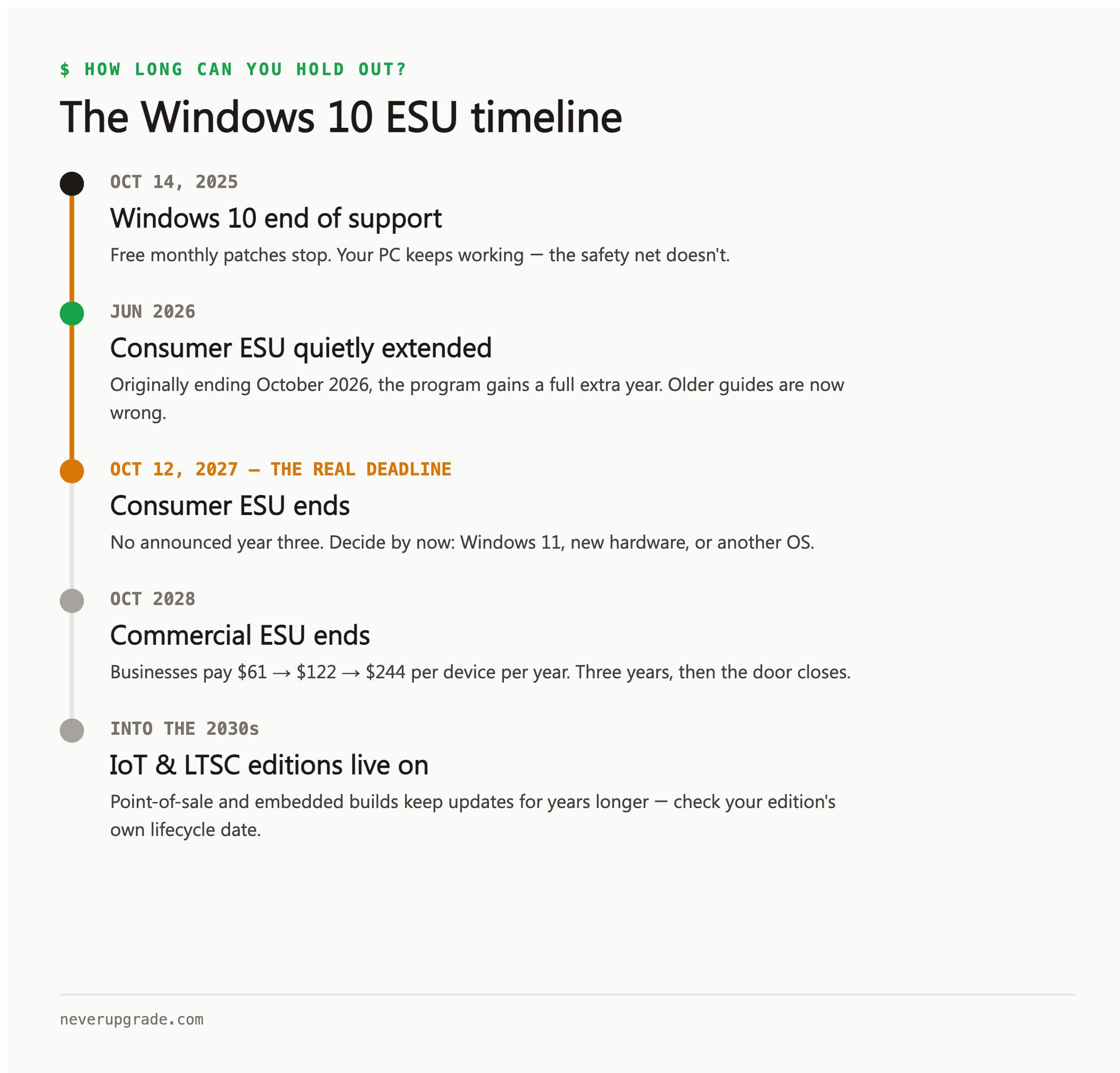
When Windows 10 support ended on October 14, 2025, your PC didn’t stop working. What stopped was the monthly flow of security patches. ESU turns that flow back on.
What you get: security updates rated critical and important by the Microsoft Security Response Center, delivered through Windows Update like always.
What you don’t get, per Microsoft’s own documentation: no new features, no bug fixes for non-security problems, no technical support. Windows 10 is in hospice care, not recovery. ESU just makes the stay safe.
One piece of genuinely good news: Microsoft quietly extended the consumer program by a full year in June 2026. Guides written last year say ESU ends in October 2026. They’re out of date. You have until October 12, 2027.
Who qualifies for extended security updates
The requirements are short but strict:
- Windows 10 version 22H2. Nothing older. Check with
winver: press Win+R, typewinver, hit Enter. If you see anything below 22H2, run Windows Update until you’re current. Earlier versions can’t enroll, full stop. - Home or Pro edition, on a personal (non-domain) machine. Corporate machines go through the commercial program instead.
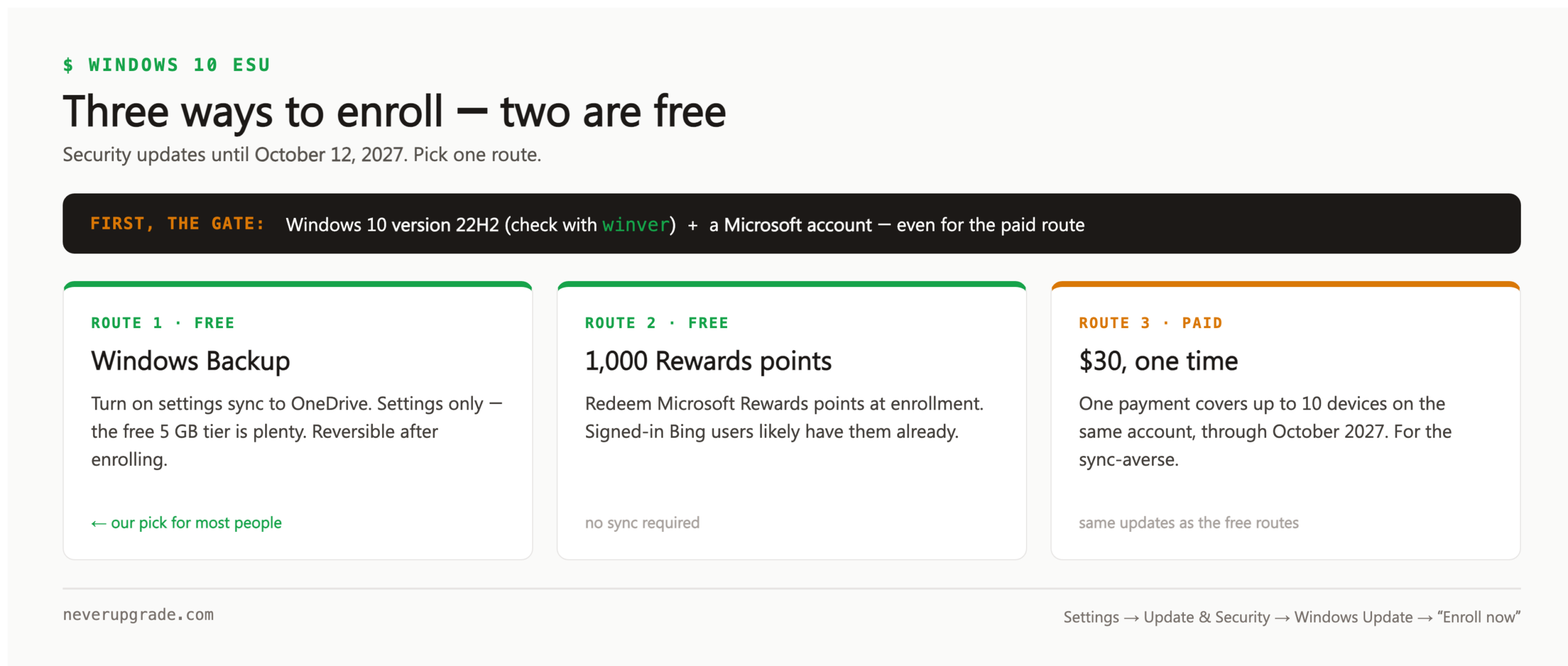
- A Microsoft account. This is the gotcha. Even the $30 paid route requires signing in with a Microsoft account. Die-hard local-account users can’t buy their way around it. Enroll while signed in, and you can go back to your local account afterward; the ESU license sticks to the account-plus-device pairing.
The three enrollment routes
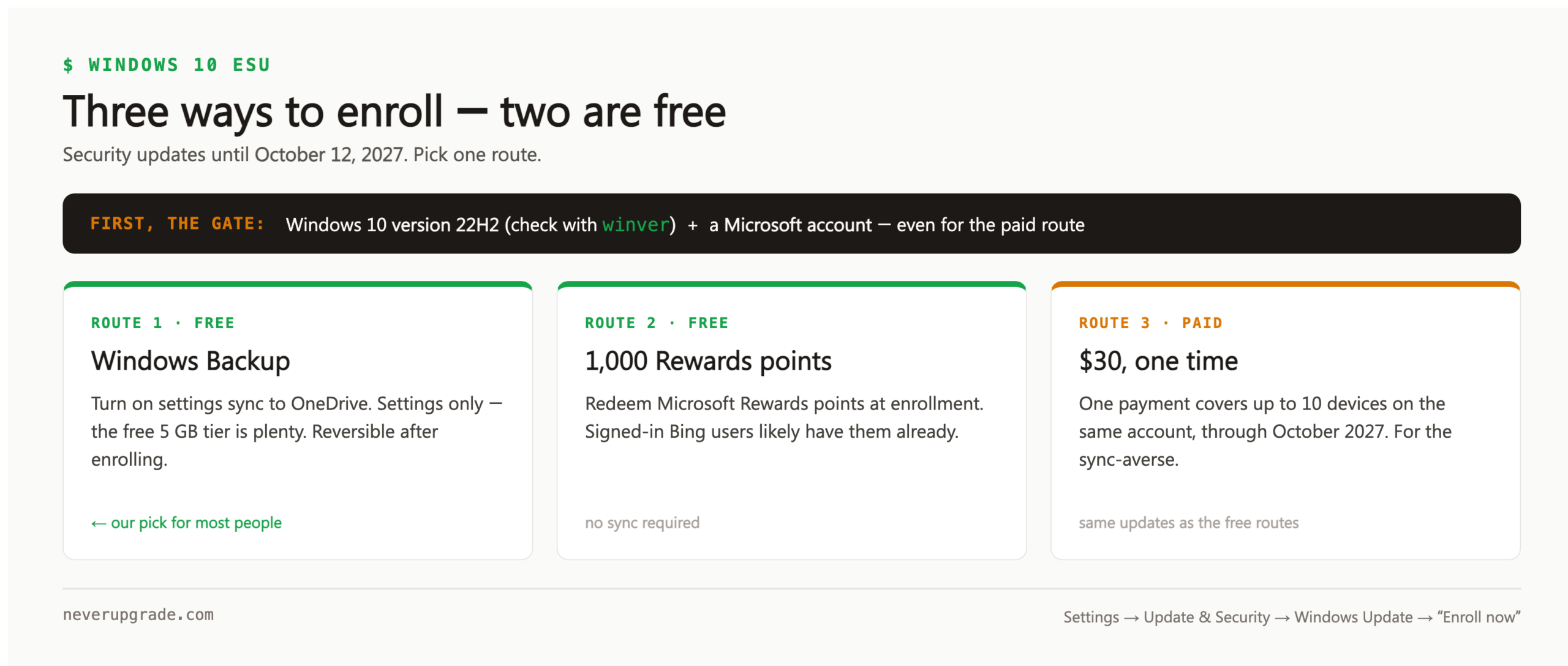
Go to Settings > Update & Security > Windows Update and look for the “Enroll now” link. You’ll be offered three ways in:
- Free, via Windows Backup. Turn on settings sync to OneDrive. That’s the whole price. You don’t need to back up your files, just settings, so the free 5 GB OneDrive tier is plenty.
- Free, via Microsoft Rewards. Redeem 1,000 Rewards points. If you’ve ever used Bing search signed in, you probably have them already.
- $30, one time. A single payment covers the device through October 2027; the price didn’t change when the deadline moved, which makes it better value than it was at launch. Covers up to 10 devices tied to the same Microsoft account.
Our take: use the Windows Backup route unless you have a specific reason not to. It’s free, instant, and reversible: you can turn sync off after enrolling and keep the updates. If cloud sync of any kind is a hard no for you, the $30 is honest money for two years of patches.
If the “Enroll now” link isn’t showing, it’s almost always one of three things: you’re not on 22H2, you’re signed in with a work/school account, or the rollout simply hasn’t reached your machine. The link ships via a cumulative update, so install pending updates and check again.
What about businesses?
The commercial program is a different animal: $61 per device for year one, doubling each year after ($61, then $122, then $244), available through volume licensing for up to three years, ending October 2028. If you’re running Windows 10 machines for a business, do that math against the cost of replacement hardware before reflexively renewing. By year three you’ve spent $427 per device keeping a dead OS alive.
Special cases get longer runways: Windows 10 IoT Enterprise LTSC editions receive updates into the 2030s depending on the version. If your point-of-sale terminal or lab instrument runs an LTSC build, check its specific lifecycle date before paying anyone for anything.
The honest risk assessment
Enrolled in ESU, a well-maintained Windows 10 box in 2026 is not meaningfully more dangerous than it was in 2024. Unenrolled is a different story: every Patch Tuesday, attackers reverse-engineer the Windows 11 fixes and go hunting for the same holes in unpatched Windows 10. The gap between “patched” and “unpatched” widens every single month.
So here’s the one case where we’ll tell you to act like an upgrader: if you’re not going to enroll in ESU, free as it is, don’t keep that machine on the open internet. Enroll, or isolate it, or move it to Linux. Doing none of those isn’t stubbornness, it’s negligence.
Before you touch anything: image the disk. Every guide on this site assumes you have a rollback path.
Frequently asked questions
Is Windows 10 ESU really free?
Yes, for consumers: via Windows Backup settings sync or 1,000 Microsoft Rewards points. The $30 option exists for people who’d rather pay than sync. All three deliver identical updates through October 12, 2027.
Do I need ESU if I have antivirus?
Yes. Antivirus watches for known malware; ESU closes the holes malware crawls through. Third-party AV on an unpatched OS is a screen door on a submarine.
What happens after October 2027?
Consumer ESU ends and there is no announced year three. That’s your real deadline for deciding: Windows 11, a new machine, or a supported alternative OS. We’d bet against another extension: Microsoft granted this one grudgingly.
NeverUpgrade covers keeping unsupported software alive, safely. If it still works, keep it working, just do it with your eyes open.