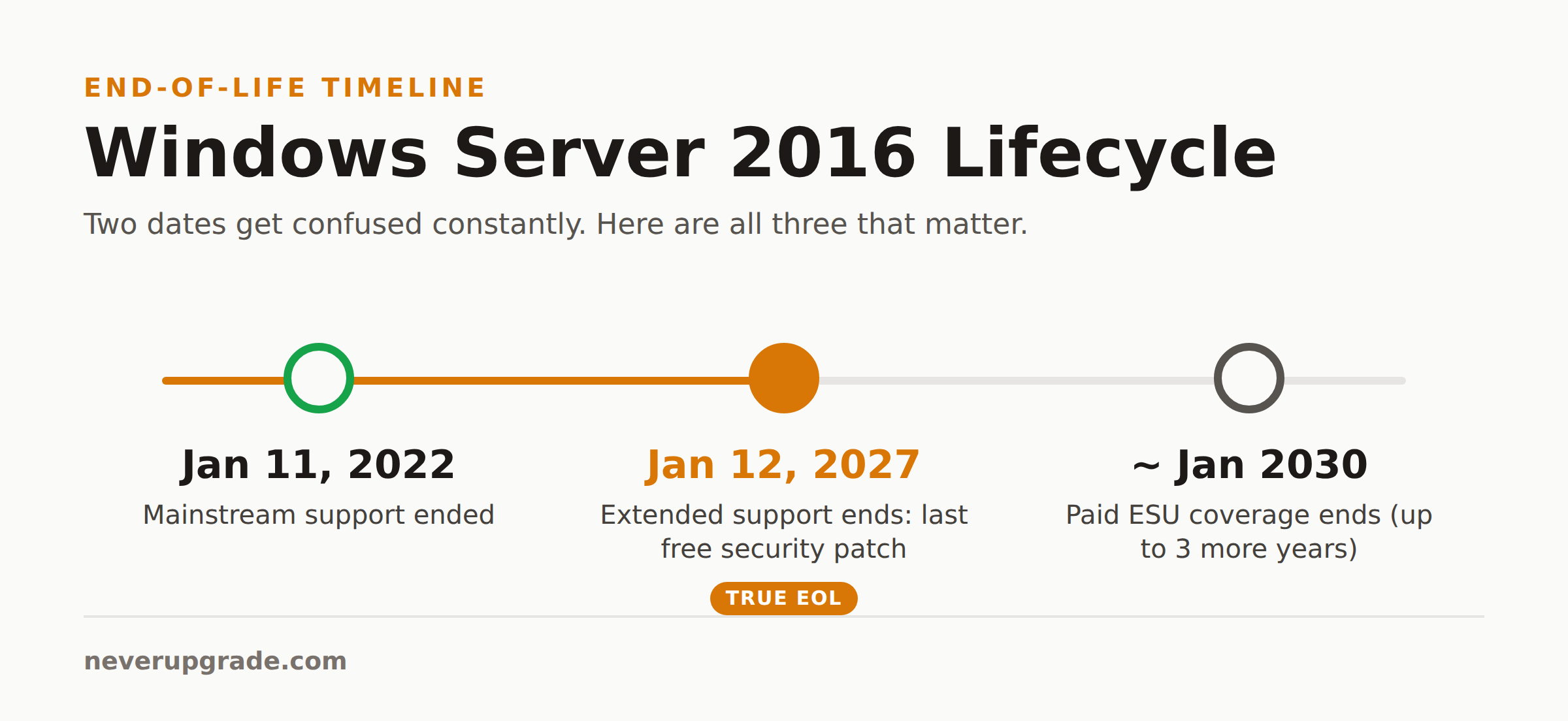
Windows Server 2016 reaches end of life on January 12, 2027. That is the day Microsoft ships the last free security patch. Mainstream support already ended on January 11, 2022, so for the last four years you have been running on security-only updates whether you noticed or not. After the 2027 date, no patches, no bug fixes, no phone support, unless you pay for an extension or move.
Here is the part the countdown blogs skip: nothing breaks on January 13. Your servers boot. Your file shares mount. QuickBooks opens. The problem is not that the software stops. The problem is that the day a new remote-code-execution bug lands in SMB or the print spooler, you are the only one in the room without a patch. We keep plenty of old software running on purpose. A domain-joined, internet-adjacent server is the one case where the calculus is different, and we will be straight with you about why.
The Windows Server 2016 end of life date, and what it actually means
Two dates matter, and people mix them up constantly.
- Mainstream support ended: January 11, 2022. No new features, no design changes, no free warranty-style support. You have been on the second half of the lifecycle for years.
- Extended support ends: January 12, 2027. This is the real Windows Server 2016 end of life date. It is the last day of free security updates under the Fixed Lifecycle Policy.
Both dates come straight from the Microsoft Lifecycle page for Windows Server 2016, which is the only source worth trusting when a vendor blog and a Reddit thread disagree. Bookmark it.
One correction we see everywhere: the EOL date is January 12, not January 11. The 11th was the mainstream date in 2022. A one-day error in a blog headline tells you the author never opened the lifecycle page.
What breaks the day support ends
Nothing, mechanically. That is the trap. Here is what actually changes on January 12, 2027:
- New CVEs stop getting patched. Every vulnerability Microsoft discovers after that date in Server 2016 code stays open forever on your box. Attackers read the patch notes for Server 2019 and 2022, find the shared code, and aim it at the version that will never get fixed.
- Compliance gets awkward. PCI-DSS, HIPAA, and most SOC 2 auditors flag unsupported operating systems as a finding. Not an instant fail in every case, but a conversation you now have to win every audit.
- Cyber insurance gets sticky. Read your policy. A growing number of insurers exclude or reduce payouts for breaches traced to end-of-life software. That clause was rare five years ago. It is common now.
- Third-party software drops you. Backup agents, antivirus, and line-of-business apps start ending Server 2016 support on their own schedules, usually within a year or two of Microsoft.
The honest version: risk climbs slowly for a few months, then a single wormable bug can make it vertical overnight. You are betting on the timing of a vulnerability you cannot see.
Windows Server 2016 end of life extended support: the ESU program
If you genuinely cannot move by January 2027, Microsoft has a paid escape hatch. In February 2026 it announced Extended Security Updates (ESU) for Windows Server 2016. This is the same program that covered Server 2012 before it. A few things worth knowing about Windows Server 2016 end of life extended support:
- It buys up to three more years. ESU coverage runs annually past the 2027 date, through roughly January 2030, per the timeline tracked at endoflife.date. You buy it one year at a time.
- It is critical-and-important security patches only. No new features, no bug fixes for non-security issues, no general support. It is life support, not a renewal.
- Azure changes the math. Microsoft delivers Server 2016 ESU through Azure Arc, with updates in the Azure portal and subscription billing. Workloads actually running in Azure typically get ESU at no extra charge, which is Microsoft’s standard nudge toward the cloud. On-premises, ESU is a per-core paid add-on that gets more expensive each year it runs.
Our take: ESU is a fine bridge and a terrible destination. It is priced to make year three hurt on purpose. Use it to finish a migration you have already started, not to postpone starting one.
Upgrade paths from Windows Server 2016
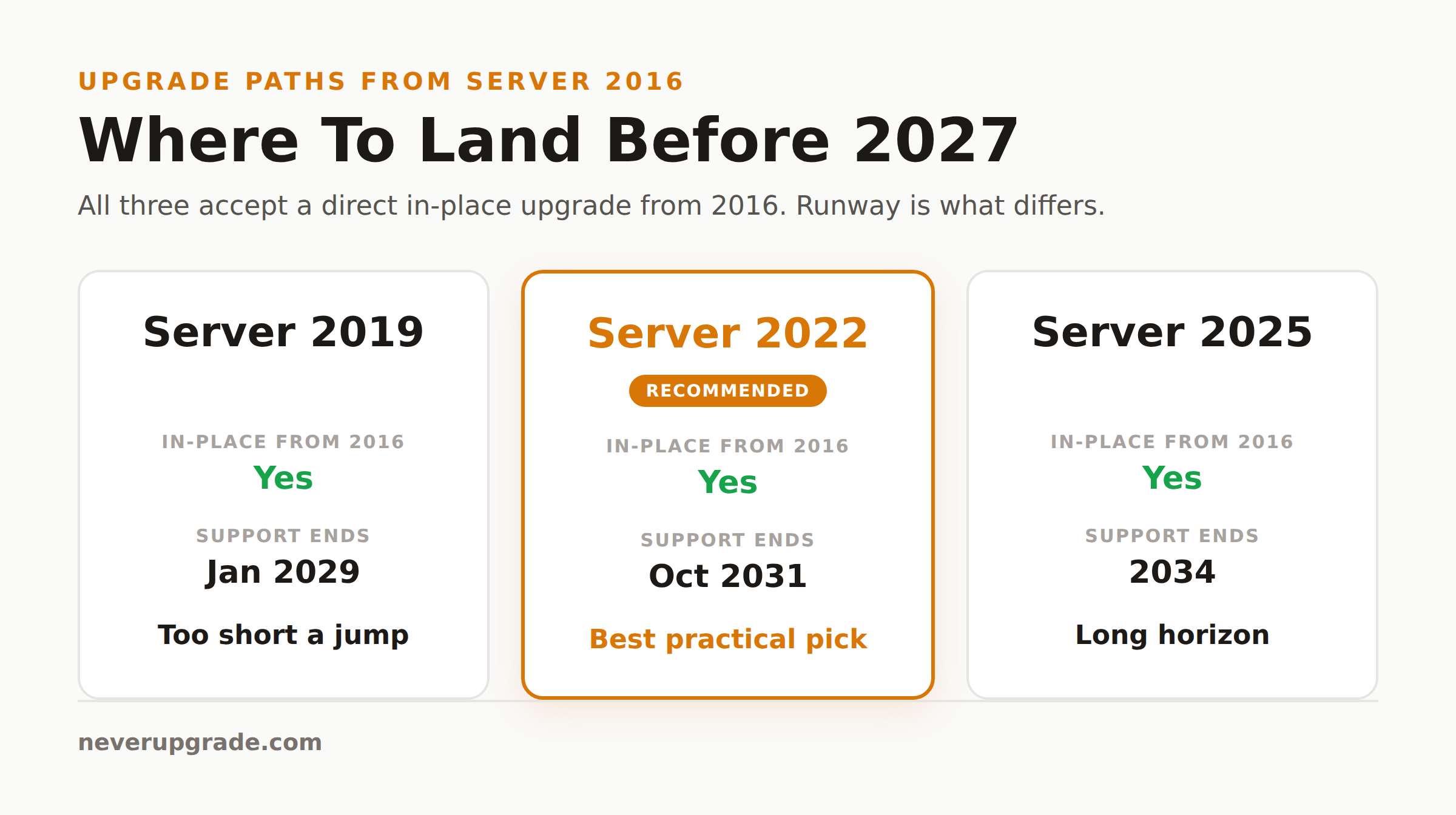
You have three real destinations: Server 2019, Server 2022, or Server 2025. All three are in-place-upgrade targets from 2016, though the sane routes differ.
- Server 2019 is the smallest jump and the shortest remaining runway. Its own extended support ends in January 2029. Upgrading 2016 to 2019 to buy two years is usually a waste of a maintenance window.
- Server 2022 is the practical middle. In-place upgrade from 2016 is supported directly, hardware requirements are modest, and extended support runs to October 2031.
- Server 2025 is the long horizon, supported into 2034. In-place upgrade from 2016 is supported, but the bigger the version jump, the more driver and application testing you owe yourself.
For most shops still on 2016, the answer is 2022. It clears the EOL problem for years without the newest-version teething issues, and the direct upgrade path means fewer hops.
If you are weighing this against other lingering deadlines, our breakdown of Windows Server 2012 end of life options walks through the same decision one generation earlier, and the pattern repeats.
Rebuild vs in-place vs Azure: how to choose
Three ways to get off 2016. Pick by how much you trust the existing box.
In-place upgrade. Fastest, keeps roles and data, riskiest if the server is crufty. Good for a clean, single-role machine (a plain file server, a print server). Bad for a domain controller or anything you have been nursing through weird errors for years.
Clean rebuild and migrate. Stand up a fresh Server 2022 box, move roles and data across, decommission the old one. More hours, far fewer surprises, and you end with a server nobody has hand-edited for eight years. This is our default recommendation for anything important.
Lift to Azure. Migrate the workload into an Azure VM. This is worth it if you were heading to the cloud anyway or want the free-ESU cushion while you re-platform. It is not worth it as a reflex, and the running bill outlives the one-time migration cost.
Before you start: back up
Do not touch any of this without a tested, restorable backup and a written rollback plan. Numbered, boringly:
- Take a full backup, then restore it somewhere to confirm it is not corrupt. An untested backup is a rumor.
- Snapshot the VM, or image the physical disk, right before you begin.
- Document current roles, IPs, and licensing so a rebuild is reproducible.
- Verify application vendors support your target version before you upgrade, not after.
We have watched an in-place upgrade fail at 82% with a rollback that did not roll back cleanly. The tested backup is the difference between a bad afternoon and a bad quarter.
FAQ
How long will Windows Server 2016 be supported?
Free security support ends January 12, 2027. Paid Extended Security Updates can stretch coverage annually for up to three more years, to roughly January 2030, for critical and important patches only.
Can you upgrade Windows Server 2016 directly to 2022 or 2025?
Yes. In-place upgrade from Server 2016 to both 2022 and 2025 is supported. For most environments 2022 is the better target: a smaller jump than 2025, with support running to October 2031. Always test line-of-business apps against the new version first, and back up before you begin.
Is Windows Server 2016 ESU free?
Not on-premises. There it is a paid, per-core add-on that gets more expensive each year. Workloads running in Azure typically receive ESU at no additional charge, which is Microsoft’s standard incentive to move to the cloud.
The bottom line
Windows Server 2016 end of life is January 12, 2027, and unlike a desktop OS, a patch-frozen server is one of the few pieces of software we will tell you to actually move. Plan the migration in 2026, land on Server 2022 unless you have a reason not to, and keep ESU in your pocket as a bridge, never a home.
Refusing to upgrade what still works is a good instinct. Knowing the one case where it does not apply is what keeps it from getting you breached.