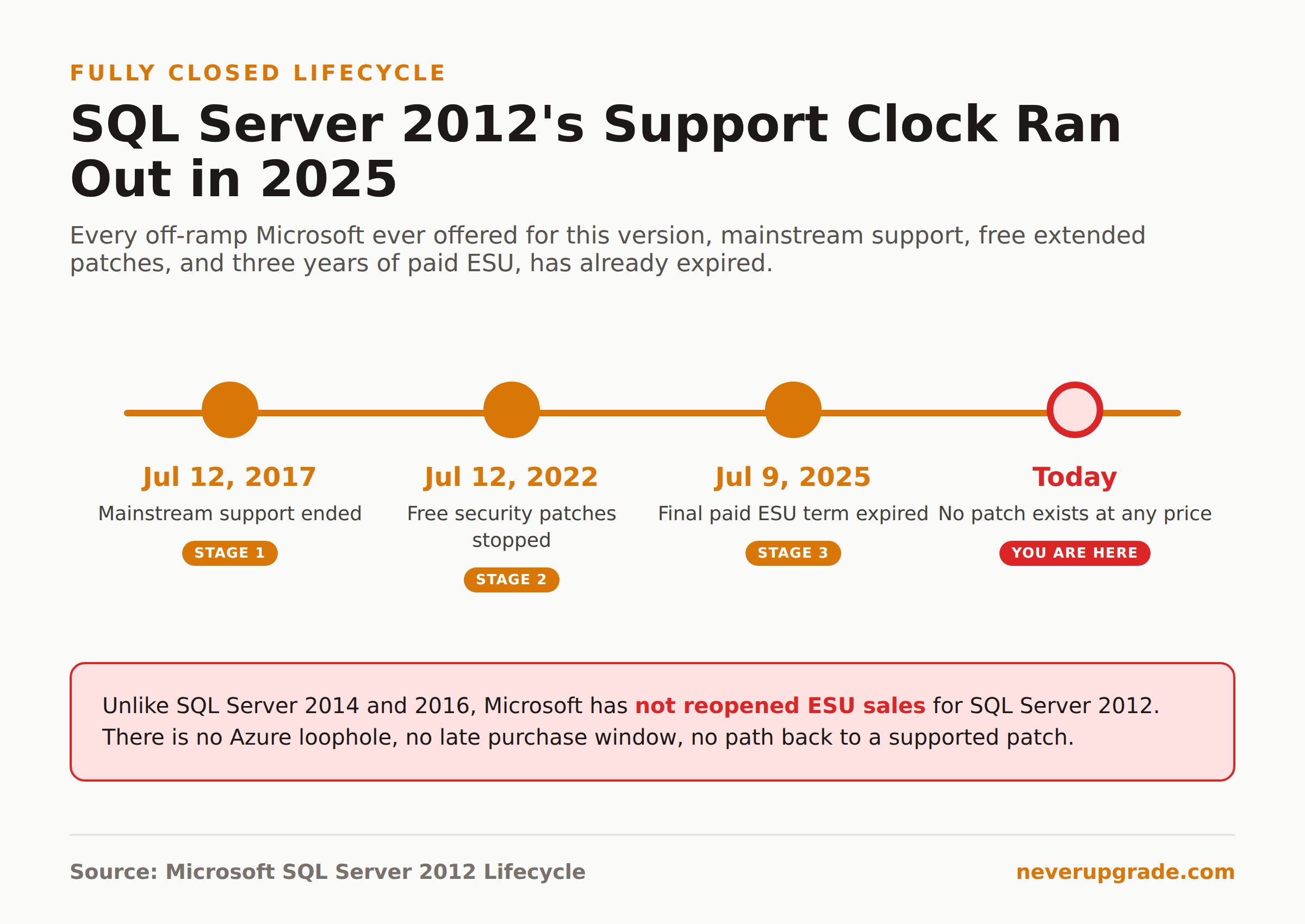
Yes, SQL Server 2012 end of life is fully behind you now: mainstream support ended July 12, 2017, free extended support ended July 12, 2022, and the paid Extended Security Updates program that followed ran out on July 9, 2025. There is no more legal way to get a security patch for it. If you’re still running a production instance, you’re not in a gray zone anymore, you’re past every off-ramp Microsoft ever offered.
That’s a harder sentence to read than the usual “end of support is coming” post, so let’s be precise about what it means and what your real options are from here.
The timeline, in full
SQL Server 2012 followed Microsoft’s standard ten-year fixed lifecycle, and every date on it has already passed:
- May 20, 2012: original release
- July 12, 2017: mainstream support ended (no more feature updates or design change requests from here, though security patches kept coming)
- July 12, 2022: extended support ended, meaning free security patches stopped
- July 13, 2022 to July 9, 2025: the three-year Extended Security Updates (ESU) window, sold to Software Assurance customers
- July 9, 2025: the final ESU term expired. No further patches exist, at any price.
If you last checked on this topic back in 2022 or 2023, the thing that’s changed since is that last line. Back then, paying for ESU was a real, if pricey, way to keep a 2012 instance patched. That door has been closed for over a year now.
What already broke versus what’s quietly at risk
Nothing crashes the day support ends. That’s the trap. A SQL Server 2012 instance that was stable last month is exactly as stable today, right up until it isn’t.
Here’s the honest split:
Still fine, mechanically. The engine runs. Queries execute. Your application talks to it the same way it did in 2021. If nothing about your network exposure has changed, day-to-day operation looks identical to before end of life.
Quietly getting worse. Every vulnerability disclosed in SQL Server’s shared codebase since July 2025 is a vulnerability your instance has, permanently, because a fix will never ship for it. That risk compounds. A year of unpatched CVEs on top of the ones already known at EOL is a meaningfully bigger attack surface than the instance had in 2023, even though nothing about the server itself changed. Compliance frameworks that require supported software (PCI DSS, HIPAA, SOC 2, most cyber-insurance riders) will also flag an unsupported database engine as a finding, and “it still works fine” is not an answer an auditor accepts.
Was SQL Server 2012 ever eligible for ESU, and is that window really closed
Yes to both. SQL Server 2012 Standard and Enterprise editions (x86 and x64) were eligible for Extended Security Updates, sold in one-year terms and layered on top of active Software Assurance, the same structure Microsoft has used for every version since. Express, Web, and standalone Developer editions were never eligible.
The window ran exactly three years past end of support: July 2022 through July 2025, split into three purchasable terms. That’s over now. Unlike SQL Server 2014 and 2016, where Microsoft has since opened newer mechanisms (Azure Arc-enabled ESU, pay-as-you-go through Azure VMs) that extend coverage further out, SQL Server 2012 aged out before some of those programs existed in their current form, and Microsoft has not retroactively reopened ESU sales for it. If someone offers to sell you “ESU for SQL Server 2012” today, get very specific about what they’re actually selling, because Microsoft isn’t the one selling it.
Realistic migration targets, ranked by pain
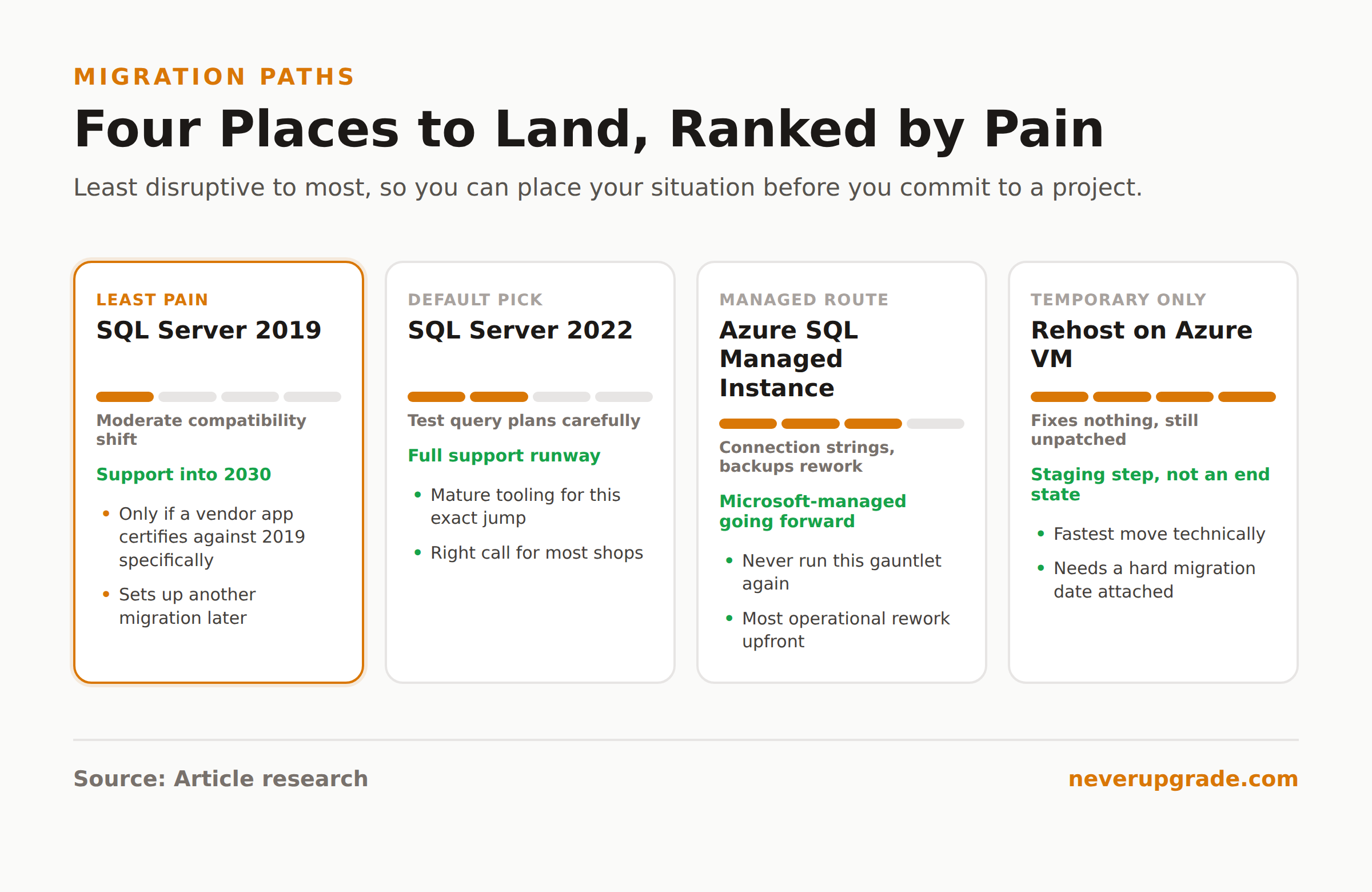
If you’re moving off 2012, here’s how the common destinations actually compare, from least to most disruptive.
- SQL Server 2019. Mainstream support already ended, but it’s on extended support into 2030. Compatibility level differences from 2012 are moderate, and most T-SQL from a decade-old application runs with minimal changes. Reasonable if a vendor app certifies against 2019 specifically and nothing newer.
- SQL Server 2022. The default answer for most shops migrating off 2012 on-premises or on a VM. Full support runway, a decade of engine improvements, and the migration tooling (Data Migration Assistant, in particular) is mature and well documented for exactly this jump. Expect to test query plans carefully; a decade of compatibility-level changes means some queries will behave differently even if the syntax is unchanged.
- Azure SQL Managed Instance. Near-complete surface compatibility with on-premises SQL Server, but Microsoft owns patching and version upgrades going forward, which is the whole point if “we didn’t have bandwidth to upgrade” is why you’re reading this in 2026 instead of 2021. It’s also the most disruptive move operationally: connection strings, backup routines, and anything touching the OS or filesystem directly need rework.
- Rehost on an Azure VM without re-platforming. Technically the fastest move, but it doesn’t fix the underlying problem. You’re still running SQL Server 2012, unpatched, just on someone else’s hardware. Only do this as a genuinely temporary staging step with a hard migration date attached, not as an end state.
Full breakdown of what each path actually costs in time and risk is in our migration paths guide ranked by pain, which covers Windows Server 2012 workloads generally, most of which apply directly to a SQL Server 2012 instance sitting on the same box.
The one case where staying is genuinely reckless
Most of the “should you upgrade” advice out there hedges. This one doesn’t need to: if your SQL Server 2012 instance is reachable from the public internet, directly or through a lightly firewalled DMZ, staying is not a defensible choice anymore. Every unpatched, internet-facing database engine past its final ESU date is a matter of when, not if, and the exposure isn’t limited to the server itself. It’s whatever data lives inside it.
If the instance is genuinely air-gapped, network-isolated, and running a workload where the data has no real sensitivity or regulatory weight, you have more room to plan an unhurried migration. That’s the one legitimate case for staying put a while longer. Outside of it, treat this as urgent, not someday.
If you can’t migrate this quarter, at minimum: pull it off any public-facing network segment, restrict access to the specific application servers that need it, audit and prune every login with access, and put monitoring on it that would actually catch something before you’d find out the hard way. None of that replaces patching. It just buys you time to do the migration properly instead of in a panic.
FAQ
Will SQL Server 2012 still run on newer Windows Server versions?
It will generally still install and run on modern Windows Server releases in the sense that nothing stops the binary from executing, but Microsoft doesn’t test or support that combination, and driver or dependency mismatches get more likely with each new Windows Server release. Running an unsupported database engine on a supported OS doesn’t make the database engine supported.
How do I upgrade SQL Server 2012 to SQL Server 2022?
There’s no in-place upgrade path across that many versions; you’re doing a side-by-side migration. Back up the databases, stand up a new SQL Server 2022 instance, restore into it, and test at the existing compatibility level before stepping it up. Microsoft’s Data Migration Assistant will flag breaking changes and deprecated features specific to your databases before you cut over.
Can I still buy Extended Security Updates for SQL Server 2012?
No. The three-year ESU program for SQL Server 2012 ran from July 2022 through July 2025, and Microsoft has not reopened it. Anyone offering to sell ESU coverage for SQL Server 2012 today is not selling a genuine Microsoft product.
Before you touch anything, back up every database you’re about to migrate, and confirm the backup restores cleanly on a test instance first. If you’re weighing whether the Windows Server underneath is also past end of life, our guide on migrating Windows Server 2012 R2 to Azure walks through the ESU path for the OS layer as well.