If you are still running Windows Server 2012 R2 in 2026, you have four realistic moves: do nothing, upgrade in place, lift-and-shift to Azure, or rebuild fresh. Ranked from least to most painful for a small shop, lift-and-shift to Azure and the in-place upgrade tie for easiest, a clean rebuild is the most work but the least regret, and doing nothing is cheapest today and most expensive the day you get breached. This guide ranks each path by the three things that actually hurt: downtime, cost, and regret.
We keep old boxes alive for a living, so this is not a “just upgrade already” lecture. Sometimes staying put is the right call for another quarter. But the free Extended Security Updates that Azure has been handing out end on October 13, 2026, so the math changed. Here is the honest ranking.
First, know your Windows Server 2012 R2 deadline
The Windows Server 2012 end of life story is short: extended support for Windows Server 2012 and Windows Server 2012 R2 ended October 10, 2023. Since then you have been living on Extended Security Updates (ESU), and 2026 is the last year of them. The final ESU date is October 13, 2026, for both Azure-hosted and on-premises servers. After that, no more critical or important patches. Ever.
That gives you roughly ten weeks from today. Every path below has to clear that fence, so pick one now rather than in September when your calendar is already full.
The do-nothing baseline and what it actually costs
Doing nothing is free until it is not. A 2012 R2 box that has run fine for eight years will keep running fine on October 14. The failure mode is not a crash, it is exposure: the next wormable SMB or RDP bug ships with no patch for you.
The real cost of do-nothing is not the license you saved. It is:
- Compliance failure. PCI-DSS, HIPAA, and most cyber-insurance renewals now flag unsupported operating systems automatically. One denied claim dwarfs an upgrade.
- Software rot. Vendors drop 2012 R2 from their support matrix fast. QuickBooks, Sage, and most line-of-business apps already have.
- The forced-migration tax. The day a bug forces your hand, you migrate in a panic over a weekend instead of on a plan. Panic migrations are where data gets lost.
If you genuinely cannot move before October, at minimum isolate the box: pull it off the internet, segment it on its own VLAN, and treat it as radioactive. That buys weeks, not years. Our full breakdown of what happens to Windows Server 2012 R2 after end of life covers the isolation playbook in detail.
Regret score: high. Cheap now, brutal later.
In-place upgrade: the chain just got shorter
Here is the update almost every Spiceworks and Reddit thread still gets wrong. For years the gospel was that you had to chain upgrades: 2012 R2 to 2016, then 2016 to 2019, one hop at a time, because Windows Server only supported jumping two versions.
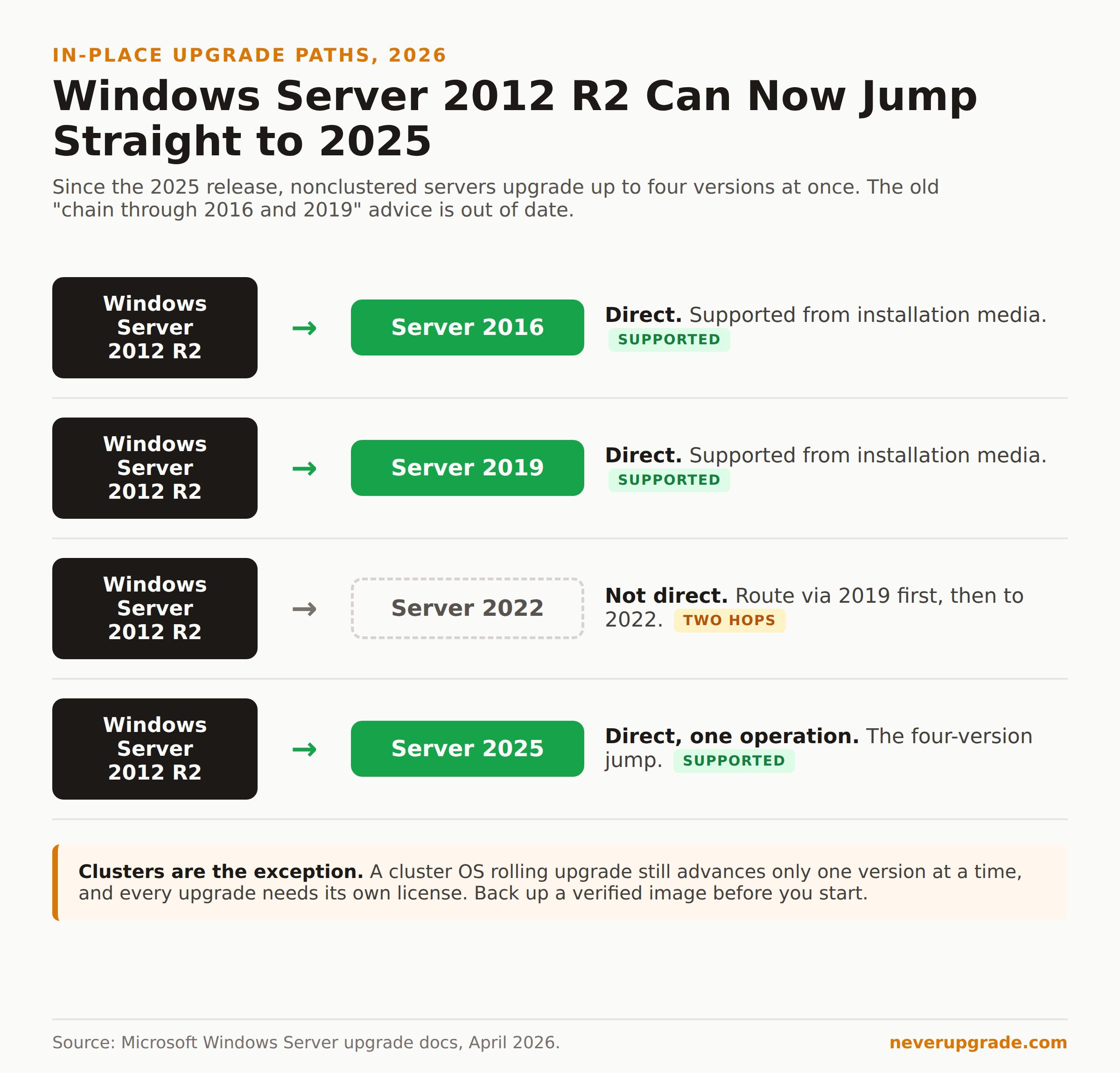
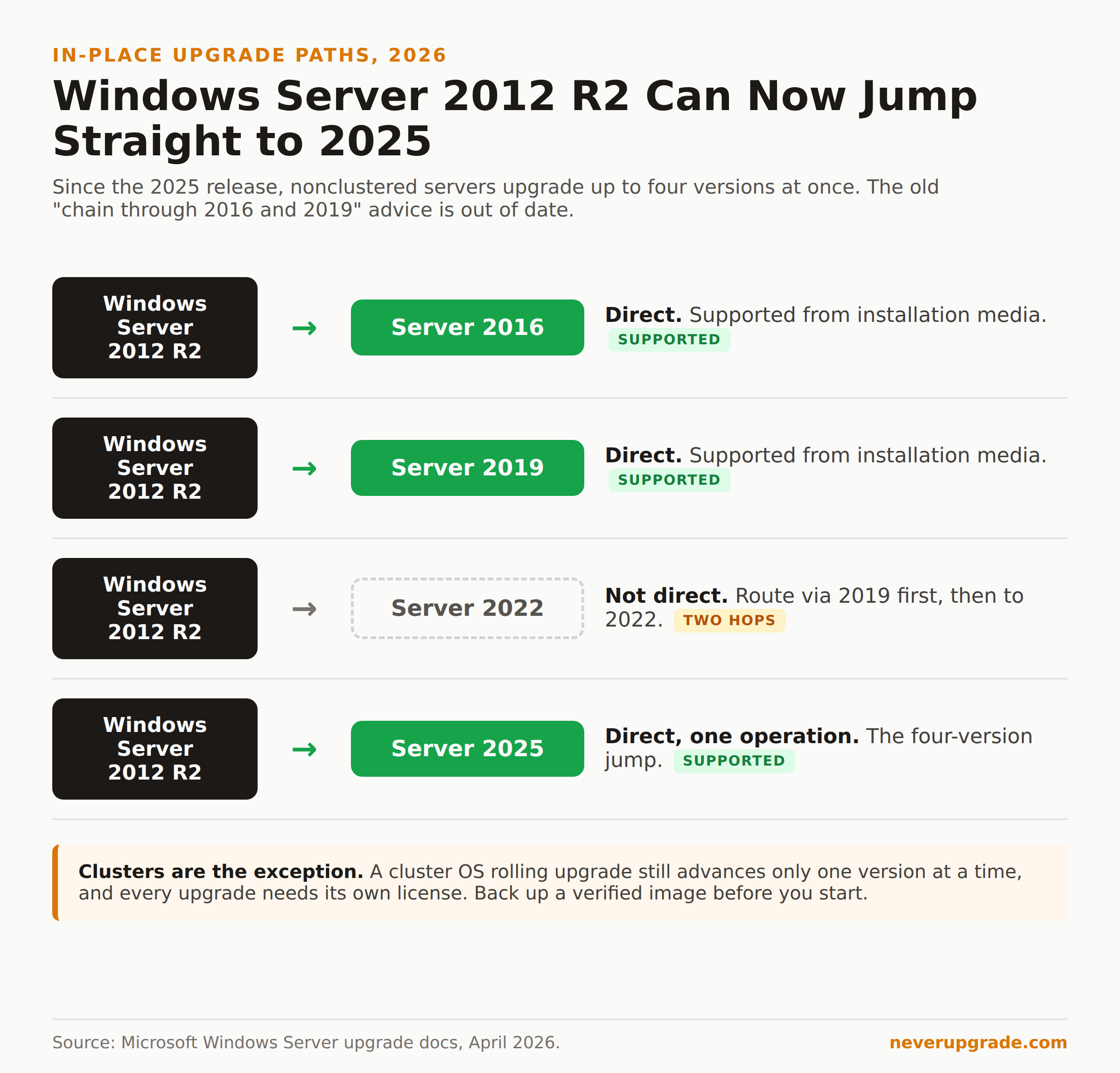
That changed. Per Microsoft’s current upgrade documentation (updated April 2026), Windows Server 2025 lets nonclustered systems upgrade up to four versions at a time. In plain terms: you can now in-place upgrade Windows Server 2012 R2 straight to Windows Server 2025 from installation media, one operation, no intermediate hops.
A few things that table does not shout but you need to know:
- The direct jump works for 2012 R2 to 2016, 2019, or 2025, but not 2022. If you specifically want to land on 2022, you upgrade to 2019 first, then to 2022.
- Clusters are the exception. A cluster OS rolling upgrade still advances only one version at a time. If this is a Hyper-V or Scale-Out File Server cluster, you are back to hopping.
- Each upgrade needs its own license. A 2025 upgrade requires a valid 2025 key, not your old 2012 R2 one.
- Domain controllers have their own rules, and 32-bit installs cannot upgrade to a 64-bit release at all (though 2012 R2 is already 64-bit, so that mostly bites older boxes).
Before you touch it: back up. Full image, verified restore, tested. In-place upgrades keep your roles and data, which is the appeal, but a failed upgrade on an unbacked box is how you lose a domain.
Downtime: one long reboot cycle, usually two to four hours per server. Cost: a new license. Regret score: low, if your hardware is new enough to run 2025.
Lift-and-shift to Azure for the free-ESU loophole
This is the path Microsoft actively wants you to take, and for once the incentive is real. Extended Security Updates are free of charge for Windows Server 2012 and 2012 R2 running in Azure. Migrate the box as-is to an Azure VM and you get the ESUs automatically, no separate purchase, no product key to install, through that same October 13, 2026 end date.
The catch is that “free ESU” is not “free server.” You are now paying for an Azure VM every month. For a single low-traffic file server that can run pennies; for a beefy SQL host it adds up quick. Azure Hybrid Benefit lets you apply your existing licenses to cut the cost, which softens it.
Where lift-and-shift genuinely wins:
- You want out of the patch problem this week without rebuilding anything.
- Your hardware is old and dying anyway, so you were going to buy a new box regardless.
- You are comfortable running the workload in the cloud long-term.
Where it bites: if you lift-and-shift purely to grab free ESUs and plan to yank it back on-premises later, you have just added a cloud migration and a repatriation to your to-do list. That is two projects to dodge one deadline. We walk through the ESU options and pricing in our guide to security updates for Windows Server 2012 in 2026.
Downtime: a migration window, hours to a day depending on data size. Cost: ongoing Azure bill. Regret score: low if you were cloud-bound anyway, medium if you are just parking it.
Rebuild fresh versus migrate roles
The nuclear option: stand up a clean Windows Server 2025 (or 2022) box, migrate roles and data across, and retire the 2012 R2 machine. This is the most labor, and the least regret.
An in-place upgrade drags a decade of accumulated cruft forward: stale registry keys, dead scheduled tasks, that one service someone installed in 2016 and nobody remembers. A clean install leaves all of it behind. For a domain controller, a file server, or anything security-sensitive, we almost always prefer a rebuild over an in-place upgrade when the calendar allows it.
Rough decision rule:
- One or two roles, new hardware, time to spare: rebuild fresh and migrate roles. Cleanest long-term.
- Many entangled roles, tight deadline, same hardware: in-place upgrade. Faster, messier.
- You want gone from hardware entirely: lift-and-shift to Azure.
The cost here is mostly your hours, plus a license and possibly a new server. The payoff is a box you actually understand, which matters more than any spec sheet.
Downtime: schedulable, near zero if you cut over cleanly. Cost: highest in labor. Regret score: lowest.
The paths ranked by pain
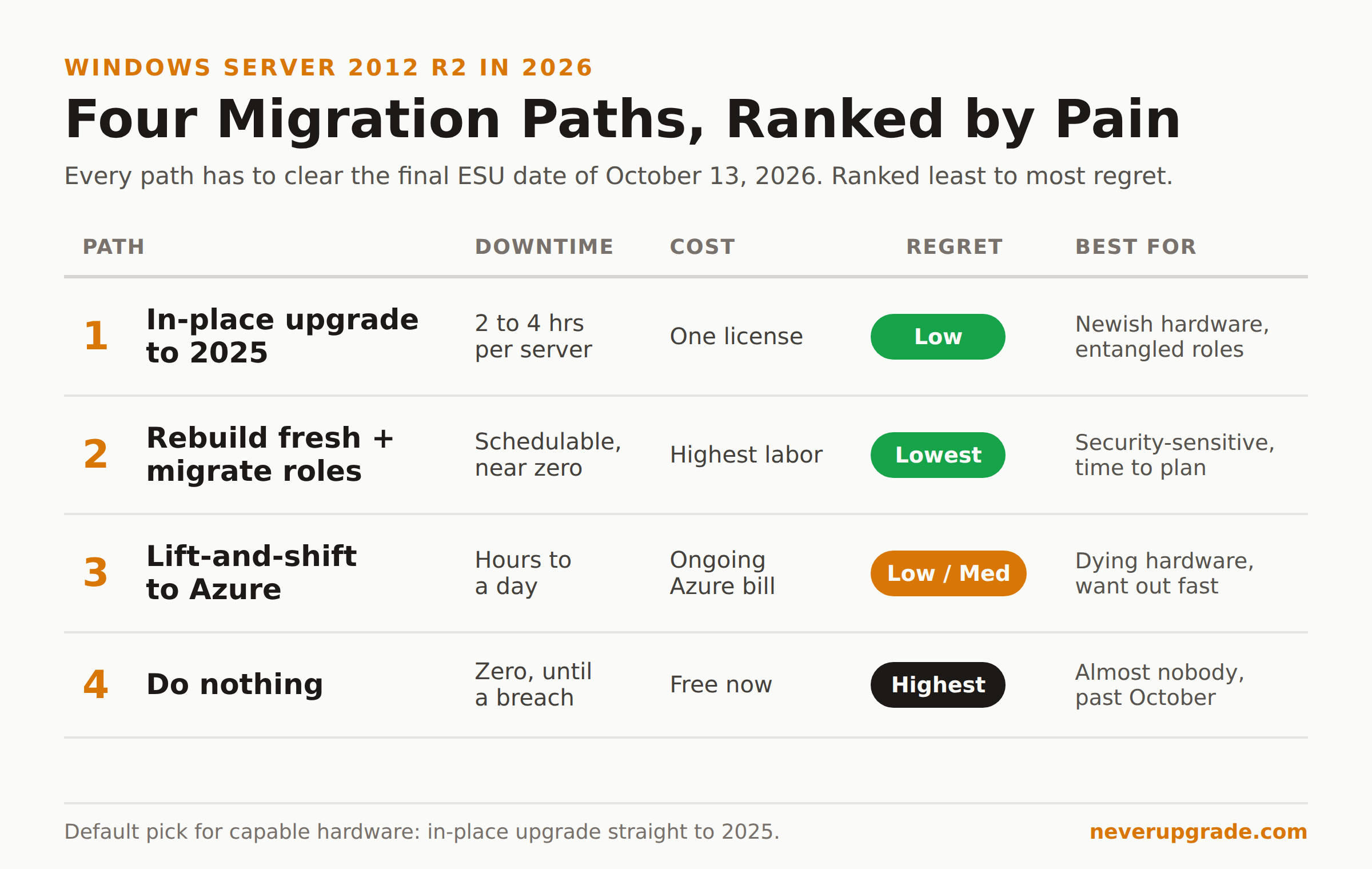
Here is the whole thing on one line each, worst regret last:
| Path | Downtime | Cost | Regret | Best for |
|---|---|---|---|---|
| Lift-and-shift to Azure | Hours to a day | Ongoing Azure bill | Low to medium | Dying hardware, want out fast |
| In-place upgrade to 2025 | 2 to 4 hours/server | One license | Low | Newish hardware, entangled roles |
| Rebuild fresh + migrate roles | Schedulable, near zero | Highest labor | Lowest | Security-sensitive, time to plan |
| Do nothing | Zero, until a breach | Free now | Highest | Almost nobody, past October |
If we had to pick one default for a small business with capable hardware and a few tangled roles, it is the in-place upgrade straight to 2025. It is the path the internet still tells you is impossible, it is one reboot cycle, and it clears the October deadline with room to spare.
FAQ
Is Windows Server 2012 R2 still getting updates in 2026?
Only through the paid or Azure-hosted Extended Security Updates program, and only until October 13, 2026. Regular support ended October 10, 2023. After the October 2026 date, there are no more security updates of any kind, so any 2012 R2 box online past then is permanently unpatched.
Can you upgrade Windows Server 2012 R2 directly to 2025?
Yes, as of the 2025 release. Nonclustered servers can now upgrade up to four versions at once, so 2012 R2 goes straight to 2025 from installation media in a single operation. The one gap is 2022: you cannot jump 2012 R2 to 2022 directly, and clusters can still only advance one version per rolling upgrade.
Do I get free security updates if I move Windows Server 2012 to Azure?
Yes. Extended Security Updates are free of charge for Windows Server 2012 and 2012 R2 running in Azure, applied automatically with no product key to buy, through October 13, 2026. You still pay for the Azure VM itself, but the ESUs on top cost nothing extra.
Bottom line
The end of support for Windows Server 2012 is not a someday problem anymore. You have until October 13, 2026, and four ways out, three of which are genuinely low-regret if you start now. Pick the in-place upgrade if your hardware can take 2025, lift-and-shift if it cannot, and rebuild if the box guards anything you care about.
Whatever you choose, do it on a plan and not on the weekend a CVE forces your hand.