Short answer: no, QuickBooks Desktop is not going away in 2026, but Intuit has already stopped selling new subscriptions for most of the product line, and the version you are running right now may already be out of support. That gap between “discontinued for new buyers” and “gone” is where most of the panic on forums comes from, and it is worth separating the two before you make any decisions about your books.
If you are running QuickBooks Desktop 2023 or earlier, the software itself still opens. What stopped working is everything that touches Intuit’s servers.
What Intuit has actually discontinued so far (not what Reddit says)
Here is the part that gets mangled every time this topic comes up on a forum: “QuickBooks Desktop discontinued” has meant three different things at three different times, and people conflate all of them into “QuickBooks Desktop is dead.”
- September 2024: Intuit stopped selling new subscriptions of QuickBooks Desktop Pro Plus and Premier Plus to first-time buyers. Existing subscribers could still renew. This is the move that kicked off most of the “going away” headlines, and it is also the one people most often overstate.
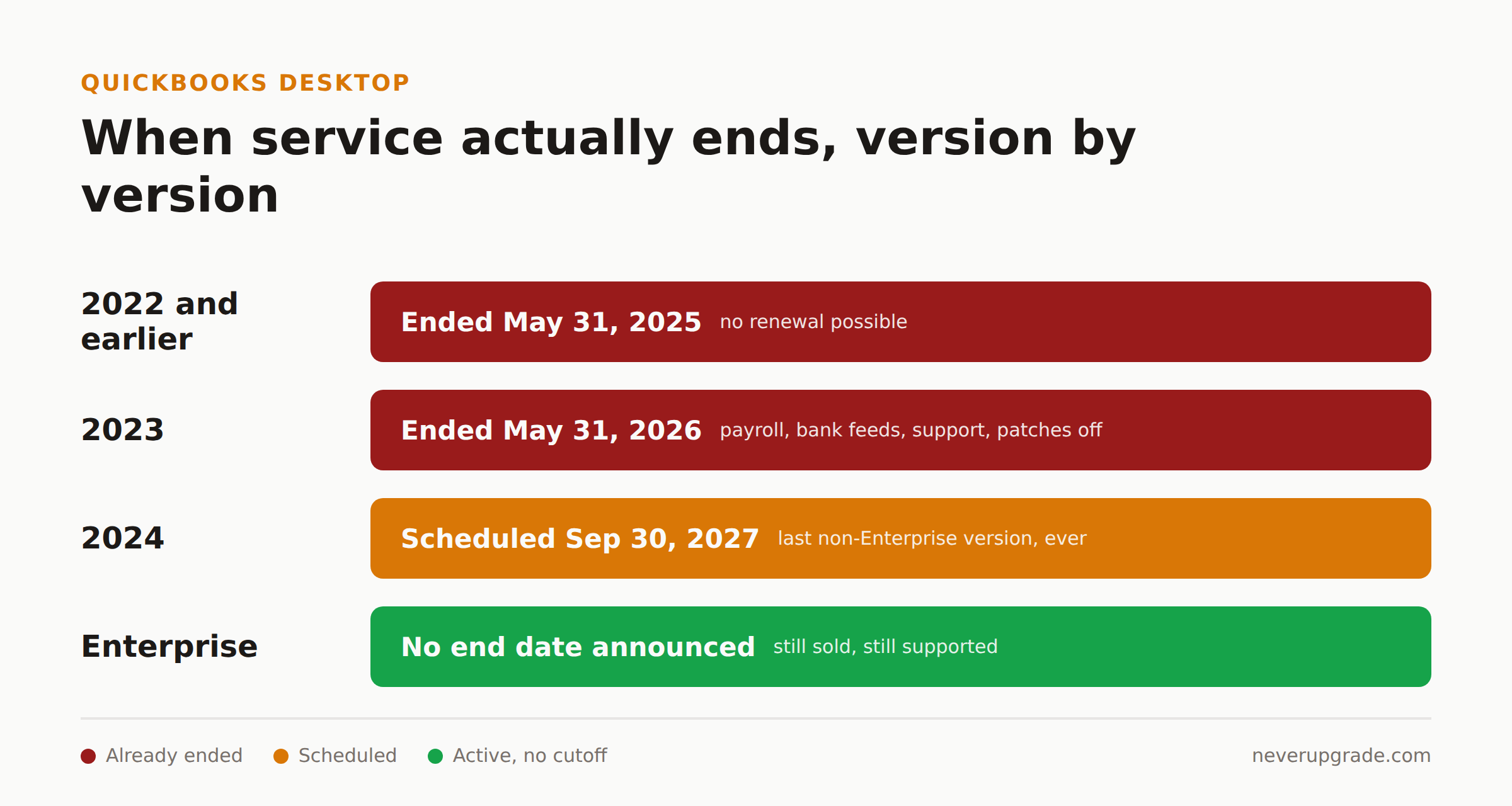
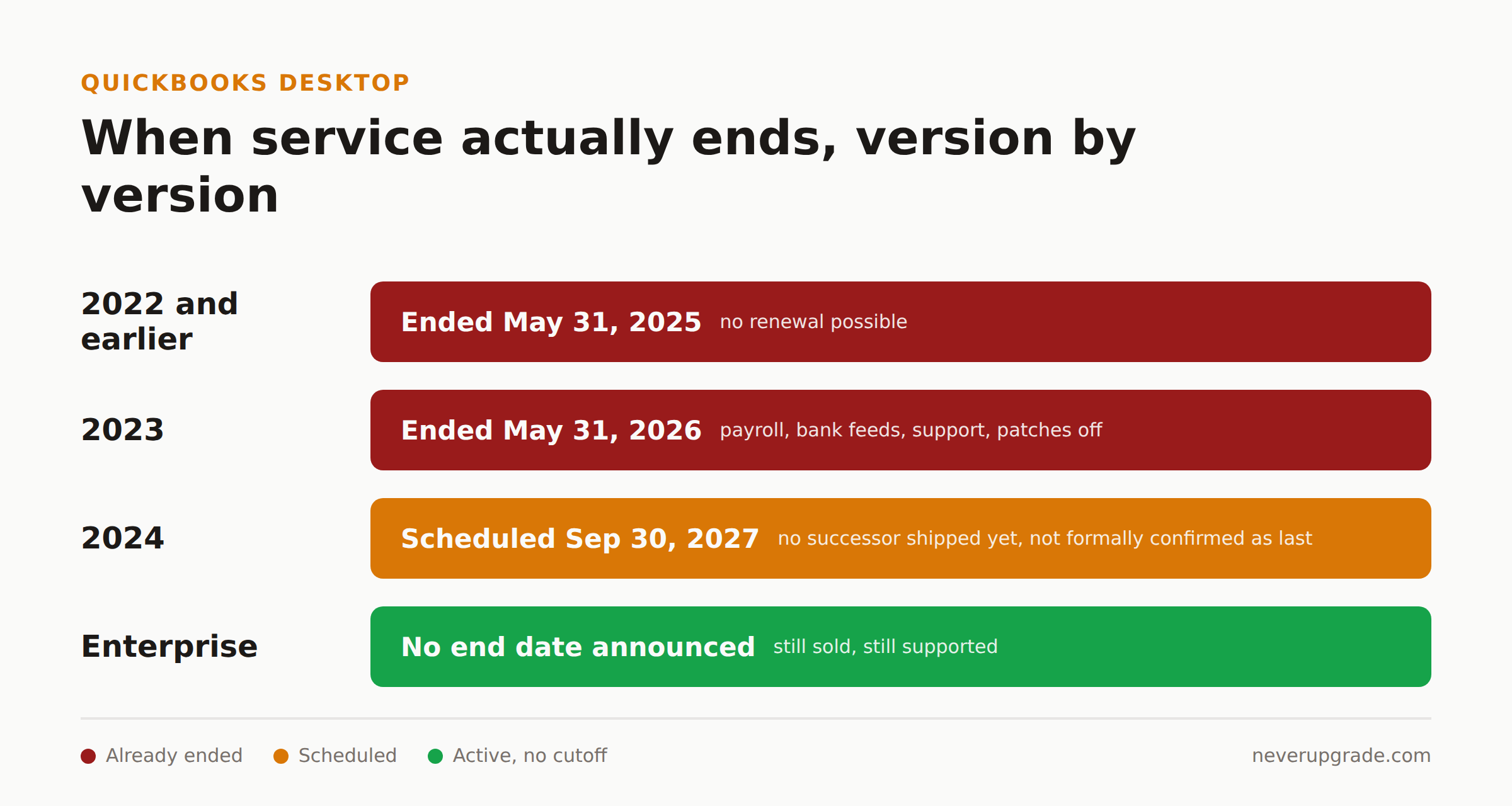
- May 31, 2026: Official end of service for the 2023 versions: Pro Plus 2023, Premier Plus 2023, Enterprise Solutions 23.0, Premier Accountant Edition Plus 2023, Enterprise Accountant 23.0, and Desktop for Mac Plus 2023. If you are on any of these, you already lost live support, security patches, payroll tax tables, Assisted Payroll, QuickBooks Workforce access, payment processing, bank feed downloads, and the Accountant Copy transfer feature. That is a lot of moving parts to lose in one day, and it happened over three months ago.
- September 30, 2027: The scheduled end of service for Desktop 2024. No Desktop 2025 shipped, and nothing since suggests a 2026 or 2027 non-Enterprise edition is coming, but Intuit has not published a formal commitment that 2024 is the last one. Treat “last version ever” as the most likely outcome, not a confirmed fact.
Notice what is missing from that list: Enterprise. QuickBooks Desktop Enterprise is still being actively sold and supported, with no announced end date. If your QuickBooks conversation on a forum thread jumps straight from “2023 discontinued” to “Intuit is killing Desktop,” somebody skipped step three and assumed Enterprise dies with the rest of the line. It has not, at least not yet.
What still works if you are already on an unsupported version
This is the detail that gets buried under the scare headlines, and it is the one your accountant actually needs to hear: the local program does not shut itself off. Intuit does not brick the software.
On a discontinued version, you can still:
- Open the file and view historical transactions
- Enter new transactions manually
- Print and export reports
- Run payroll calculations manually if you are comfortable doing the math yourself (the automated tax tables are gone, the arithmetic is not)
What you lose is everything that depends on a live connection to Intuit’s servers: payroll tax updates, bank feeds, payment processing, email sending from inside the app, and any future security patch, ever, for that build. The security exposure is the part we will not soften for you. An unpatched accounting file sitting on a machine with years of client financial data is a real target, not a theoretical one. If you are still processing card payments or moving money through a discontinued version, that is the one case where the “never upgrade” stance does not hold. Fix that specific exposure even if you keep everything else frozen.
How long can existing subscribers keep renewing?
If you bought in before the cutoff, Intuit has generally let you keep renewing your existing subscription tier, which is a different thing from being allowed to upgrade forward indefinitely. The pattern so far: each version gets roughly three years from release before its service cutoff, and Intuit keeps the renewal window open for existing subscribers right up until that cutoff date, not beyond it.
Translate that into your own version number:
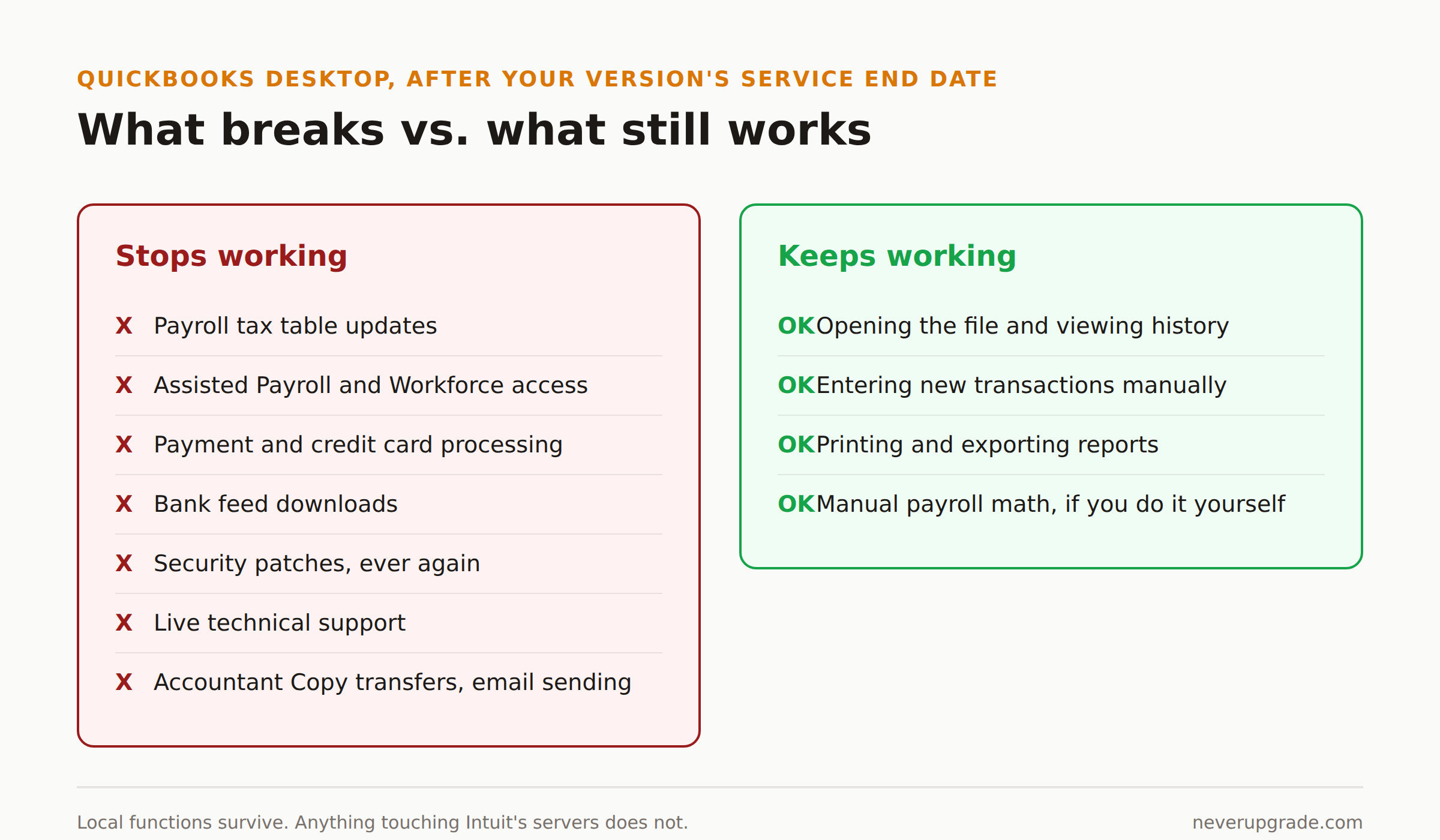
- 2022 and earlier: Services ended May 31, 2025. You cannot renew anything tied to that build anymore.
- 2023: Services ended May 31, 2026. Same story, just a year later.
- 2024: Services are scheduled to end September 30, 2027. No 2025 version shipped and nothing points to a successor, though Intuit has not formally committed to ending the non-Enterprise line here.
- Enterprise (any current edition): Still sold, still supported, no end date on the table.
If your subscription renewal notice still goes through without a warning banner, you are fine for now. The moment Intuit starts bouncing your renewal or the app nags you about an upcoming cutoff, that is your actual deadline, not whatever a forum post guessed.
What to do now, depending on your version
Before you touch anything: back up your company file. Use File > Backup Company > Create Local Backup, and copy that backup file off the machine, onto a separate drive or cloud folder, before you change license tiers, migrate data, or touch payroll settings. A failed migration with no backup is how a one-hour task turns into a three-day one.
With that done:
- On 2022 or earlier: You are past the support cliff already. Decide now whether you are staying on a frozen, offline-capable install (fine for read-only historical access, not fine for live payments or payroll) or migrating. Waiting changes nothing in your favor.
- On 2023: You are three months past end of service as of this writing. Same decision as above, with more urgency if you are still running payroll or taking card payments through it.
- On 2024: You have until September 30, 2027. That is real runway. Use it to plan a deliberate migration rather than a panicked one, but do not mistake “has runway” for “no deadline.”
- On Enterprise: You are not facing a forced migration. Renew as usual and revisit this when Intuit actually announces an end date, not before.
If you decide to migrate to QuickBooks Online, know the constraint going in: you get 60 days from creating the QBO account to import your Desktop data. Miss that window and you are doing a manual re-entry instead of an import. Plan the migration around that 60-day clock, not around “whenever we get to it.”
FAQ
Is QuickBooks Desktop actually being discontinued in 2026?
No single event in 2026 kills the whole product line. What happened in 2026 is the scheduled end of service for the 2023 versions specifically, on May 31. Desktop 2024 and Enterprise continue past that date on their own separate timelines.
Can I still use QuickBooks Desktop after my version’s service ends?
Yes, for local functions. You can open the file, enter transactions, and print reports indefinitely. You lose payroll tax updates, bank feeds, payment processing, security patches, and live support the day the service end date hits.
What is the real difference between Desktop being “discontinued” and “unsupported”?
Discontinued means Intuit stopped selling new subscriptions of that version to new customers, which happened for most non-Enterprise tiers in September 2024. Unsupported means the service end date for your specific version year has passed and the connected features are switched off. A version can be discontinued for new sales years before it becomes unsupported for existing users.
If you are trying to decide whether to stay on Desktop at all while the clock runs out on your version, see our breakdown of what still works if you run QuickBooks Desktop without an active subscription and our full rundown of what Intuit still supports in 2026 and what it does not.