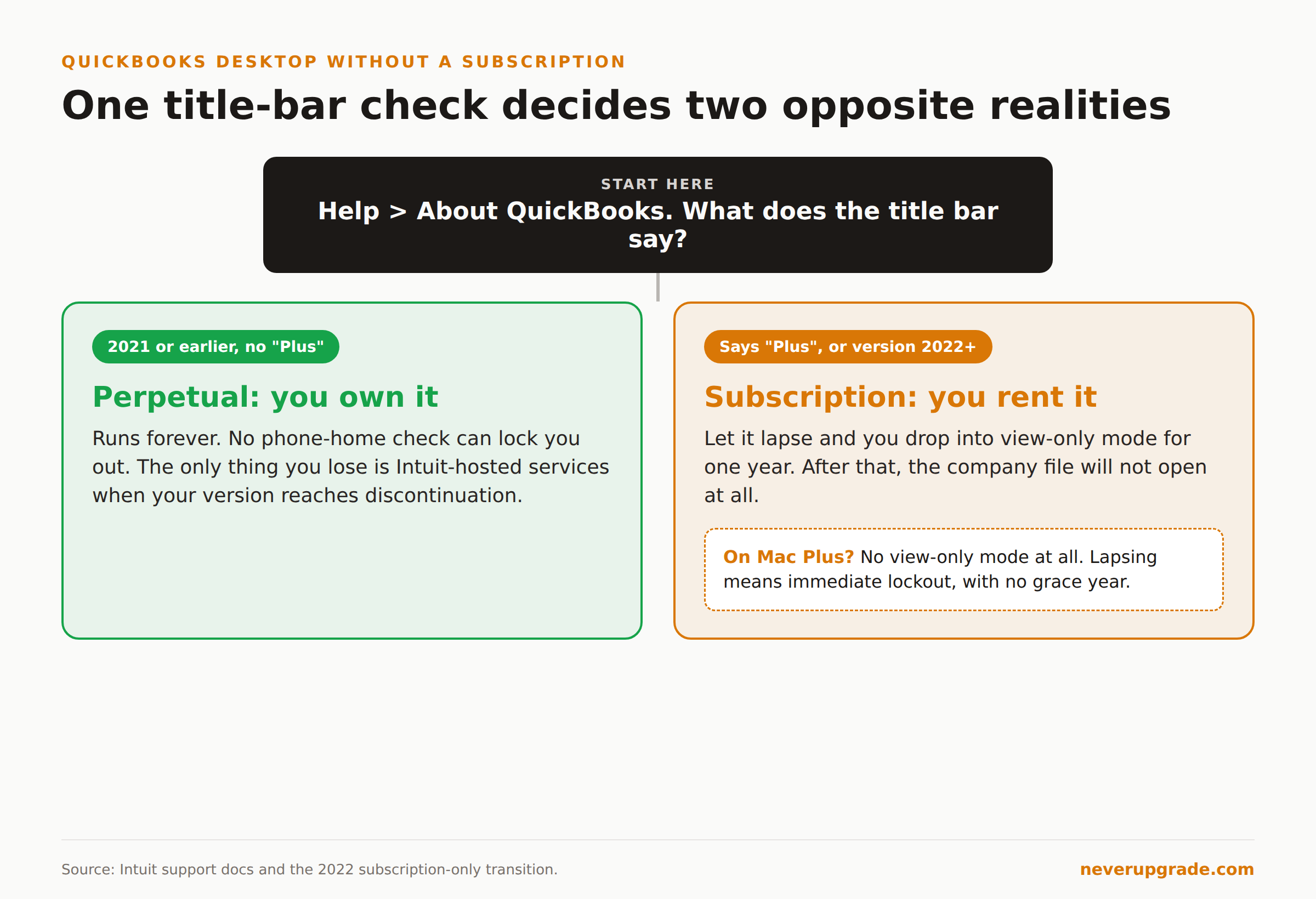
Running QuickBooks Desktop without a subscription works fine if you own a perpetual license, which means QuickBooks Desktop 2021 or earlier. It opens, it runs, and nobody can switch it off. If you have a Plus product instead (Pro Plus, Premier Plus, Enterprise), letting the subscription lapse drops you into view-only mode for one year, and after that the file will not open at all.
Those two situations get treated as one question everywhere on the internet. They are opposites. One is software you own. The other is a countdown.
So before anything else, work out which one you are holding.
Perpetual vs subscription: what you actually own
Check the title bar. Help > About QuickBooks will tell you the exact version and year.
If it says 2021 or earlier and does not say “Plus”, you have a perpetual license. You bought it once. It runs forever, on any machine you can still install it on, with no phone-home check that can lock you out.
If it says Plus, or it is version 2022 or later, you are renting. Pro, Premier, and Mac went subscription-only with the 2022 release. Intuit sold the last non-subscription Pro and Premier licenses until December 10, 2021. Enterprise has no perpetual option at all.
That December 2021 cutoff is the line that matters, and it is why the advice you find is so contradictory. Half the search results were written by people holding a 2019 perpetual license, for whom “no subscription” means “nothing happens.” The other half were written by people whose Pro Plus 2023 just went read-only. Both are describing reality. Neither one is describing yours until you check the version.
One correction while we are here, because a top-ranking page states the opposite: you cannot buy QuickBooks Desktop as a standalone perpetual application in 2026. That option closed in December 2021 and has not come back.
Running QuickBooks Desktop without a subscription: what keeps working forever
Everything that runs locally. This is the part vendors are strangely quiet about.
- Opening and editing your company file
- Entering transactions, invoices, bills, journal entries
- Running and exporting every report
- Printing checks
- Multi-user mode on your own network
- Your entire history, going back as far as the file does
No subscription check. No expiry. A Pro 2019 install on a machine that never touches the internet will still be entering transactions in 2036, assuming the hardware holds.
What you lose is anything routed through Intuit’s servers, and you lose it on Intuit’s schedule regardless of what you paid. That is a different kill switch, and it fires even on a perpetual license.
What dies: the two separate kill switches
Here is the distinction that the SERP mangles.
Kill switch one: service discontinuation. QuickBooks Desktop support runs on a fixed clock, and it expires on every version, perpetual or subscription, roughly three years after release. After May 31, 2026, QuickBooks Desktop 2023 loses live support, security updates, Desktop Payroll, Desktop Payments, online bank feeds, and the ability to email forms and reports. Your perpetual 2021 license already went through this in May 2024. The software still runs. The connected services do not.
Kill switch two: subscription lapse. This only hits Plus products, and it is the harsh one.
When a Pro Plus, Premier Plus, or Enterprise subscription expires, you get view-only mode for one year. Then the door closes. Reactivate or lose access to your own books.
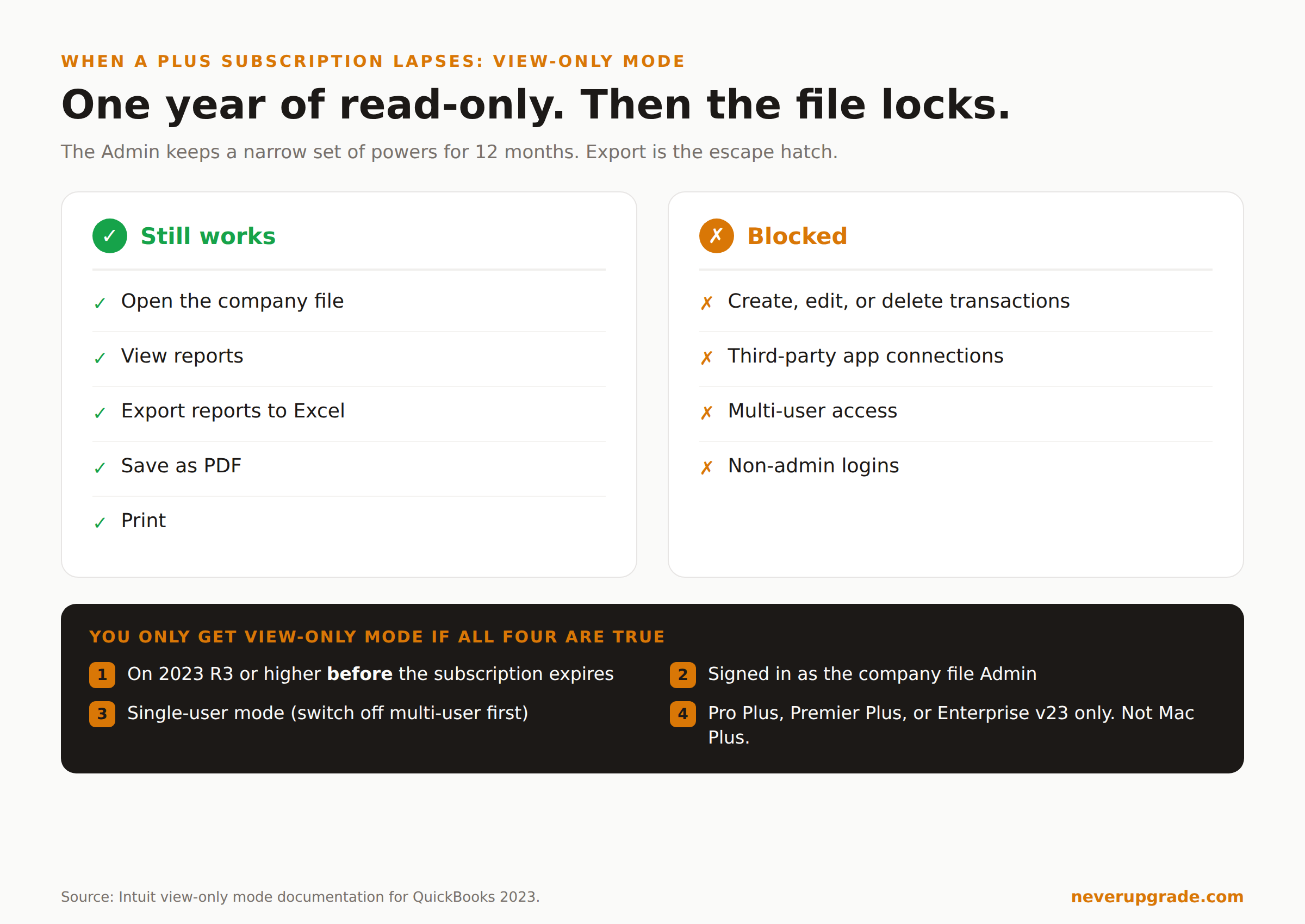
View-only mode has conditions that nobody puts in the headline:
- You must be on 2023 R3 or higher before the subscription expires. Upgrade after it lapses and you may not get view-only mode at all. This is a timing trap: the fix has to happen while you still have a working subscription.
- Only the company file Admin gets in. Not your bookkeeper, not your staff logins.
- Single-user mode. Switch off multi-user hosting before you cancel. View-only mode may not work through multi-user.
- Mac Plus users get nothing. View-only mode covers Pro Plus, Premier Plus, and Enterprise v23 only. It is not available on Mac Plus, Point of Sale, or Intuit-hosted cloud access. If you are on Mac Plus, lapsing means immediate lockout with no grace year.
Inside view-only mode you cannot create, edit, or delete transactions, and third-party apps linked to the file stop connecting.
But you can run reports. And you can export them.
That last point contradicts Intuit’s own help content, which in places says you “won’t be able to add transactions, run reports, or make any edits.” The detailed walkthrough says otherwise: the Admin can open reports, view them, export to Excel, or save as PDF. Intuit’s documentation is inconsistent with itself here. Treat the export path as your escape hatch, but test it before you need it, because you are relying on the behavior rather than the promise.
Back up like the software is already orphaned
Because it is. Every version becomes unsupported eventually, and the day it does, your company file is a proprietary blob that only an aging binary can read.
Before you start: make a backup, and verify it opens.
The discipline that actually matters for orphaned accounting software:
- Keep a local backup, not just an Intuit one. File > Back Up Company > Create Local Backup. Put it somewhere you control.
- Export the human-readable version too. Reports to Excel, and the full general ledger to CSV or PDF, once a quarter. If the binary ever refuses to open, this is the only copy of your books a human or an accountant can actually read. A .QBB file with no software to open it is not a backup, it is a hostage.
- Archive the installer and the license key together. Same folder as the backup. A perpetual license is worthless if you cannot reinstall it in five years, and discontinued products cannot be registered for the first time.
- Test the restore annually. On a different machine. An untested backup is a rumor.
- Snapshot the whole VM if you can. Installer, license state, and file in one restorable image.
The Excel export in step 2 is the one people skip, and it is the one that saves you. It is also, conveniently, the one thing view-only mode still lets you do.
If you are running QuickBooks Desktop on an unsupported Windows install too, you are stacking two orphaned systems on top of each other, and the risk compounds in ways worth thinking through honestly. We covered that calculation in our honest risk assessment of staying on Windows 10.
Exit strategies, ranked by how much they hurt
If staying put stops being viable, in order of pain:
Stay on the perpetual license, offline. Cheapest. Works indefinitely. Requires giving up payroll, bank feeds, and payments, and accepting an unpatched application. Reasonable if the machine is isolated and the books are mostly historical.
Keep the subscription for one more year while you migrate. Not surrender. The worst migration is the one you do in a panic during view-only mode with no ability to fix a bad import. Paying for one clean year to move deliberately is usually the cheapest option in real terms.
Move to a perpetual competitor. The non-subscription desktop accounting market still exists, and it is a legitimate answer to a legitimate grievance about the upgrade treadmill.
Move to QuickBooks Online. Intuit’s preferred destination. Some Desktop features do not survive the trip, and you are back on a subscription. Sometimes still the right call.
Here is the one case where you actually should renew rather than hold out: if you run payroll. Frozen tax tables do not throw an error. They silently calculate withholding against expired rates, and you find out at quarter end when the 941 is wrong. Every other feature fails loudly. Payroll fails quietly, and it fails into penalties. Do not run payroll on unsupported software to save a few hundred dollars.
FAQ
Can I still use QuickBooks Desktop without a subscription?
Yes, if you have a perpetual license, meaning QuickBooks Desktop 2021 or earlier without “Plus” in the name. It runs indefinitely with no expiry check. If you have a Plus product, no: an expired subscription gives you view-only access for one year, then blocks access entirely.
What happens to my data if I let my QuickBooks subscription lapse?
The data stays on your disk, but you need working software to read it. Pro Plus, Premier Plus, and Enterprise v23 give the Admin one year of view-only access, where you can view and export reports but cannot enter transactions. Mac Plus gets no view-only mode. Export your reports to Excel before you cancel.
Can I buy a non-subscription QuickBooks Desktop license in 2026?
Not from Intuit. Non-subscription Pro and Premier sales ended December 10, 2021, and every Desktop product since is subscription-only. Be skeptical of resold licenses: discontinued products cannot be registered for the first time, so a cheap sealed box may never activate.
The short version
Check Help > About QuickBooks. If it says 2021 or earlier and does not say Plus, relax: you own it, it runs forever, and the only thing you lost was services you can live without. If it says Plus, you have a decision with a deadline, and the worst version of that decision is the one you make after the subscription has already lapsed.
Either way, export your reports to Excel this week. That habit is what turns an orphaned install from a liability back into a filing cabinet.