There is no 32-bit edition of Windows 11. There never has been. Every Windows 11 ISO Microsoft has ever shipped, from the first release build through every feature update since, installs a 64-bit operating system only. If you are hunting for a “Windows 11 32-bit download” because your hardware or firmware genuinely can’t run 64-bit code, stop looking: it doesn’t exist, and Microsoft has given no indication it ever will.
That is the whole short answer. The rest of this guide is about the two things people actually need once they hear it: why Microsoft made this call, and what to do if your machine really is stuck in 32-bit land.
The Short Answer: No, Windows 11 Does Not Have a 32-Bit Edition
Microsoft says this plainly in its own support documentation: “Windows 11 doesn’t have a 32-bit version and is 64-bit only.” Not “not recommended.” Not “phased out.” It simply is not built.
Windows 11 was the first version of Windows, going back to Windows 95, to drop the 32-bit edition entirely. Every prior release from Windows XP through Windows 10 shipped both a 32-bit (x86) and 64-bit (x64) installer. Windows 11 shipped with one option, and it is 64-bit.
Here is the part most articles skip: this was not really Microsoft “removing” 32-bit support out of nowhere. It was closer to Microsoft acknowledging that the 32-bit path had already become a dead end.
Why Microsoft Killed 32-Bit, and It Is Not Just Marketing
The cynical read is that Microsoft wanted a reason to force new hardware sales. There is some truth buried in there, but the mechanics are more boring and more defensible than that.
Windows 11’s minimum requirements already exclude any CPU that would need a 32-bit edition in the first place. The supported CPU list starts at 8th-generation Intel Core chips and AMD Zen+ processors, both of which are exclusively 64-bit silicon. Add the TPM 2.0 and UEFI Secure Boot requirements, features that essentially did not exist on hardware old enough to still ship 32-bit-only CPUs, and you get a hardware floor where a 32-bit edition would serve almost nobody.
Practically speaking, 64-bit CPUs from AMD and Intel have been standard since around 2003 to 2004. Any machine new enough to clear Windows 11’s other gates (TPM, Secure Boot, CPU generation) was already 64-bit capable years before Windows 11 existed. Building and testing a 32-bit edition for that tiny remaining sliver of hardware, none of which meets the other requirements anyway, was not worth Microsoft’s engineering budget. We think that reasoning holds up. It is a different thing entirely from the requirements list itself, which we have plenty of opinions about elsewhere.
The Trap: 32-Bit CPU vs. 32-Bit Firmware
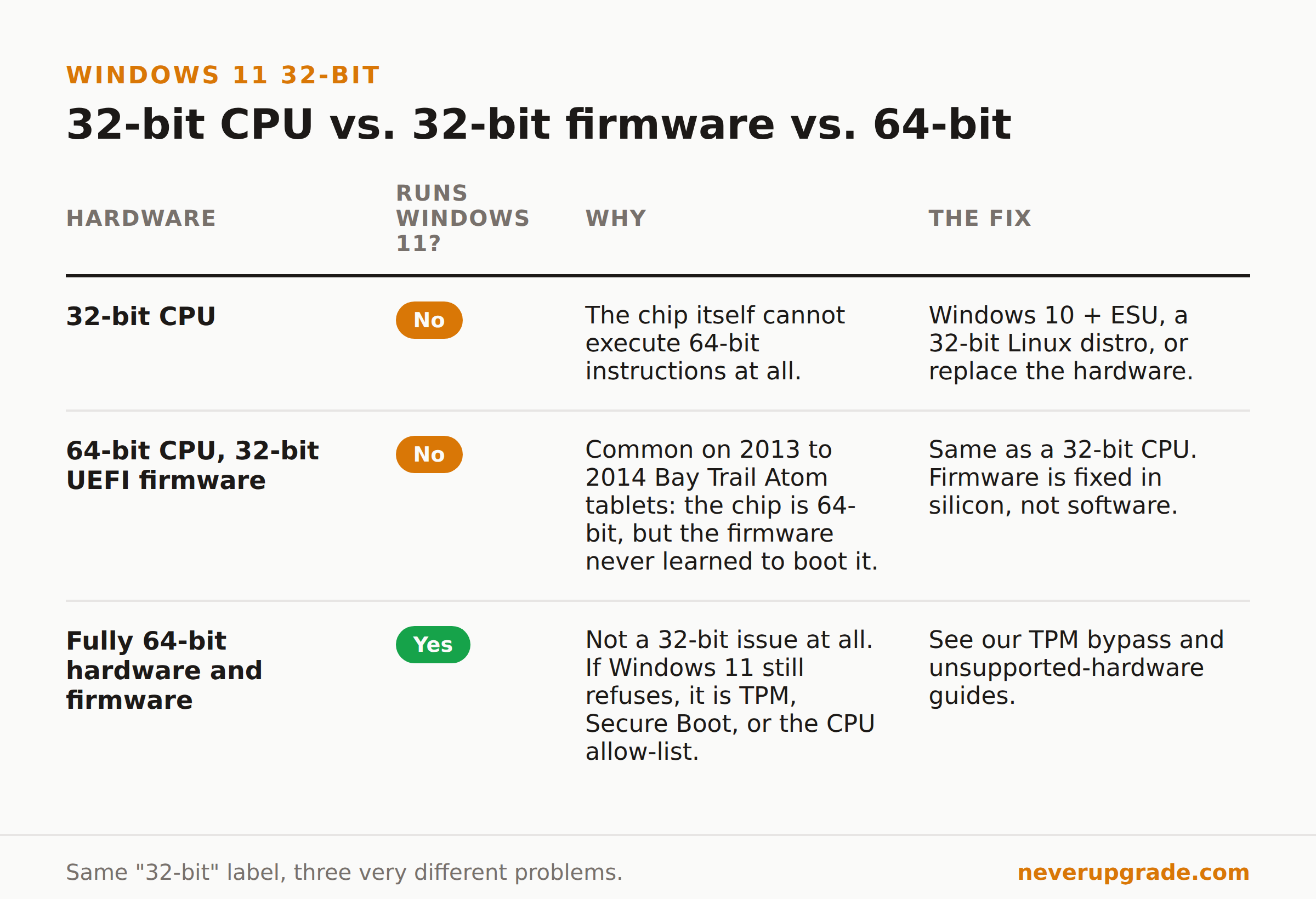
Here is the detail that trips up more people than the CPU question ever does: your processor can be fully 64-bit capable while your firmware is not.
A batch of cheap tablets and netbooks built around 2013 and 2014, mostly on Intel’s Bay Trail Atom chips, shipped with 32-bit UEFI firmware even though the CPU itself supported 64-bit instructions just fine. Manufacturers did this to save a few dollars on flash storage. The result was a device that could only ever boot a 32-bit operating system, not because the chip demanded it, but because the firmware never learned how to hand off to a 64-bit boot loader.
If you own one of these devices, no driver update, no BIOS setting, and no registry hack changes that. The firmware is what it is. This is genuinely different from a 32-bit CPU, and it is worth knowing which one you actually have before you spend a weekend chasing the wrong fix.
Your Real Options If You’re Stuck on Genuinely 32-Bit Hardware
If your device fails on CPU architecture, on firmware, or both, here is what actually works, in order of how much sense each one makes.
- Stay on Windows 10 with Extended Security Updates. This buys time without touching the hardware. It is a bridge, not a destination, and the clock is running. Our complete ESU guide covers enrollment, cost, and how long the program actually lasts.
- Run a 32-bit Linux distribution. A shrinking number of distros still build official 32-bit installer images. Debian has historically been one of the more reliable holdouts. Check current availability before you commit, since support for 32-bit builds has been quietly disappearing across the Linux world too, not just in Redmond.
- Replace the hardware. We do not say this often, but for a genuinely 32-bit-only machine, this is usually the honest answer. A device old enough to be firmware-locked to 32-bit is also old enough to be missing modern security baselines that have nothing to do with Windows: no hardware root of trust, aging storage, batteries and capacitors well past their design life. If the device is doing anything that touches the internet or sensitive data, the risk calculation shifts. This is one of the few cases where upgrading the hardware is the actually responsible move, not just the convenient one.
Before you commit a weekend to any of these, do the five-minute check in the next section. A lot of people solve the wrong problem first.
Are You Actually Blocked by 32-Bit, or by Something Else Entirely?
Most people who think they are hitting the 32-bit wall are not. They are hitting Windows 11’s TPM 2.0 requirement, its Secure Boot requirement, or its CPU generation allow-list, all of which are separate problems from having 32-bit-only hardware.
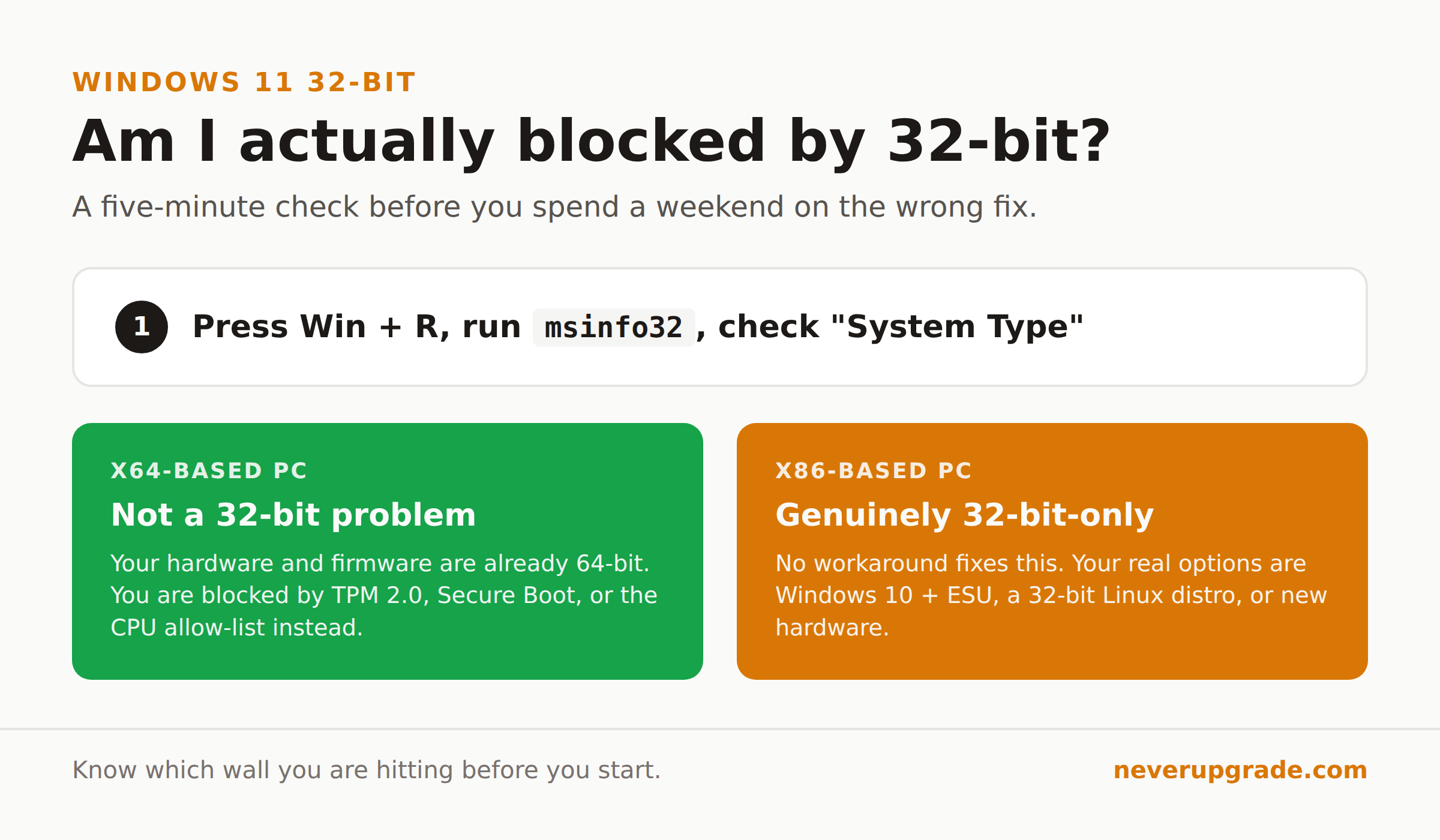
Here is the check, before you start anything else:
- Press Windows key + R, type
msinfo32, and hit Enter. - Look at the “System Type” field.
- If it reads “x64-based PC,” your hardware and firmware are already 64-bit capable. Whatever is blocking Windows 11 is something else, TPM, Secure Boot, or the CPU allow-list, not a 32-bit limitation.
- If it reads “x86-based PC,” your device is genuinely 32-bit-only, and the options in the previous section are your real choices.
If you land in the x64-based PC bucket, your actual problem is covered by two other guides: our walkthrough on installing Windows 11 on unsupported hardware and our deep dive on TPM bypass methods that still work. Both solve a completely different problem than the one this article is about, and confusing the two is exactly how people waste a weekend on the wrong fix.
Need to Run Old 32-Bit Software, Not a 32-Bit OS?
One more disambiguation, because this is the mixup we see most often. Wanting a 32-bit edition of Windows 11 is not the same question as “will my old 32-bit program run on Windows 11.”
It will, almost always. Windows 11’s 64-bit-only design does not stop it from running 32-bit applications. A compatibility layer called WOW64 has handled that since the 64-bit era of Windows began, and it still works the same way in Windows 11. If that is actually your situation, an old QuickBooks module or a label-printer utility that happens to be 32-bit, skip everything above and go straight to our guide on running 32-bit programs on Windows 11, which covers exactly that.
Frequently Asked Questions
Is there a 32-bit version of Windows 11?
No. Windows 11 has never had a 32-bit edition, in any release since launch. Microsoft’s official documentation states Windows 11 is 64-bit only, and every installer Microsoft distributes reflects that.
Will Microsoft ever release a 32-bit version of Windows 11?
There is no indication of this happening. Windows 11’s other requirements, TPM 2.0, Secure Boot, and a CPU allow-list that starts at 64-bit-only chips, already exclude the hardware that would need a 32-bit edition. Building one would serve almost no eligible devices.
My computer shows a 32-bit operating system. Does that mean I can’t get Windows 11?
Not necessarily. Many machines running 32-bit Windows 7 or Windows 10 today have 64-bit-capable CPUs and firmware; they were just installed with the 32-bit edition at some point and never reinstalled. Check “System Type” in msinfo32: if it says “x64-based PC,” you can move to 64-bit Windows in place of your current 32-bit install. Only an “x86-based PC” result means you are genuinely locked out.
Before You Spend a Weekend on This
Confirm which limitation you are actually hitting before you touch anything. Run the msinfo32 check first. If you are x64-based, your problem is TPM, Secure Boot, or the CPU list, and there are real workarounds for that. If you are genuinely x86-based, no workaround exists for the 32-bit wall itself, and your honest choices are ESU, a 32-bit Linux distro, or new hardware. Knowing which bucket you are in before you start saves the weekend the wrong guide would have cost you.