QuickBooks Desktop vs Online comes down to one question that has nothing to do with buttons or menus: do you want to own a file on your own machine, or rent access to a file that lives on Intuit’s servers. Desktop still wins for offline work, deep inventory, and people who hate re-learning software every year. Online wins for anyone who needs remote access, automatic backups, or bank feeds that just work. Neither one is “better.” They’re built for different relationships with your own data.
If you’re the person who’s been putting off this decision since Intuit stopped selling Pro Plus and Premier Plus to new customers in 2024, here’s the honest version, not the marketing one.
The real difference: a file you own vs. a subscription you rent
Desktop’s company file lives on your hard drive (or your server, if you’ve got a small office network). You can back it up to a USB stick, copy it to another machine, or open it five years from now on a fresh Windows install with no internet connection at all. That’s the whole appeal for a holdout: the file is yours, full stop.
Online’s data lives in Intuit’s cloud. You don’t get a local copy you can just grab and move. If Intuit changes a feature, deprecates a report, or raises prices, you’re along for the ride, because there’s no “downgrade to the old version” option the way there sort of is on Desktop. Online quickbooks vs desktop debates online almost always skip this part and jump straight to feature checklists, which misses the actual stakes.
Here’s the wrinkle worth sitting with: Desktop hasn’t been a one-time purchase in years either. Pro Plus and Premier Plus were already annual subscriptions before Intuit stopped selling them to new customers in 2024 (source). If you bought a perpetual-license copy of Desktop before that shift, you’re the exception, not the rule, and you already know it.
Where Desktop still wins for reluctant upgraders
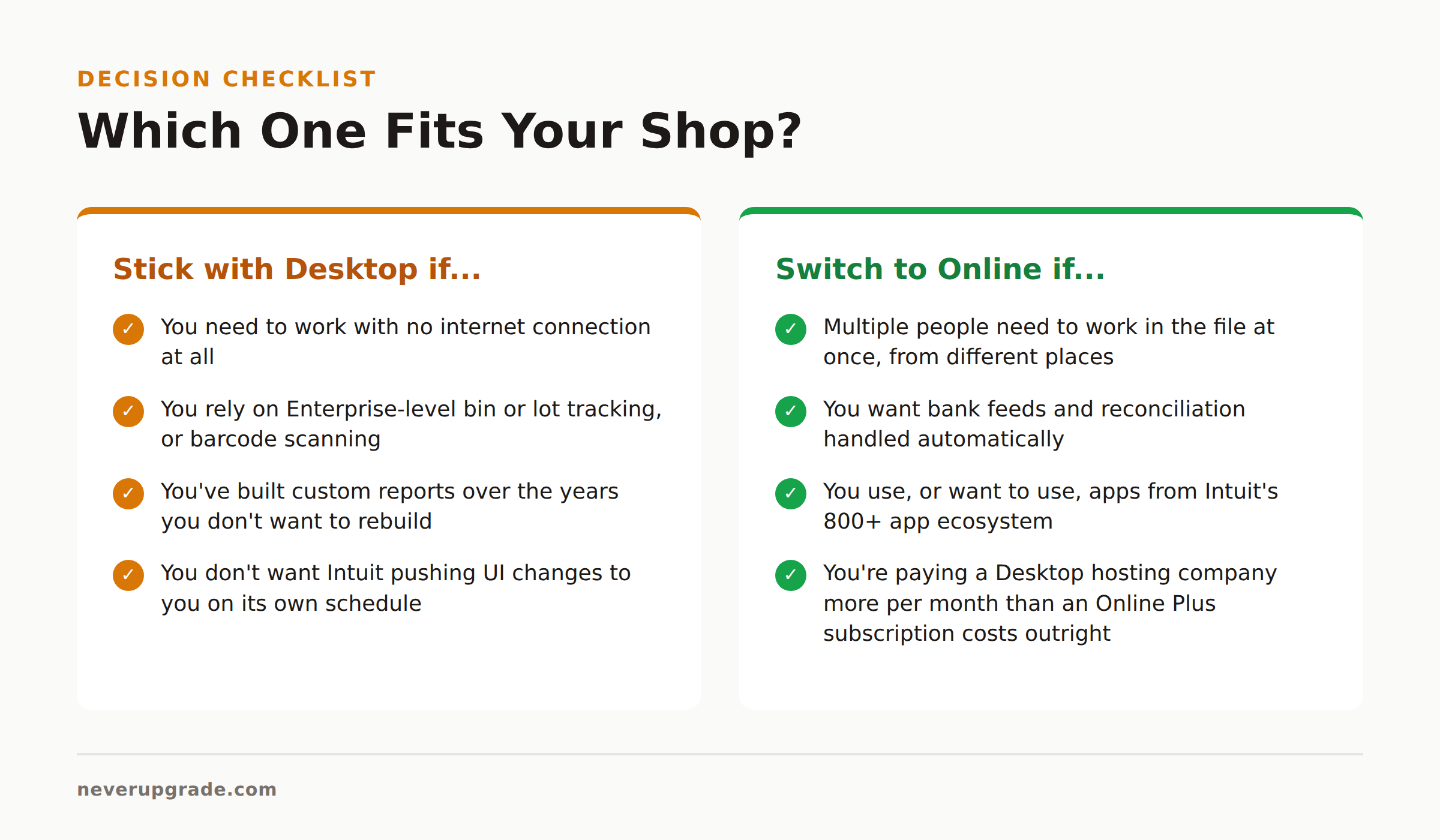
- Offline access. No internet, no problem. If your office loses connectivity or you’re working from a location with spotty service, Desktop doesn’t care.
- Deep inventory and job costing. Enterprise’s bin and lot tracking, barcode scanning, and industry-specific editions (contractor, manufacturing, wholesale) go further than anything Online offers, even on the Advanced tier.
- Custom report writer. Desktop’s report builder is genuinely more flexible than Online’s, and accountants who’ve built reports over a decade don’t want to rebuild them.
- No surprise UI changes. Intuit pushes interface and workflow updates to Online constantly. Desktop moves at your pace, not theirs, at least until they force an upgrade cycle.
If any of those four are load-bearing for how you run your books, that’s a legitimate reason to stay put. Not nostalgia. A real operational reason.
Where Online wins, and when the switch is worth it anyway
Online earns its subscription fee in three places: remote access for multiple people at once, automatic bank feed matching, and integrations with the 800-plus apps in Intuit’s app ecosystem (source). If you’ve got a bookkeeper who works from home, a business partner in a different city, or you’re tired of emailing a company file back and forth, Desktop’s multi-user setup (a shared network file, or a paid third-party hosting service running $44 to $200 per user per month, per Tipalti’s pricing breakdown) starts looking a lot less appealing than Online’s built-in concurrent access.
This is the one case where I’ll tell you to actually upgrade: if you’re paying a hosting company more per month for remote Desktop access than a QuickBooks Online Plus subscription costs outright, you’re paying twice for the same convenience Online includes by default.
Cost comparison over 3 years, not just year one
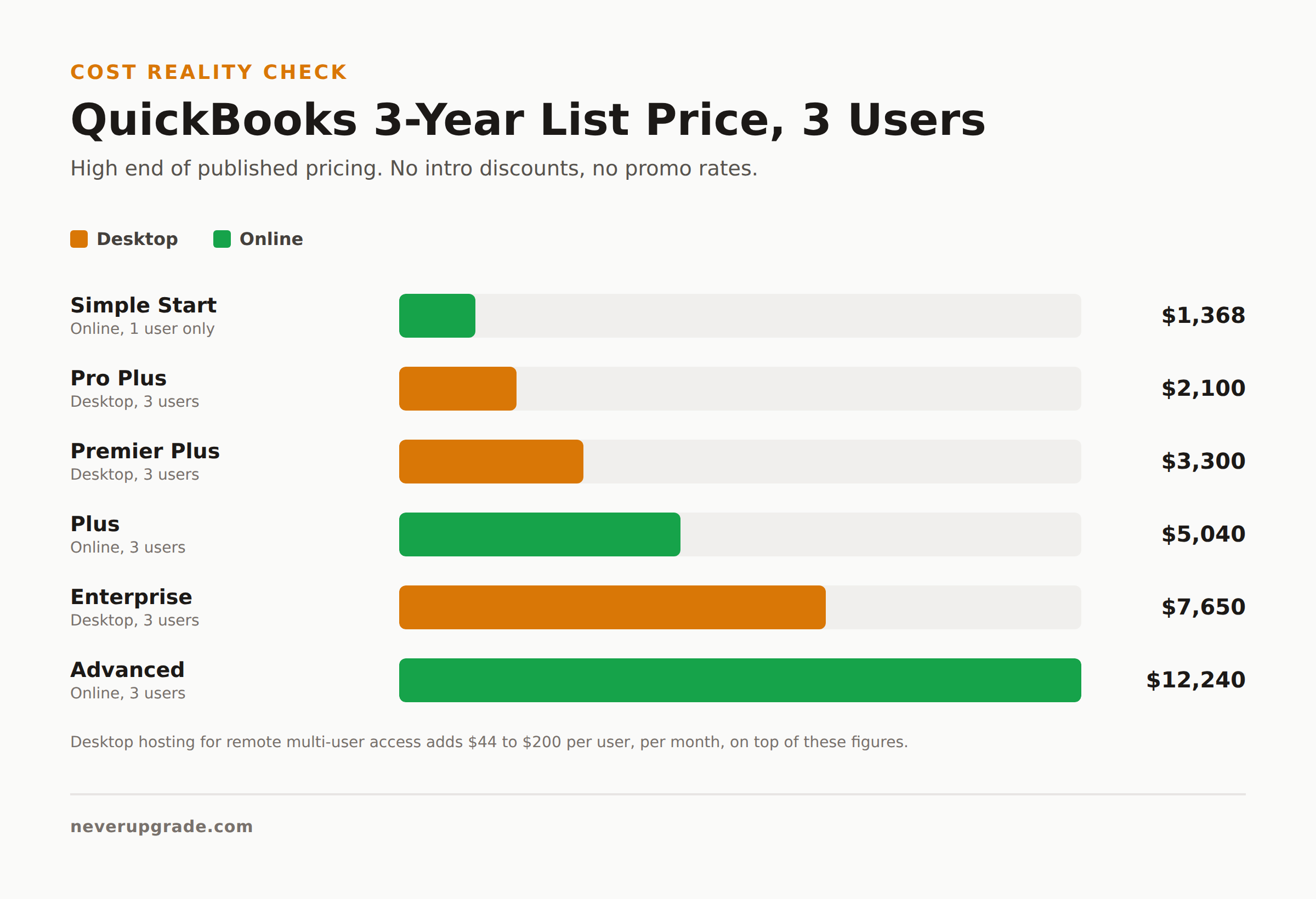
Every quickbooks desktop vs online pricing comparison online quotes the sticker price and stops there. That’s the wrong number. Here’s a rough 3-year total for a 3-person shop, using published list pricing:
QuickBooks Desktop (3 users):
– Pro Plus: roughly $400 to $700 per year, so $1,200 to $2,100 over 3 years
– Premier Plus: roughly $600 to $1,100 per year, so $1,800 to $3,300 over 3 years
– Enterprise: starts around $2,300 to $2,550 per year for 3 users (source), so $6,900 to $7,650 over 3 years
– Add remote hosting if you need multi-location access: another $1,584 to $7,200 over 3 years for 3 users
QuickBooks Online:
– Simple Start: $38/mo regular price, so about $1,368 over 3 years (single user only, so it’s not really comparable for 3 people)
– Plus: $140/mo regular price, so about $5,040 over 3 years
– Advanced: $340/mo regular price, so about $12,240 over 3 years
Intuit’s intro discounts (as low as $19/mo for the first 3 months) make Online look cheaper than it is if you only glance at the first invoice. Run the 3-year number before you decide anything, and remember Desktop’s promo periods don’t discount nearly as deep or as often.
Migration path if you decide to switch
If the cost and workflow comparison tips you toward Online, here’s how to do it without losing your history.
Before you start: back up your Desktop company file (File > Back Up Company > Create Local Backup) and store a copy somewhere that isn’t the machine you’re migrating from.
- Run your key reports in Desktop first (P&L, Balance Sheet, AR/AP aging) for every year you need on file, and export them to PDF. Online’s import doesn’t guarantee every custom report survives the trip.
- Use Intuit’s built-in Online migration tool (Company > Export Company File to QuickBooks Online) rather than a manual re-entry. It carries over the chart of accounts, transactions, and most list data.
- Rebuild any custom Desktop reports manually in Online. FinOptimal’s migration writeup is blunt about this: validating the migrated data usually takes longer than the transfer itself.
- If you’re on Enterprise with bin or lot-level inventory tracking, expect no clean automated path. Budget time for a manual inventory reconciliation, because that’s the piece most likely to break.
- Keep the old Desktop file and its backups for at least one full fiscal year after the switch, untouched, in case you need to cross-check anything the migration missed.
That last step is the one people skip and regret. A holdout’s instinct to keep the old thing around “just in case” is, for once, exactly correct here.
FAQ
Is QuickBooks Desktop going away in 2026?
No, not entirely. Intuit stopped selling Pro Plus and Premier Plus to new subscribers in 2024, but existing subscribers can keep renewing, and QuickBooks Desktop Enterprise is still actively sold and developed. If you already own a Desktop subscription, nothing forces you off it in 2026.
Is QuickBooks Online cheaper than Desktop?
It depends entirely on the tier and user count. For a single user, Online’s Simple Start plan can be cheaper than Desktop Pro Plus. For 3 or more users needing deep inventory or job costing, Desktop Enterprise is often cheaper over 3 years than Online Plus or Advanced. Run the multi-year math for your specific user count before assuming either direction.
Can I switch from QuickBooks Online back to Desktop?
Yes, but it’s more manual than the Desktop-to-Online path, since Intuit doesn’t build a one-click reverse migration tool. You’ll typically need a third-party conversion service or a manual re-entry of open balances and recent transactions. It’s a real project, not a setting you toggle.
If you’re specifically worried about running an already-purchased copy of Desktop without paying for the ongoing subscription, see our breakdown of what still works when you stop paying for QuickBooks Desktop. And if payroll is the piece keeping you on Desktop, we covered what QuickBooks Desktop Payroll actually costs and what breaks without it separately.