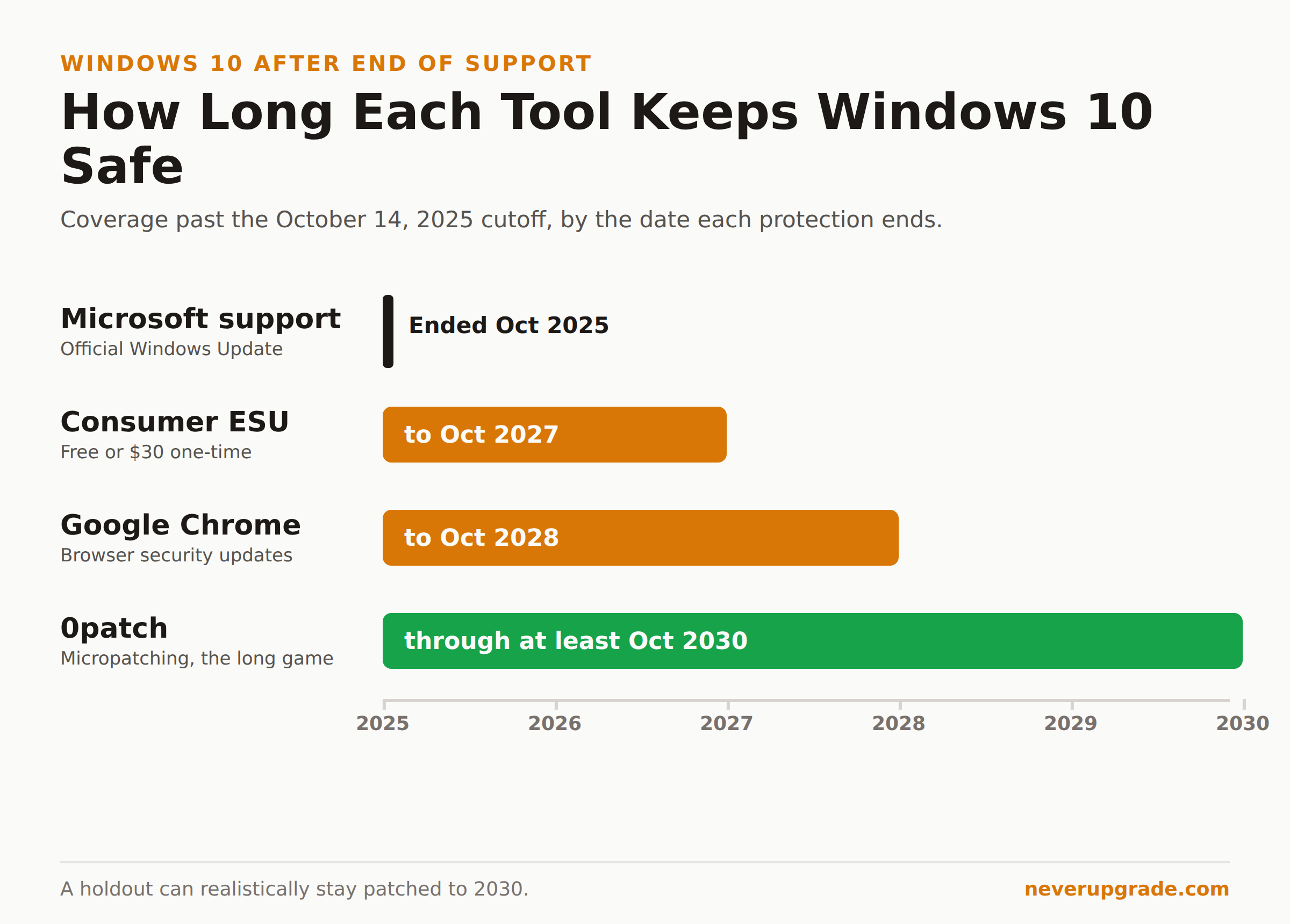
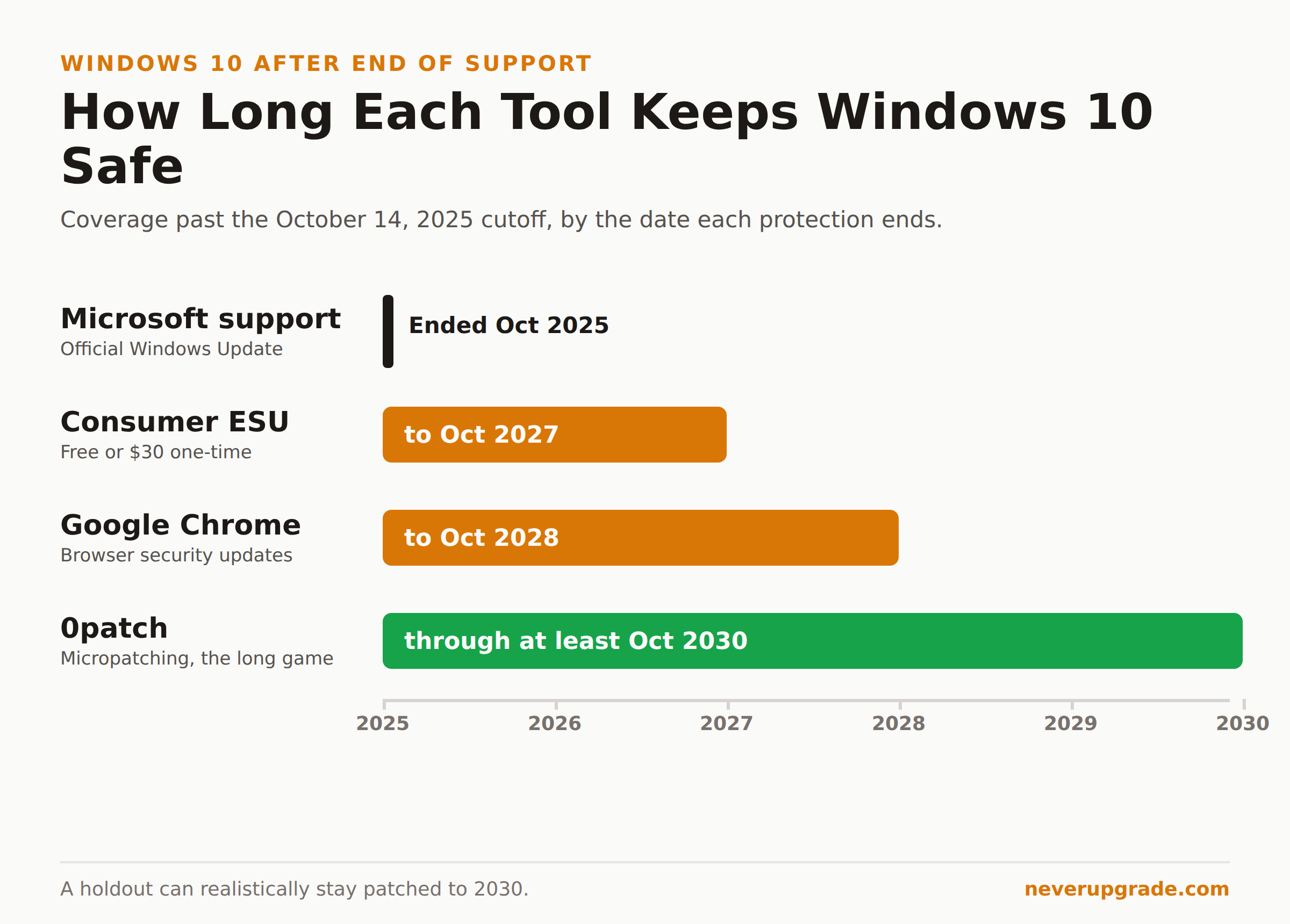
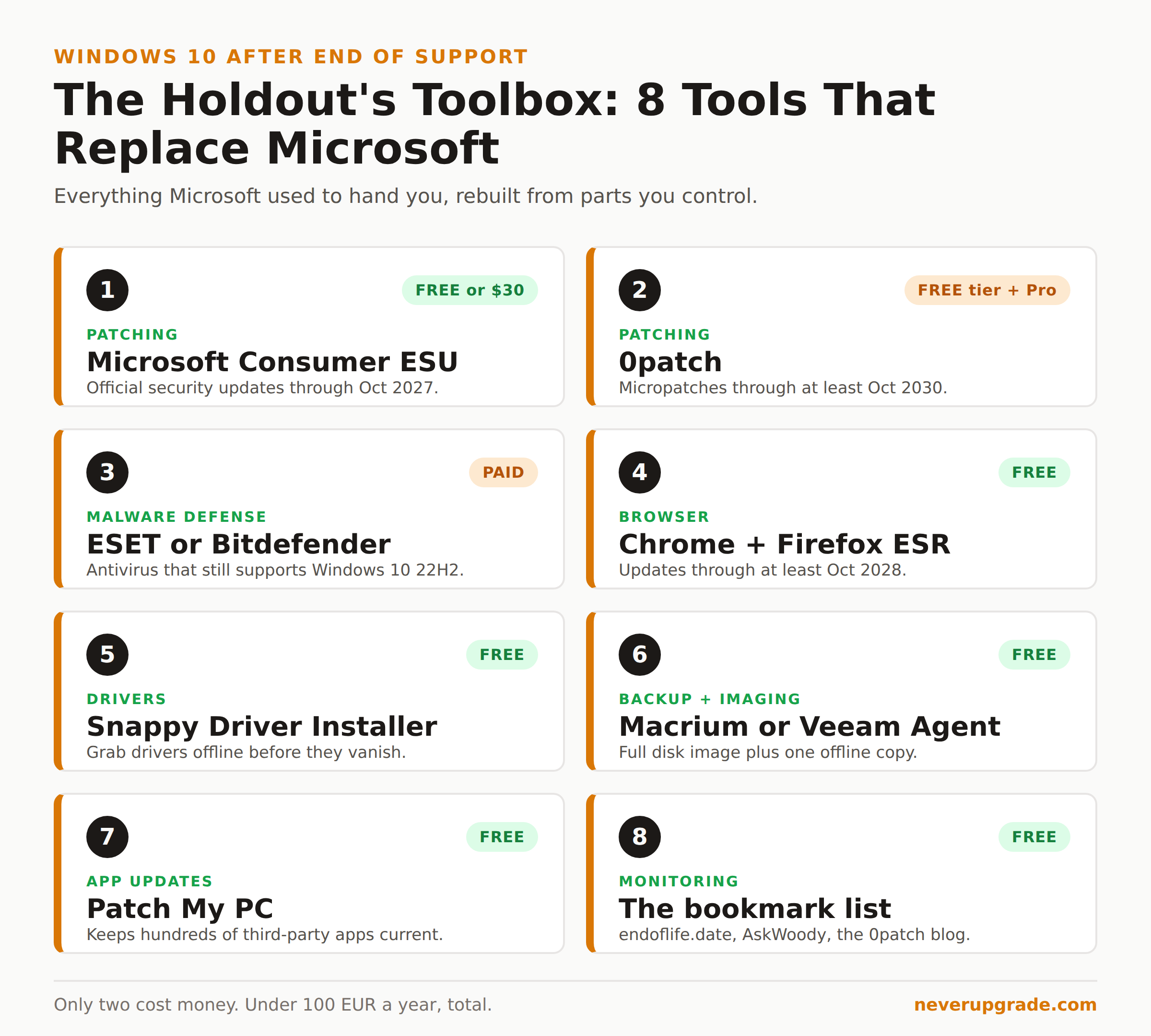
Running Windows 10 after end of support is not the death sentence Microsoft’s nag screens imply. Support officially ended on October 14, 2025, which means no more free patches, no phone support, and a steady drumbeat of “upgrade or else.” But a working Windows 10 machine did not turn into a pumpkin that morning. With the right eight tools, you can replace almost everything Microsoft used to hand you: security patches, a browser that still gets updates, drivers, backups, and an early-warning system for the day a bug actually matters.
Here is the honest part first. Unsupported means the safety net is now yours to build. Skip the backup step and one bad ransomware click ends the story. Do the whole list and a Windows 10 holdout in 2026 is arguably better patched than the average person who upgraded and never thinks about security again.
We run this exact stack on our own shop machines. Here is what is on it, and why.
Tools 1 and 2: How to patch Windows 10 after end of support
Two tools cover the patching gap Microsoft left at Windows 10 end of life support. Use both if you can, because they fix different things.
Microsoft Consumer ESU is the official lifeline, and it is cheaper than most people think. Microsoft quietly extended the consumer Extended Security Updates program through October 12, 2027. You can enroll three ways: turn on Windows Backup to sync your PC settings (free), redeem 1,000 Microsoft Rewards points (free), or pay a one-time $30 for a license that covers up to 10 devices on one Microsoft account. The catch: you need Windows 10 version 22H2 and a Microsoft account, not a local one. If you have not enrolled yet, start here. We wrote a full walkthrough in our Windows 10 ESU enrollment guide.
0patch is the tool that takes you past 2027. It delivers tiny in-memory security fixes (“micropatches”) for known vulnerabilities without touching the actual Windows files, and it applies them silently while the app is running. The company has publicly committed to patching Windows 10 version 22H2 for at least five years past Microsoft’s cutoff, meaning coverage through at least October 2030. There is a free tier for a limited set of critical fixes and a Pro plan (roughly 25 EUR per computer per year) for the full catalog. It is the single best insurance policy a holdout can buy. Our 0patch review digs into exactly what it does and does not cover.
Run ESU and 0patch together and you have overlapping coverage from two independent sources. That is not paranoia. That is redundancy.
Tool 3: An antivirus that still supports Windows 10
Your OS stopped getting patches. Your antivirus should not. The good news: security vendors move slower than Microsoft, and most have committed to Windows 10 well into the future because tens of millions of machines are still on it.
As of mid-2026, Bitdefender, ESET, and Malwarebytes all still ship and update their Windows 10 products. ESET in particular has a long history of supporting old Windows versions years after Microsoft walks away. Whatever you pick, verify one thing on the vendor’s system-requirements page before you pay: that Windows 10 22H2 is still listed. Drop the product the moment it is not.
Do not lean on Microsoft Defender alone here. Defender still gets definition updates on Windows 10 for now, but its engine improvements are tied to the OS Microsoft is actively developing, and that is no longer yours.
Tool 4: Browser lifelines (Chrome and Firefox)
Your browser is the single most attacked piece of software on the machine, so this one is not optional.
Google has said Chrome will keep receiving updates on Windows 10 until at least October 2028. That is a hard, published date, and it buys you years. Keep Chrome and let it auto-update.
For a second option that does not depend on Google’s calendar, install Firefox ESR (Extended Support Release). Mozilla has committed to supporting Firefox on Windows 10 for the foreseeable future, and the ESR channel is built for exactly this kind of “stable platform that cannot change” situation. We keep Chrome for compatibility and Firefox ESR as the daily driver.
One rule: whichever browser you use, never turn off its automatic updates. The browser is doing the job the OS no longer does.
Tool 5: Driver archives, before they vanish
This is the tool nobody thinks about until a reinstall goes sideways. Hardware makers eventually pull Windows 10 drivers from their sites, and when your network card or GPU driver disappears, a clean install turns into a bad afternoon.
Fix it now, while the files still exist. Go to your motherboard, GPU, and peripheral makers’ support pages, download the current Windows 10 drivers, and save them to the same external drive as your backups. For older or orphaned hardware, Snappy Driver Installer Origin is a free, open-source tool that bundles enormous driver packs you can keep offline. Grab the drivers you need today so a 2029 reinstall does not depend on a website that no longer hosts them.
Tool 6: Backup and disk imaging (the one you cannot skip)
Every how-to on this site opens with “back up first,” and this list is where you build that habit into infrastructure. On unsupported software, a good backup is the difference between a bad hour and a lost business.
You want two kinds:
- A full disk image so you can restore the entire machine, OS and all, after a failed patch or a dead drive. Macrium Reflect and the free Veeam Agent for Microsoft Windows both do this well. An image taken today is also your rollback if an ESU or 0patch update ever misbehaves.
- A file-level backup of your actual documents to a separate drive or cloud, updated automatically.
Keep at least one copy offline and unplugged. Ransomware cannot encrypt a drive that is sitting in a drawer. Test a restore once so you know it works before you need it.
Tool 7: A third-party app updater
Windows Update covered the OS. It never covered the pile of other software that is now the softest target on your machine: PDF readers, media players, Java, old runtimes. Those get exploited constantly.
Patch My PC Home Updater is free and keeps hundreds of common apps current in one click. Ninite does the same for a curated set. Run one of them weekly. Keeping your third-party software patched closes far more real-world attack paths than fretting over the OS itself.
Tool 8: The bookmark list every holdout needs
Your last tool is not software. It is a monitoring habit, so you hear about the one bug that actually threatens you instead of the hundred that do not.
Bookmark these and check them monthly:
- endoflife.date for exact support timelines on Windows, Office, and nearly everything else you run.
- AskWoody for plain-English warnings about which patches are safe and which are breaking things.
- The 0patch blog for news on newly discovered Windows 10 vulnerabilities and whether a micropatch shipped.
That is the early-warning radar. It costs nothing and turns “I hope nothing bad is happening” into “I would know if it were.”
Put it together
Eight tools, and only two cost money: 0patch Pro and an antivirus subscription, together under 100 EUR a year. That is the real price of staying on Windows 10 safely, and it is a fraction of a new PC. The trap is not the cost. The trap is doing three of the eight, feeling covered, and skipping the backup. Do the whole list or do not bother pretending you are protected.
If you want the honest version of whether this is even worth it for your situation, we laid out the tradeoffs in can you keep using Windows 10 after end of support.
FAQ
Is it safe to use Windows 10 after end of support?
It is safe enough for most people if you replace the protections Microsoft removed: patch with ESU and 0patch, run an antivirus that still supports Windows 10, keep your browser auto-updating, and back up to an offline drive. It is not safe if you do none of that. The risk is real but manageable, and the mitigation is a weekend of setup.
Does 0patch really keep Windows 10 secure?
0patch does not replace every Microsoft patch, but it covers the vulnerabilities that matter most: the ones attackers actually exploit. It applies fixes in memory without modifying Windows files, and the company has committed to Windows 10 through at least October 2030. Treat it as your primary post-2027 patch source, layered on top of an antivirus, not as a total substitute for good security habits.
How long can I keep Windows 10 with these tools?
Realistically through at least 2030. Consumer ESU runs to October 2027, 0patch has committed to at least October 2030, Chrome updates through at least October 2028, and antivirus vendors will likely follow the same curve. The limiting factor will not be security patches. It will be the day a critical app you depend on drops Windows 10 support, and that is what the bookmark list is for.