0patch can keep an end-of-life Windows 10 machine patched against real-world exploits without paying Microsoft, and it does it without reboots. It is not a full replacement for Windows Update, and it never will be. For most holdouts running Windows 10 22H2, the honest answer is that 0patch plus a supported browser is a legitimate way to stay online safely past October 2025, as long as you understand exactly what it does and does not cover.
We have run the 0patch Agent on production machines that we refuse to retire. This is what actually holds up.
What 0patch is and how micropatches work
0patch is a security service from a Slovenian company called ACROS Security. Instead of shipping a full patch that rewrites files on disk, it delivers tiny fixes called micropatches straight into the memory of running processes.
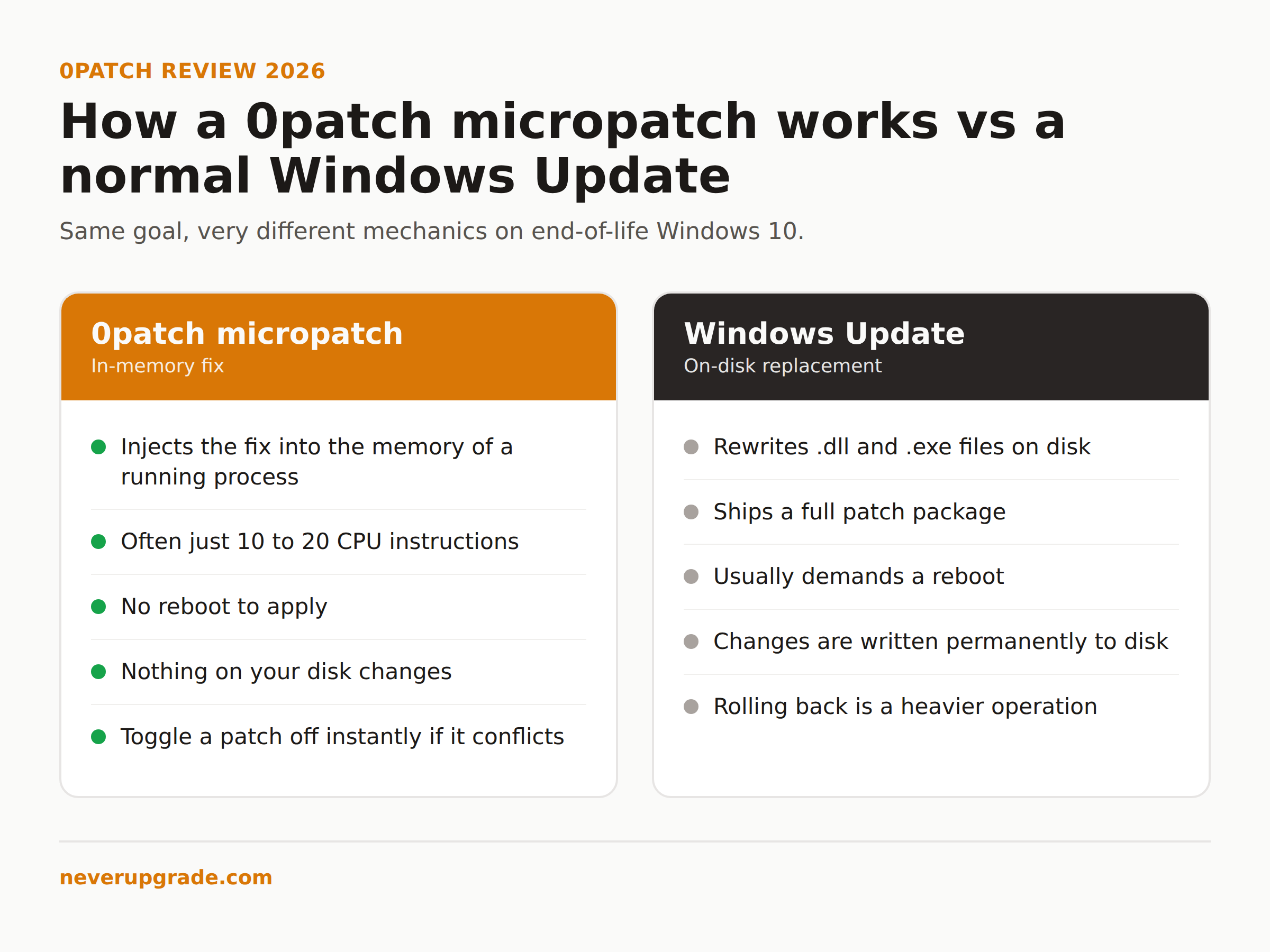
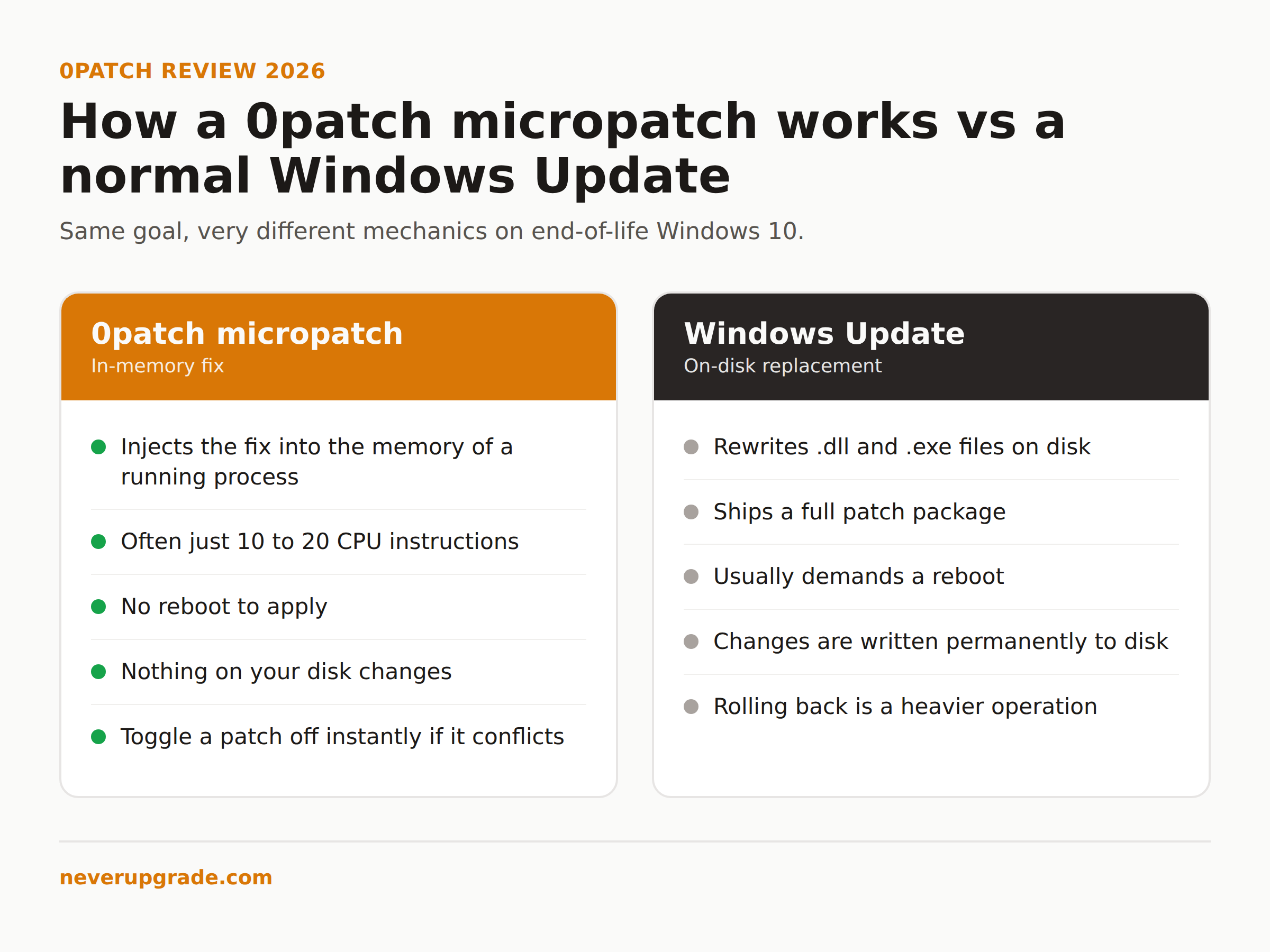
Here is the mechanical difference that matters. A normal Windows update replaces .dll and .exe files, then usually demands a reboot. A 0patch micropatch is often 10 to 20 CPU instructions that get injected into a process while it runs. Nothing on your disk changes. No reboot. If a patch ever misbehaves, you toggle it off and the process returns to its original code instantly.
That design has a real consequence for people who keep old systems running: patching stops being a scheduled outage. On a legacy line-of-business box that nobody is allowed to reboot during business hours, that alone can be worth the license.
The catch is that ACROS has to write each micropatch by hand. You are not getting every fix Microsoft would have shipped. You are getting the specific vulnerabilities ACROS decided are worth patching, usually the ones being exploited in the wild or trivially exploitable.
What 0patch covers on EOL Windows 10 (and what it never will)
Here is where 0patch Windows 10 coverage gets specific. ACROS publicly committed to providing post-end-of-support micropatches for Windows 10 version 22H2 for at least five years after Microsoft’s cutoff. Windows 10 hit end of support on October 14, 2025, so that commitment runs through roughly October 2030, and ACROS has said it will extend further if demand holds up. That is five years of a moving target that Microsoft walked away from.
What you get:
- Micropatches for critical Windows vulnerabilities that are actively exploited or high risk, delivered usually within days of public disclosure.
- Fixes for some vulnerabilities Microsoft chose not to patch at all, including a few “0day” cases where 0patch shipped before the vendor did.
- Coverage that works whether or not you ever enrolled in Microsoft’s Extended Security Updates.
What you will never get from 0patch:
- Feature or quality updates. Your Windows 10 stays frozen at 22H2 forever. That is usually the point, but say it out loud.
- A patch for every CVE. If ACROS has not written a micropatch for a given flaw, you are exposed to that flaw. They triage; they do not mirror Patch Tuesday one for one.
- Browser security. 0patch does not maintain your browser. Run a browser that still gets its own updates, because that is where most drive-by attacks land. This is the single most common mistake we see people make with 0patch: they patch the OS and keep running an ancient browser.
- Antivirus, firewall, or driver-level protection. 0patch is a patching layer, not a security suite. It sits alongside your existing defenses.
Treat 0patch as a way to close the OS-level exploit window on a system Microsoft abandoned. It is not a magic “supported forever” button.
0patch pricing vs Microsoft ESU
This is where the decision usually gets made, so here are real numbers.
0patch pricing (per computer, per year, plus tax):
- Free: covers a limited set of 0day patches, non-commercial use only, up to 10 computers. Not the post-EOL Windows 10 coverage most readers want.
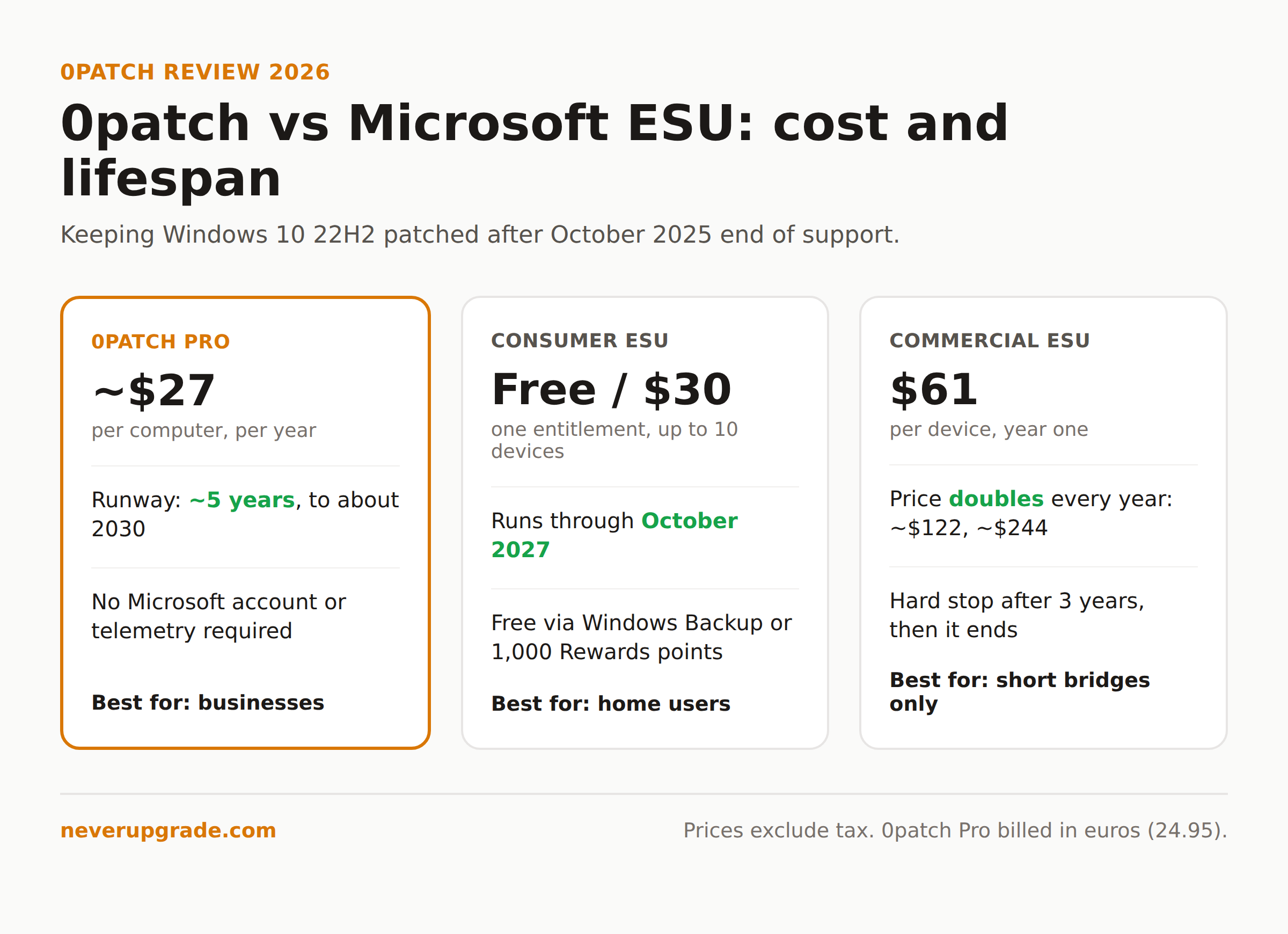
- Pro: 24.95 euros, roughly 27 US dollars. All security patches, standard support, central monitoring.
- Enterprise: 34.95 euros. Adds group policies, silent deployment, and role-based management. Volume discounts kick in at 20 licenses.
Microsoft Windows 10 ESU:
- Consumer ESU started as a one-year bridge. In June 2026 Microsoft quietly extended it, so free consumer coverage now runs into October 2027. You enroll for free by turning on Windows Backup, or by redeeming 1,000 Microsoft Rewards points, or you pay a one-time 30 US dollars. One entitlement covers up to 10 devices on the same Microsoft account.
- Commercial ESU is a different animal. It starts around 61 US dollars per device in year one and doubles every year after (about 122, then 244), for a maximum of three years. Then it ends. Period.
So the comparison splits cleanly:
If you are a home user with a Microsoft account, consumer ESU is free through October 2027 and you should take it. There is no reason to pay 0patch for a single home PC while Microsoft is handing out the same OS patches at no cost.
If you are a business, the math flips hard. Commercial ESU is expensive, doubles annually, and dies after three years. 0patch is a flat sub-30-dollar-per-seat cost with a five-year runway and no local account or telemetry requirements. For a fleet of legacy machines, 0patch is usually the cheaper and longer-lived option by a wide margin.
0patch setup walkthrough
Setup is genuinely simple, which is rare for anything in this category. Before you start: back up the machine, or at least confirm you have a current image. You are installing a low-level agent that injects code into running processes, and you want a rollback point.
- Create an account at 0patch Central. This is the web console where licenses and patch status live.
- Assign yourself a license. Free tier is automatic; for Pro or Enterprise, buy a license and it appears in your account.
- Download the 0patch Agent installer from your account. It is a small MSI, a few megabytes.
- Run the installer on the Windows 10 machine. It installs a background service and a system tray icon.
- Log in from the Agent using your 0patch Central credentials. The Agent registers the machine to your account.
- Let it sync. Within a minute or two the Agent pulls down every applicable micropatch and applies it in memory. You will see the tray icon report how many patches are active.
That is the whole thing. No reboot to finish, no configuration files to edit. From the console you can see each machine, which patches are applied, and toggle individual patches off if one ever conflicts with your software. In months of running it, we have toggled a patch off exactly once, and re-enabled it after the next Agent update fixed the conflict.
Honest verdict: who should use 0patch and who should just take ESU
0patch does what it claims. The micropatch model is clever, the reboot-free delivery is a real operational win, and the five-year Windows 10 commitment is longer than anything Microsoft is offering businesses. In our testing it has been quiet and reliable, which is the highest compliment you can pay a security agent.
Use 0patch if:
- You run Windows 10 on business machines and commercial ESU pricing is insulting to you.
- You have legacy systems you cannot reboot on Microsoft’s schedule.
- You want to avoid Microsoft account and telemetry requirements on those boxes.
- You are comfortable pairing it with a self-updating browser and existing antivirus.
Just take Microsoft ESU if:
- You are a home user. Consumer ESU is free through October 2027. Do not overthink it.
- You need full quality and feature updates, in which case you do not want to stay on EOL Windows 10 at all.
And the one case where you should actually upgrade: if the machine handles regulated data (health, payment, anything with a compliance auditor attached), micropatching a dead OS will not satisfy the auditor no matter how good the patches are. That is the scenario where the honest answer is to bite the bullet and move to a supported platform.
For everyone else keeping a perfectly good Windows 10 machine alive out of spite and good sense, 0patch is a tool worth owning.
Frequently asked questions
Is 0patch safe to run on a production machine?
Yes, with normal caution. It injects micropatches into memory rather than modifying files, and any patch can be toggled off instantly from the console if it conflicts with your software. Back up before installing, as you would with any low-level agent, and start on one machine before rolling it out to a fleet.
Does 0patch replace Windows Update?
No. 0patch only delivers hand-written micropatches for selected vulnerabilities. It does not ship feature updates, quality rollups, or a fix for every CVE. Think of it as targeted exploit coverage for an OS Microsoft no longer patches, not a full update channel.
Is 0patch better than Microsoft ESU for Windows 10?
It depends on who you are. For home users, Microsoft consumer ESU is free through October 2027, so take that. For businesses, 0patch is usually cheaper and lasts about five years versus three for commercial ESU, which also doubles in price annually. Most 0patch reviews from IT admins reach the same split.