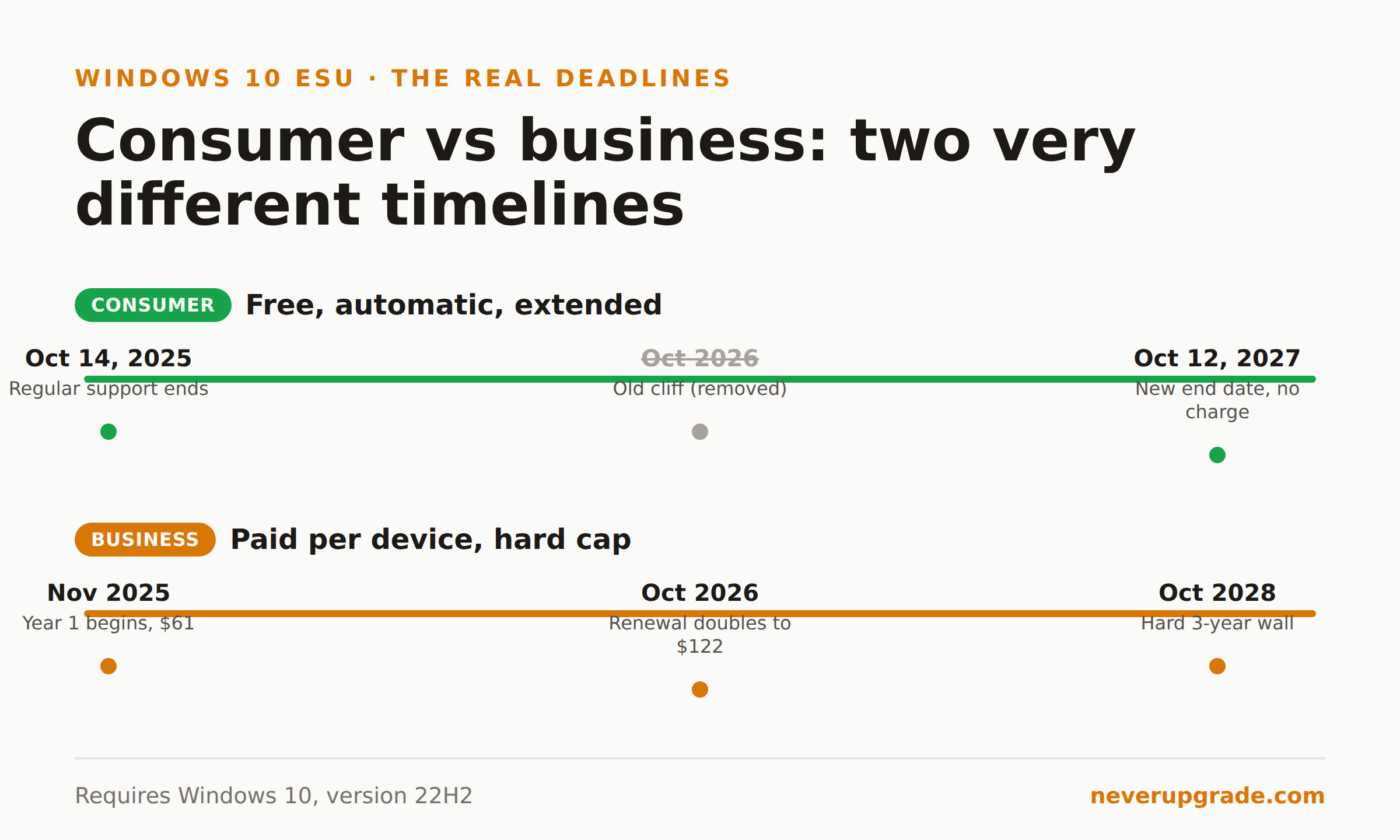
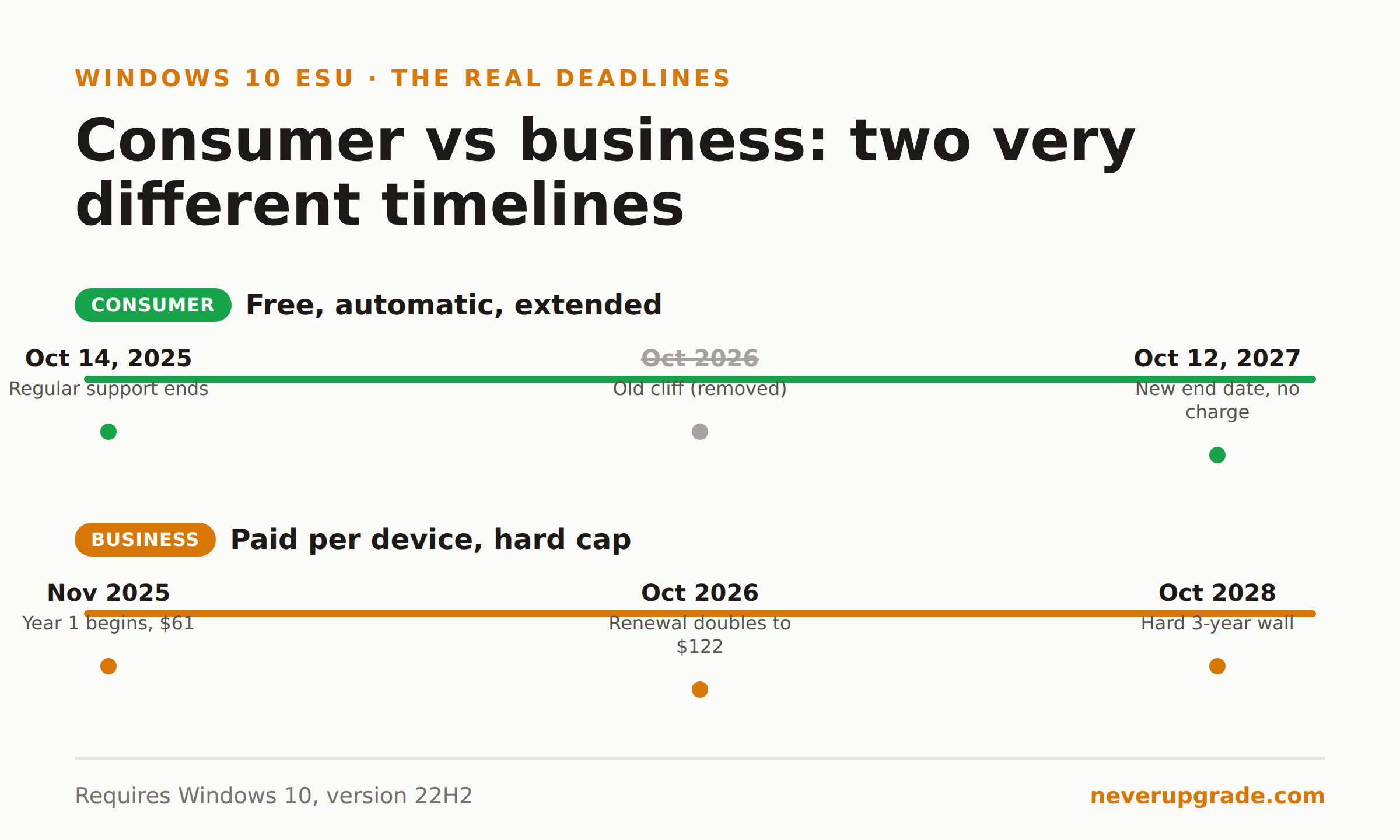
Here is the short version. If your PC is already enrolled in Windows 10 Extended Security Updates (ESU), nothing bad happens to it in October 2026. Microsoft quietly moved the consumer cutoff from October 2026 to October 12, 2027, and enrolled machines roll into that second year automatically. The thing that does change in October 2026 is the price businesses pay: the commercial ESU fee doubles to $122 per device.
That is the whole story in three sentences. The details below are the ones that decide whether you owe Microsoft money next fall, whether you owe them nothing, and how long this reprieve actually lasts.
Windows 10 Extended Security Updates: the 2026 cliff moved to 2027
Regular support for Windows 10 ended on October 14, 2025. After that date Microsoft stopped shipping feature updates, quality updates, and technical support for the OS. ESU was the bridge: enroll, keep getting critical and important security patches, buy yourself time.
Originally that bridge was one year long. Consumer ESU covered enrolled home PCs through roughly October 2026, and everyone circled that date as the next real deadline.
Then Microsoft blinked. Without a splashy announcement, they extended the consumer program a full extra year, to October 12, 2027. That quiet windows 10 end of support extension is the longest reprieve Microsoft has offered a retired desktop OS, and it happened for an obvious reason: not enough people moved to Windows 11. When most of your install base refuses to upgrade, cutting them off from security patches is a bad headline waiting to happen.
So the calendar entry you had for fall 2026 is gone. For an enrolled consumer PC, October 2026 is now a non-event.
Do enrolled machines carry over automatically?
For consumers, yes. Existing enrollees automatically receive the extended coverage through October 2027. There is no re-enrollment step and no second payment. If you used the free enrollment path or paid the one-time $30 last year, that same enrollment now carries you a year further at no extra cost.
Two caveats keep this from being universal:
- You have to actually be enrolled. The extension protects machines already in the program. If you skipped enrollment, October 2026 does nothing for you. You would enroll now and land in the same through-2027 window, but you are exposed for every month you wait. Our step-by-step enrollment walkthrough covers the process and the common failure points.
- You have to be on version 22H2. ESU only installs on Windows 10, version 22H2. If you are on an older build, update to 22H2 first or the updates will not apply.
To confirm you are covered, open Settings, then Update and Security, then Windows Update. Enrolled machines show a line reading that you are enrolled in Extended Security Updates. If it is there, you are set until October 2027. If it is not, you have a gap to close.
Businesses are a different animal, and that is where the October 2026 change actually bites.
Business ESU pricing doubles: the year-two math
Commercial ESU is a separate, paid, per-device subscription bought through Microsoft Volume Licensing. It has nothing to do with the free consumer path, and its pricing is designed to make you feel the passage of time.
Here is the schedule:
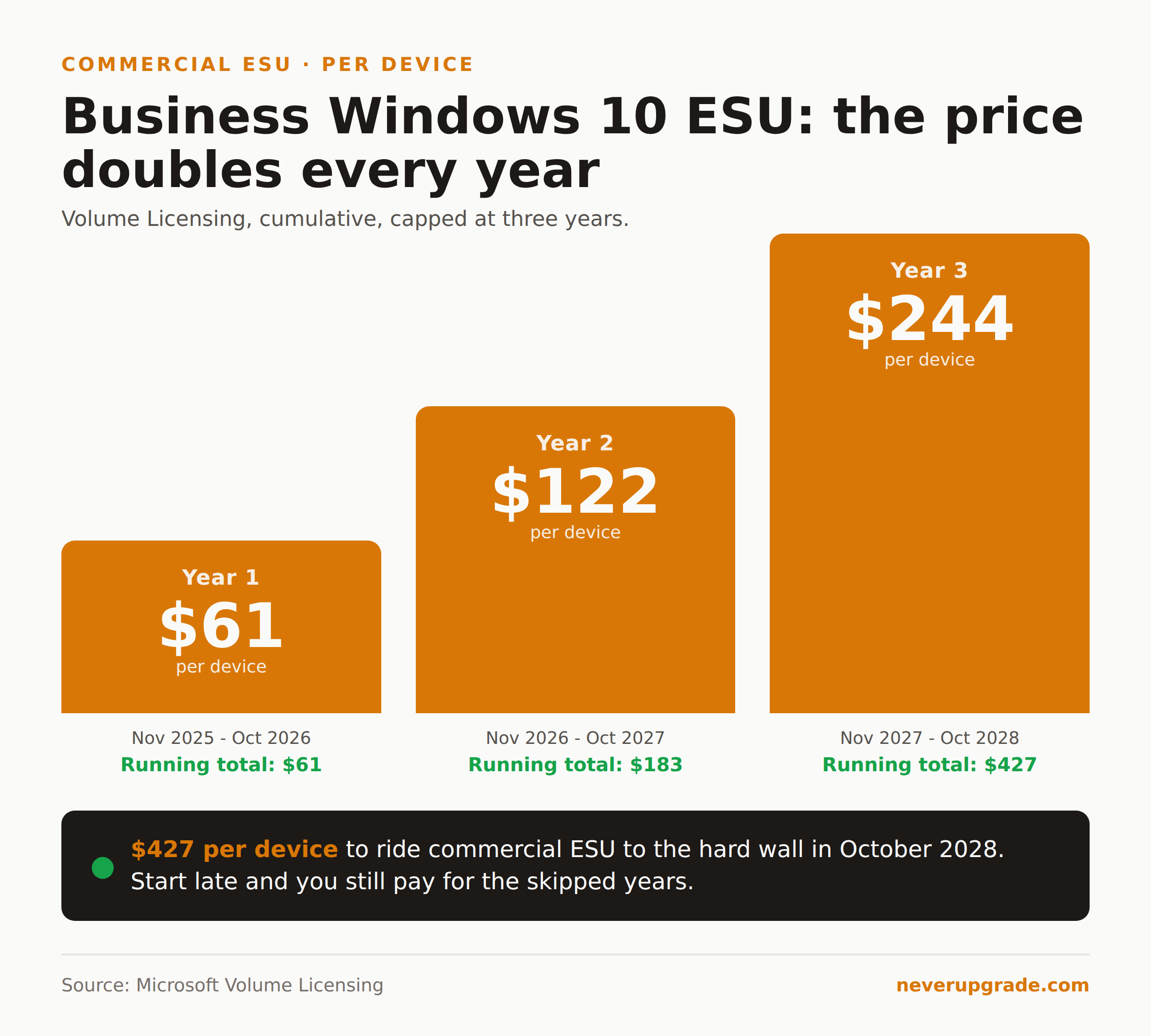
| Year | Coverage window | Price per device | Cumulative cost |
|---|---|---|---|
| Year 1 | Nov 2025 to Oct 2026 | $61 | $61 |
| Year 2 | Nov 2026 to Oct 2027 | $122 | $183 |
| Year 3 | Nov 2027 to Oct 2028 | $244 | $427 |
The price doubles every consecutive year, for a maximum of three years. Year one is $61 per device, year two is $122, year three is $244. That is $427 per device to ride commercial ESU all the way to the October 2028 wall.
One rule trips people up: the program is cumulative. If you skipped year one and want to start in year two, you still pay for year one too. There are no partial periods and no six-month options. Start late and you pay $61 plus $122 to get current.
So for a business, the thing that changes in October 2026 is simple and unpleasant: your renewal invoice doubles.
There is one legitimate way to pay nothing. Windows 10 virtual machines running on Windows 365, Azure Virtual Desktop, or Azure VMs get ESU at no additional cost, and physical endpoints connecting to a Windows 365 Cloud PC are entitled to ESU for up to three years with an active subscription. If you already have a cloud footprint, do that math before you cut a purchase order for on-premises licenses. Note that commercial ESU includes no technical support beyond activation issues, so this is patches only, not a safety net.
Signals to watch for a year-three extension
Microsoft already extended the consumer program once. Will they do it again past October 2027? My read: possible, but do not build a plan on it.
Here is what I would actually watch:
- Windows 10 market share. The first extension happened because too many machines stayed put. If Windows 10 is still running on a large slice of PCs in mid-2027, the pressure to extend again is real.
- The Windows 11 hardware wall. A lot of holdouts are not stubborn, they are stuck on hardware that fails the Windows 11 CPU and TPM requirements. As long as that wall stands, Microsoft keeps generating its own holdout problem.
- How they framed the free tier. The free consumer path was tied to a Microsoft account and settings backup. Any future extension will probably come with a similar string attached. Watch for the account requirement, not just the date.
Commercial customers get no such suspense. The three-year maximum is contractual, so business ESU ends in October 2028, full stop. There is no signal to watch there, only a ceiling to plan around. This is the practical edge of Windows 10 end of life extended support: consumers get a soft, possibly-renewable deadline, businesses get a hard one.
Your decision timeline
Skip the anxiety and do these in order.
Right now, whoever you are: Confirm you are on 22H2. Confirm your Windows 10 Extended Security Updates enrollment status in Windows Update. And before you touch anything, back up. A full image plus a copy of anything irreplaceable is cheap insurance on an OS you have decided to keep running past its expiration date.
Consumers: If you are enrolled, do nothing in October 2026. You are covered through October 2027. If you are not enrolled, enroll now, ideally through the free path so you are not out anything. If you want the money side spelled out, our breakdown of ESU cost and the ways to pay nothing lays out all three options.
Businesses: Budget for the doubled year-two renewal now, not in the fourth quarter when the invoice surprises your CFO. Evaluate whether any of those machines can move to a Windows 365 or Azure path that carries ESU for free. And start a real migration plan, because year three is $244 per device and the October 2028 wall does not move.
The honest counterpoint, since we promised you honesty: if a machine is Windows 11 eligible and nothing is holding you on Windows 10 except habit, three years of ESU costs more in money and attention than just upgrading. Staying put is the right call when you have a real reason, a legacy app, unsupported hardware you are not ready to replace, a workflow that breaks on Windows 11. It is the wrong call when the only reason is inertia.
Frequently asked questions
Is the Windows 10 ESU second year free for consumers?
Yes. Consumers already enrolled in Windows 10 ESU automatically receive coverage through October 12, 2027 at no additional charge. There is no re-enrollment and no second payment. You only pay again if you never enrolled and are starting fresh, and even then the free consumer path costs nothing.
What happens to my Windows 10 PC in October 2026?
If it is enrolled in ESU and running version 22H2, nothing changes. Security updates continue through October 2027. If it is not enrolled, it has been missing critical patches since October 2025, and October 2026 does not fix that. Enroll to close the gap.
How much does business Windows 10 ESU cost in year two?
Commercial ESU is $122 per device in year two, double the $61 year-one price. It doubles again to $244 in year three, for a three-year total of $427 per device. The program is cumulative, so starting late still requires paying for the earlier years.
The bottom line
The October 2026 deadline you were bracing for mostly evaporated. Enrolled consumer PCs coast to October 2027 for free and automatically. Businesses keep their coverage too, but pay double to do it, and still face a hard 2028 wall. Figure out which bucket you are in, confirm your enrollment, and back up before you do anything else.