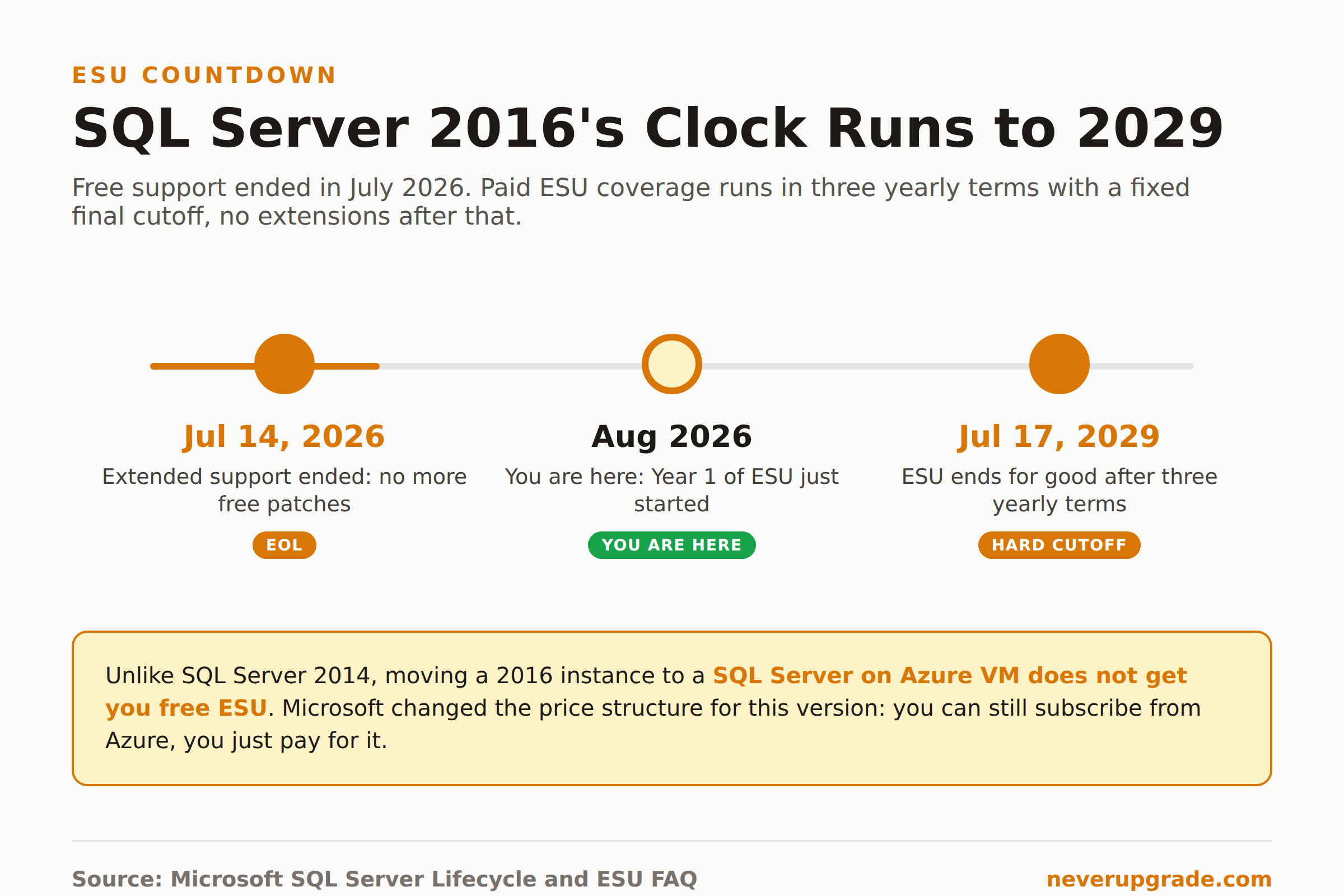
Microsoft SQL Server 2016 end of life landed on July 14, 2026, the date extended support ran out. Microsoft stopped shipping free security patches and closed the support line for it that day, and if you’re reading this after the fact, nothing broke on your server overnight, but every unpatched instance is now exposed to any Critical vulnerability that surfaces from here on. You have two honest paths: pay for Extended Security Updates through July 2029, or migrate off it. Here’s what actually changed, what ESU costs, and the one assumption from the 2014 end-of-life cycle that no longer holds.
What actually stopped on July 14, 2026
Let’s be specific, because “end of support” gets used loosely. As of that date, Microsoft no longer:
- Ships security patches for newly discovered vulnerabilities, even Critical ones
- Provides any bug fixes or functional updates
- Accepts support tickets for the product, ESU or not, outside of issues with an ESU patch itself
That last point catches people off guard every cycle. If you’re paying for a Premier or Unified support contract, it doesn’t matter. SQL Server 2016 itself is off the table for a support case unless the issue is specifically about an ESU update you’ve installed.
If you’re still running SQL Server 2012 or earlier alongside your 2016 instances, know that those get nothing at all: no ESU, no Azure exception, no path forward except upgrading. Handle those first; they’re the more urgent fire.
ESU pricing, and the Azure loophole that no longer works
If you were around for the SQL Server 2014 end-of-life cycle, you probably remember the trick: move the instance to a SQL Server on Azure VM and get ESU coverage for free, no Software Assurance required. It was a genuinely good deal, and a lot of admins are assuming the same play works for 2016.
It doesn’t. Microsoft changed the ESU price structure specifically for SQL Server 2016, and the change is explicit: migrating a 2016 workload to an Azure VM no longer gets you free ESUs. You can still subscribe once you’re there, registered through the SQL IaaS Agent extension, but you’re billed for it like everyone else. The same applies to Azure Stack: free ESU for 2014 instances, purchasable ESU for 2016. If a vendor or a blog post tells you “just move it to Azure and ESU is free,” they’re describing 2014’s deal, not yours.
Here’s what ESU for SQL Server 2016 actually looks like:
What you get. Security updates rated Critical by the Microsoft Security Response Center, for up to three years past end of support, split into three yearly terms running through July 17, 2029. No feature updates, no general bug fixes, and technical support limited strictly to problems with an ESU patch itself.
Who’s eligible. Enterprise and Standard editions only, x86 or x64. Express, Web, and Developer editions can’t subscribe on their own; Developer edition gets a pass only if it’s paired with a production instance that already has ESU.
How it’s billed. Per virtual core with a 4-core minimum per VM, or per physical core if you’re licensing the whole host. There’s also an unlimited-virtualization option through Azure Arc, billed by host p-cores with a 16-core minimum, if that works out cheaper than counting v-cores across a pile of VMs. Billing for the 2016 ESU term starts at midnight UTC on July 15, 2026 regardless of when you actually subscribe; subscribe late and you get a one-time bill-back charge to the start of the term.
No Software Assurance? You’re not locked out. On-premises ESU purchases require active Software Assurance under an EA, EAS, SCE, or EES agreement. If you don’t have it, your remaining path is to connect the instance to Azure Arc (or move it to an Azure VM) and subscribe pay-as-you-go under a “license included” model. It costs more than the Software Assurance route, but it’s a real option, not a dead end.
On raw dollars, Microsoft doesn’t publish a public price sheet; you’ll need a quote from your Microsoft rep or reseller. As a rough sense of scale, migration consultancy SourceFuse estimates ESU list pricing runs around 75 percent of a full license cost annually, putting a 20-core Enterprise estate somewhere in the tens of thousands of dollars per year. Treat that as a planning number, not a quote, and get real pricing before you budget against it.
Upgrade targets: SQL Server 2019, 2022, or Azure SQL Managed Instance
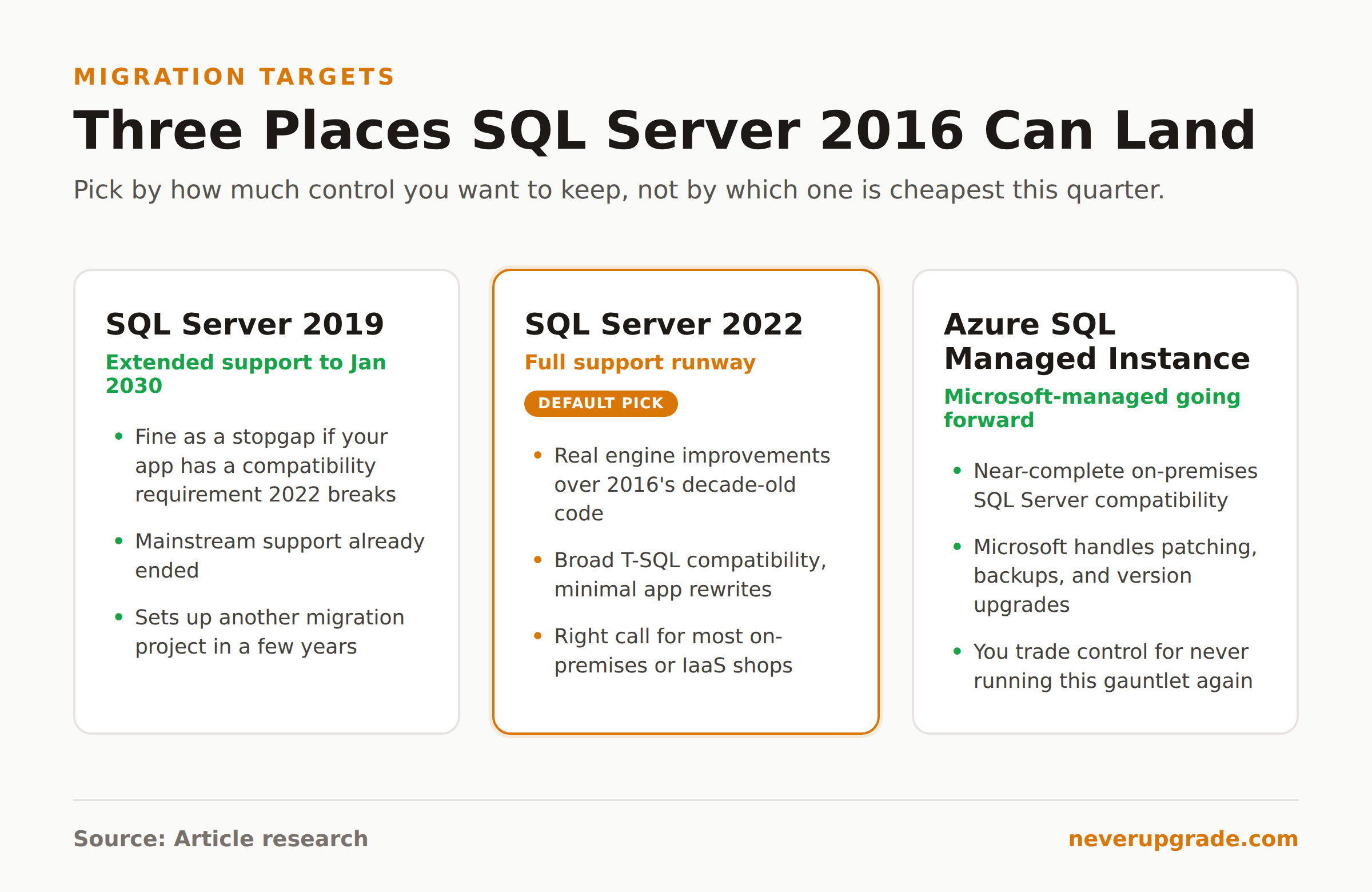
If you’re migrating instead of buying time, you’ve got three realistic landing spots.
SQL Server 2019. Mainstream support has already ended, and it’s on extended support until January 2030. It’s a fine stopgap if some dependency forces you to stay a version or two back, but you’re scheduling another migration project in a few years either way. Only pick this if you have a concrete compatibility reason.
SQL Server 2022. The default answer for most on-premises or IaaS shops. A full support runway, real engine improvements over 2016’s decade-old code, and broad T-SQL compatibility that keeps most application code untouched. Most 2016 holdouts should land here.
Azure SQL Managed Instance. Near-complete compatibility with on-premises SQL Server, but Microsoft handles patching, backups, and version upgrades from here forward. You give up some low-level control in exchange for never running this same end-of-life gauntlet again. If your reason for staying on 2016 this long was “we don’t have bandwidth for constant upgrade cycles,” Managed Instance actually delivers that, just from the cloud instead of avoiding it.
Check your database’s compatibility level before you commit to a target. SQL Server 2016 runs at compatibility level 130. Restore into 2019 or 2022 and leave that level alone at first; step it up gradually once you’ve tested, rather than jumping straight to the new engine’s native level and hoping nothing in your query plans shifts.
Where SQL Server 2017 end of life fits into your timeline
If part of your estate is on SQL Server 2017 instead, you’re not off the hook, you’ve just got more runway. SQL Server 2017 end of life lands on October 13, 2027, about fourteen months from now. It’s tempting to treat that as “later,” but a fourteen-month clock disappears fast once you factor in testing, a maintenance window, and whatever staffing gap always shows up mid-project. If you’re already touching a 2016 instance and a 2017 instance sits on the same hardware refresh cycle, plan them together. Doing two migrations as one project is consistently cheaper than doing them six months apart.
If you can’t migrate yet: isolating a 2016 instance
Sometimes the honest answer is “not this quarter.” If that’s you, ESU is the compliant path, but if budget won’t stretch to it either, here’s how to reduce exposure on an unpatched instance without pretending the risk isn’t real.
- Cut network access to the minimum. Put the instance on its own VLAN or security group, and allow inbound connections only from the specific application servers that need it. No direct internet exposure, ever, and no broad subnet-level access “just in case.”
- Lock down accounts. Audit every login with access, remove anything unused, and enforce least privilege on service accounts. A stale sysadmin-role account is the easiest way an old vulnerability turns into a real breach.
- Patch everything around it. The OS, the backup agent, any monitoring tools, the app tier talking to it. You can’t patch SQL Server 2016 without ESU, but an unpatched surrounding stack multiplies your actual attack surface.
- Monitor for anomalies, not just uptime. Watch for unusual query patterns, new logins, or spikes in failed auth attempts. You’ve lost vendor patches, not visibility.
- Document the compensating controls. If you’re under PCI-DSS, HIPAA, or SOC 2, an unsupported database fails the audit outright unless you can show documented, active mitigations. Write it down before the auditor asks, not after.
- Test your backups on a real schedule, not just take them. A backup you haven’t restored is a rumor, not a backup, and it’s the only thing standing between you and a very bad week if something does go wrong.
None of this replaces actual patches. It buys time, and time is the entire point if migration genuinely can’t happen this quarter.
We’ve covered the OS side of this same problem in Windows Server 2016 Extended Security Updates, which is worth reading if your SQL Server 2016 instance is sitting on Windows Server 2016 hardware too, since you’re running two end-of-support clocks at once. And if you went through this exact decision for an older SQL release already, SQL Server 2014 End of Life covers the version where the free-Azure-ESU trick actually did apply, for comparison.
FAQ
Is SQL Server 2016 still supported in 2026?
No, not by default. Extended support ended July 14, 2026. The only way to keep getting security patches now is an ESU subscription, available in yearly terms through July 17, 2029, or migrating to a supported version.
Does moving SQL Server 2016 to Azure get me free ESU, like it did for SQL Server 2014?
No. Microsoft explicitly changed the ESU price structure for SQL Server 2016. You can still subscribe to ESU on an Azure VM or through Azure Arc, but you pay for it. The free-in-Azure deal only applies to SQL Server 2014.
Can I upgrade SQL Server 2016 directly to SQL Server 2022?
Yes, both in-place and side-by-side upgrades from 2016 to 2022 are supported. Run the Data Migration Assistant first to catch breaking changes, restore at compatibility level 130 initially, and step it up gradually once you’ve tested rather than jumping straight to 160.
Whichever path you pick, the date that actually matters is July 17, 2029. That’s when ESU coverage for SQL Server 2016 ends completely, and there’s no further extension coming after it.