Yes, but the window is closing fast. Extended Security Updates for Windows Server 2012 and 2012 R2 end on October 13, 2026. That is the last day Microsoft ships patches under any program, paid or free. After that, you have exactly three options: keep paying (indirectly, by moving the workload to Azure), pay a third party like 0patch to micropatch the box, or lock it down so hard it does not need patches at all. This guide walks each one, with real numbers and the honest tradeoffs.
The ESU timeline: where we actually are right now
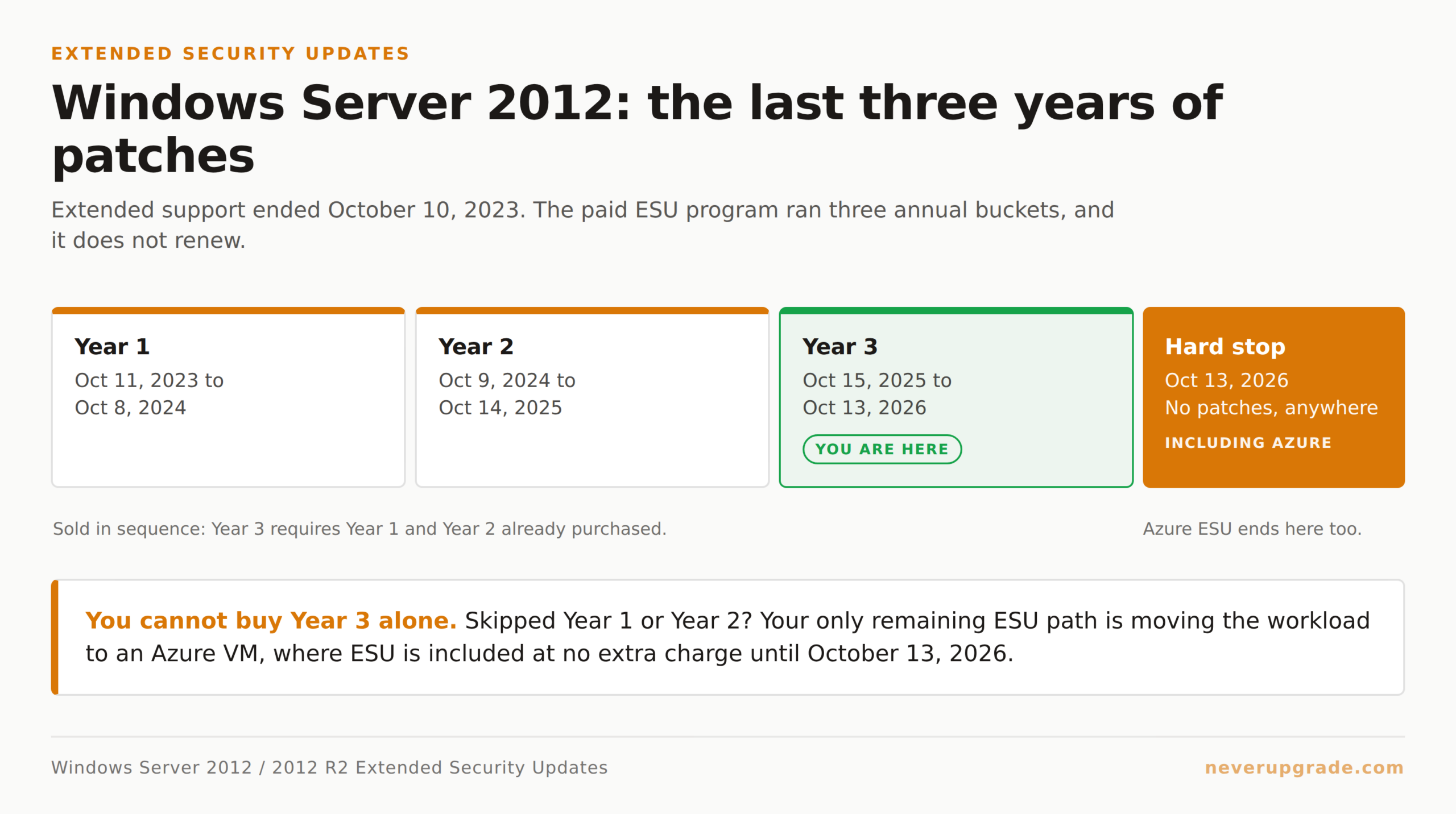
Windows Server 2012 and 2012 R2 hit end of extended support on October 10, 2023. The three-year ESU program that followed splits into three annual buckets:
- Year 1: October 11, 2023 to October 8, 2024
- Year 2: October 9, 2024 to October 14, 2025
- Year 3: October 15, 2025 to October 13, 2026
We are currently deep into Year 3. If you have not bought ESU by now, you cannot buy Year 3 alone. Microsoft’s rule is that Year 3 requires you to have already purchased Year 1 and Year 2 (Northwestern University’s IT KB spells this out explicitly for anyone hoping to jump in late). No cumulative back-purchase, no exceptions. If you skipped Year 1 or Year 2, your on-premises box has been running unpatched for months and your only remaining ESU path is Azure.
Source: Microsoft Learn’s Extended Security Updates for Windows Server overview confirms the October 13, 2026 hard stop.
The Azure loophole: free ESU, but you pay for the VM
Here is the part Microsoft’s marketing team likes and their sales team likes even more. If you lift-and-shift the server into an Azure Virtual Machine, ESU is free. No key, no separate SKU, no annual renewal. The updates just show up.
Same story for Azure Stack HCI, Azure Local, and hosted deployments running Azure Arc.
The catch is the VM itself is not free. A modest Server 2012 workload on Azure runs a few hundred dollars a month once you include storage, networking, and (crucially) the compute hours. For a small business paying $0 today to run a paid-off Dell PowerEdge in the closet, the migration is not a cost saver. It is a way to keep patched without abandoning the app.
When Azure makes sense:
– The workload already needs to move to the cloud for other reasons (disaster recovery, remote access, dying hardware).
– You have Azure Hybrid Benefit eligibility on existing Windows Server + SQL Server licenses, which knocks 40 to 55 percent off the VM cost.
– The application talks to Microsoft 365 anyway, so the latency and identity story is already there.
When Azure does not make sense:
– The workload is a chatty file server or line-of-business app used by 5 people in one office. You will pay more in Azure than the box costs to run, forever.
– The vendor of the software running on it has already died or refuses to certify Azure.
What Year 3 ESU actually costs on-premises
Microsoft’s official list price for Server 2012 ESU is per physical core, per year, with a 16-core minimum per Standard license and higher tiers for Datacenter. In practice most small shops buy through a Cloud Solution Provider (CSP) rather than direct.
Resellers that publish public pricing give you the shape of it. TrustedTech, one of the CSPs listed on the current SERP, sells a Standard 2-core ESU bundle for around $125 for Year 1. That was Year 1. ESU pricing traditionally doubles each year: Year 2 is roughly 2x Year 1, and Year 3 is roughly 2x Year 2. So a small Standard server that cost $500 to license for Year 1 costs closer to $2,000 for Year 3 alone.
A rough per-server budget in Year 3, on-premises, for a typical 8-core Standard install: $1,500 to $2,500 for the year. Datacenter is roughly 4x that.
And you get exactly three months of coverage for that price if you buy today. Year 3 ends October 13, 2026.
The math almost never works this late. We have not recommended a Year 3-only ESU purchase to a client all year.
Third-party patching: 0patch and the micropatch model
This is the option most sysadmins do not know about, and it is by far the most interesting one for a small business.
0patch, run by ACROS Security in Slovenia, releases in-memory micropatches for critical vulnerabilities on end-of-life Windows systems. They already patch Windows 7, Windows Server 2008 R2, and Windows Server 2012 R2 post-EOS. Public pricing on their site:
- Free: up to 10 machines, non-commercial only
- Pro: €24.95 per computer per year
- Enterprise: €34.95 per computer per year (roughly $38 USD at current rates)
That is not per core. It is per computer. A single 16-core Server 2012 R2 box costs €34.95 per year to keep receiving patches, versus $2,000+ for the equivalent Microsoft ESU Year 3.
The tradeoffs, being honest:
- 0patch does not patch everything. They pick the vulnerabilities that are actually being exploited or are trivially exploitable, and they skip the theoretical ones. This is closer to what a good pentester would prioritize than to Microsoft’s Patch Tuesday firehose.
- Patches are applied in-memory, so nothing gets written to disk and nothing gets modified in the OS itself. Uninstalling is instant (stop the agent).
- Compliance auditors sometimes do not know what to make of it. If you are under PCI, HIPAA, SOC 2, or similar, budget a conversation with your auditor before you assume 0patch counts.
- They have committed to Server 2012 R2 patches after ESU ends, but they publish no fixed end date. Their track record suggests coverage will run as long as customers pay for it.
For a small business running a legacy accounting server that will never touch cardholder data or PHI, 0patch is the sensible answer once Microsoft ESU ends in October 2026.
Air-gapping: the free option nobody advertises
You do not need patches for a machine that cannot reach anything.
An air-gapped Server 2012 box, with no internet access, no email client, no browsing, and no arbitrary file execution from user shares, has almost no exposure to internet-borne exploits. The remaining attack surface is:
- Malicious code introduced by insiders or via USB
- Lateral movement from a compromised machine on the same LAN
- Physical access
We have kept legacy Server 2012 boxes running like this for clients for years. The recipe is not complicated:
- Back up the server, twice, on separate media, before you touch anything.
- Remove or firewall-block outbound internet access. Block all ports at the LAN edge for that host.
- Move the machine to its own VLAN with no route to the general user network. Only the specific hosts that need to talk to it (the app server, one or two admin workstations) get an ACL entry.
- Disable browser, email, Office macros, and any local shell script execution.
- Turn on Windows Defender or ClamAV with current definitions. Update definitions manually on a USB you have scanned on a modern machine first.
- Log everything. Windows Event Log to a syslog collector on a supported OS.
Air-gapping does not fit every workload. If the server hosts a web app that customers touch, you cannot air-gap it. But for a QuickBooks Desktop server, a legacy manufacturing controller, or an internal reporting tool, this is often the right answer, and the price is zero.
Honest verdict by workload type
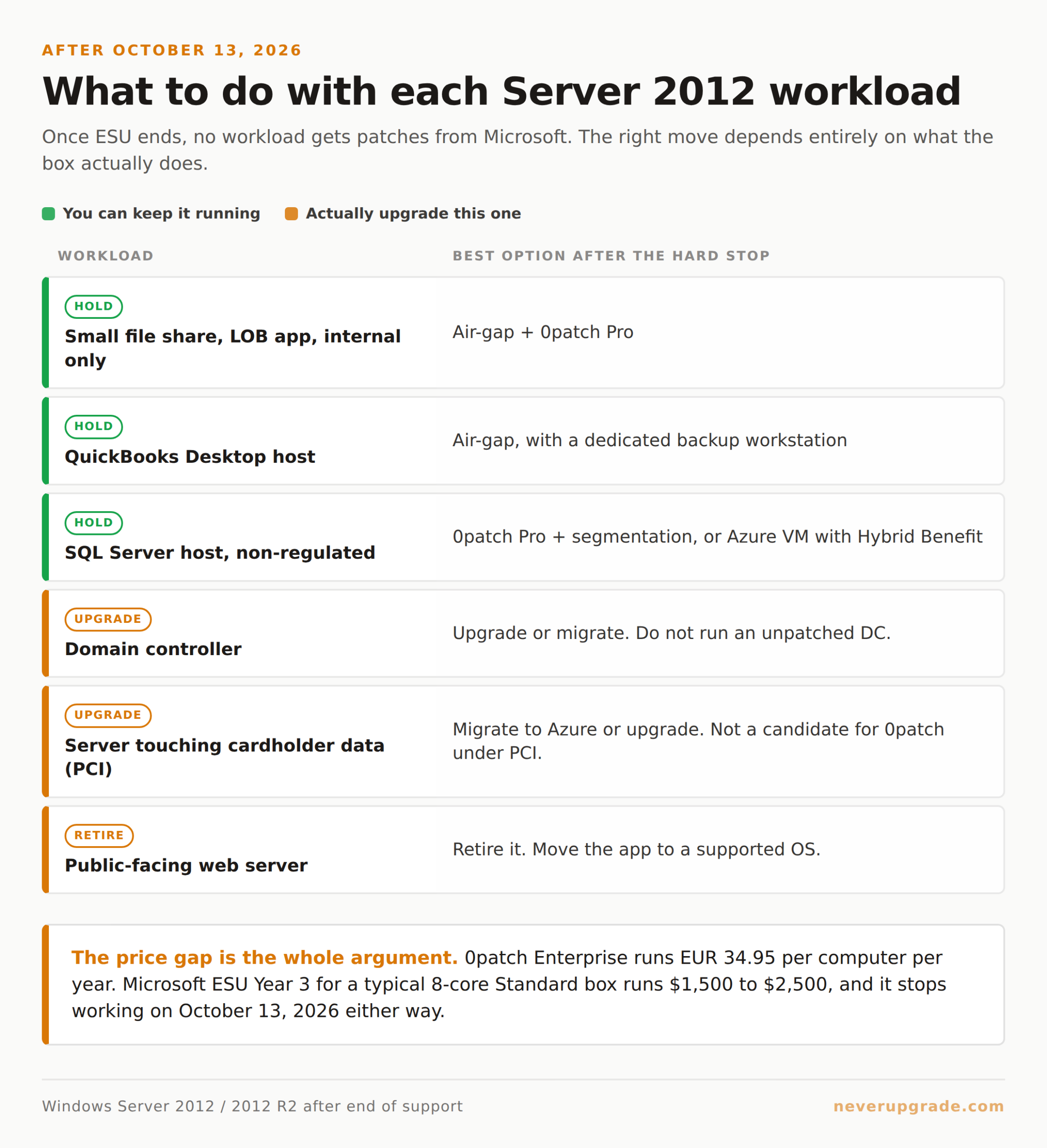
| Workload | Best option after October 13, 2026 |
|---|---|
| Small file share, LOB app, internal only | Air-gap + 0patch Pro |
| QuickBooks Desktop host | Air-gap (with dedicated backup workstation) |
| Domain controller | Upgrade or migrate. Do not run an unpatched DC. |
| Server touching cardholder data (PCI) | Migrate to Azure or upgrade. Not a candidate for 0patch under PCI. |
| SQL Server host, non-regulated | 0patch Pro + segmentation, or Azure VM with Hybrid Benefit |
| Public-facing web server | Retire it. Move the app to a supported OS. |
If the workload is a domain controller or anything internet-facing, this is one of the rare cases where we tell people to actually upgrade. The rest of the time, one of the options above buys you more runway than Microsoft would like you to have.
FAQ
Can I still buy Windows Server 2012 ESU in 2026?
Only if you already bought Year 1 and Year 2. Microsoft requires all three years to be purchased in sequence. If you skipped either earlier year, your only ESU path is migrating the workload to an Azure Virtual Machine, where ESU is included at no extra charge until October 13, 2026.
What happens on October 14, 2026?
Microsoft stops shipping any updates for Windows Server 2012 and 2012 R2, everywhere, including Azure. From that day forward, your options are third-party micropatching (0patch and similar), air-gapping the workload so it does not need patches, or moving to a supported OS. Nothing else exists.
Is 0patch a real replacement for Microsoft ESU?
For most small-business workloads that are not under strict regulatory compliance, yes. 0patch focuses on vulnerabilities that are actually exploited in the wild, applies patches in-memory without touching the OS, and costs a fraction of Microsoft ESU. It is not a fit for PCI environments or for anyone whose auditor will not sign off on non-vendor patches, but for a legacy file server or LOB host, it is the honest answer.
The bottom line
Windows Server 2012 has a hard security floor coming on October 13, 2026. Before that date, Microsoft ESU is the official option, but it only helps if you already bought earlier years, and Year 3 alone is not sold. After that date, Azure stops mattering. Third-party micropatching from 0patch, network segmentation, and air-gapping are what real sysadmins are going to be running these servers on. None of that is reckless. It just does not fit inside Microsoft’s upgrade timeline.
If you want the step-by-step for hardening a Server 2012 box for the post-ESU era, we cover that in our end-of-life guides.