Office 2021 end of support lands on October 13, 2026. That covers both the retail perpetual license (Home and Business, Home and Student, Professional) and Office LTSC 2021 Standard. After that date Microsoft stops shipping security patches, bug fixes, and technical help for any of it. The apps keep opening. The safety net underneath them does not.
If that date sounds familiar, it should: it is almost exactly five years after Office 2021 shipped. Here is what actually changes, why Microsoft boxed this version into a fixed five-year clock instead of the longer runway older versions got, and what your real options are if you are not ready to hand Microsoft a monthly subscription fee.
The Office 2021 and Office LTSC 2021 support end dates
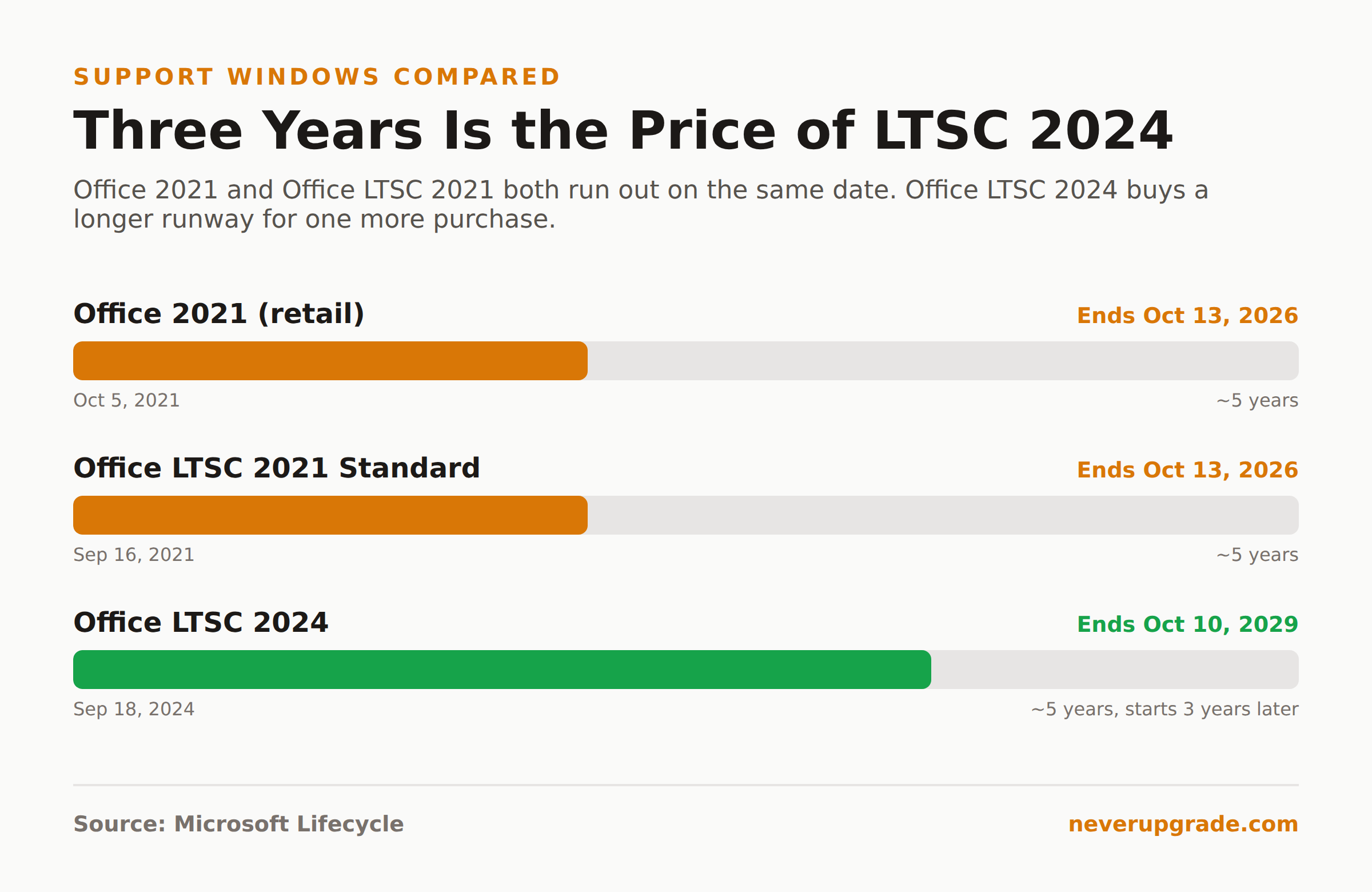
Microsoft’s own lifecycle page is unambiguous: support for Office 2021 ends October 13, 2026, “with no extension and no extended security updates.” That is not a typical Microsoft hedge. There is no ESU program to buy your way into, the way there is for Windows 10. When the date hits, it hits.
Two products share that date, and people mix them up constantly:
- Office 2021 (retail): Home and Business, Home and Student, Professional, and the Mac equivalents. Sold as a one-time purchase, licensed for one PC. Started October 5, 2021. Follows Microsoft’s Modern Lifecycle Policy, which is why its end date was never fixed in stone until Microsoft announced it.
- Office LTSC 2021 Standard: the volume-licensed version built for organizations that image machines and cannot tolerate feature-update churn. Started September 16, 2021. Follows the Fixed Lifecycle Policy, meaning the end date was published on day one.
Both land on the same retirement timestamp: 10/14/2026 6:59:59 AM Pacific Time, which is how you get the “October 13” figure everyone quotes once you convert to a normal calendar day. Office LTSC Professional Plus 2021, notably, is not listed on that fixed-lifecycle page at all; if your organization is running Pro Plus under LTSC, check your specific volume licensing agreement rather than assuming the Standard-edition date applies verbatim.
Why perpetual Office still gets a fixed, shorter lifecycle
This trips people up because Office 2016 and Office 2019 got extended, messier support windows, stretched out with side deadlines for Outlook connectivity and Mac read-only mode. We covered that history in our Office 2019 end of support piece. Office 2021 does not work that way. It got exactly five years, no extensions, full stop, from day one.
That is not an accident or a Microsoft afterthought. Office 2021 was released specifically as a bridge product for people who wanted a perpetual license but did not want to commit to Microsoft 365. Microsoft priced it accordingly and scoped its support window accordingly: five years is enough time to get real use out of it, not enough time to make it a viable long-term alternative to a subscription. A perpetual license that never really expires would undercut the subscription business Microsoft has spent a decade building. Five years, hard stop, keeps the math in Redmond’s favor.
The honest read: this was always going to happen on a fixed clock. If you bought Office 2021 in 2021 expecting Office 2010-style longevity (nine years of support), that expectation was wrong from the day you clicked purchase.
Staying on 2021 safely vs moving to LTSC 2024
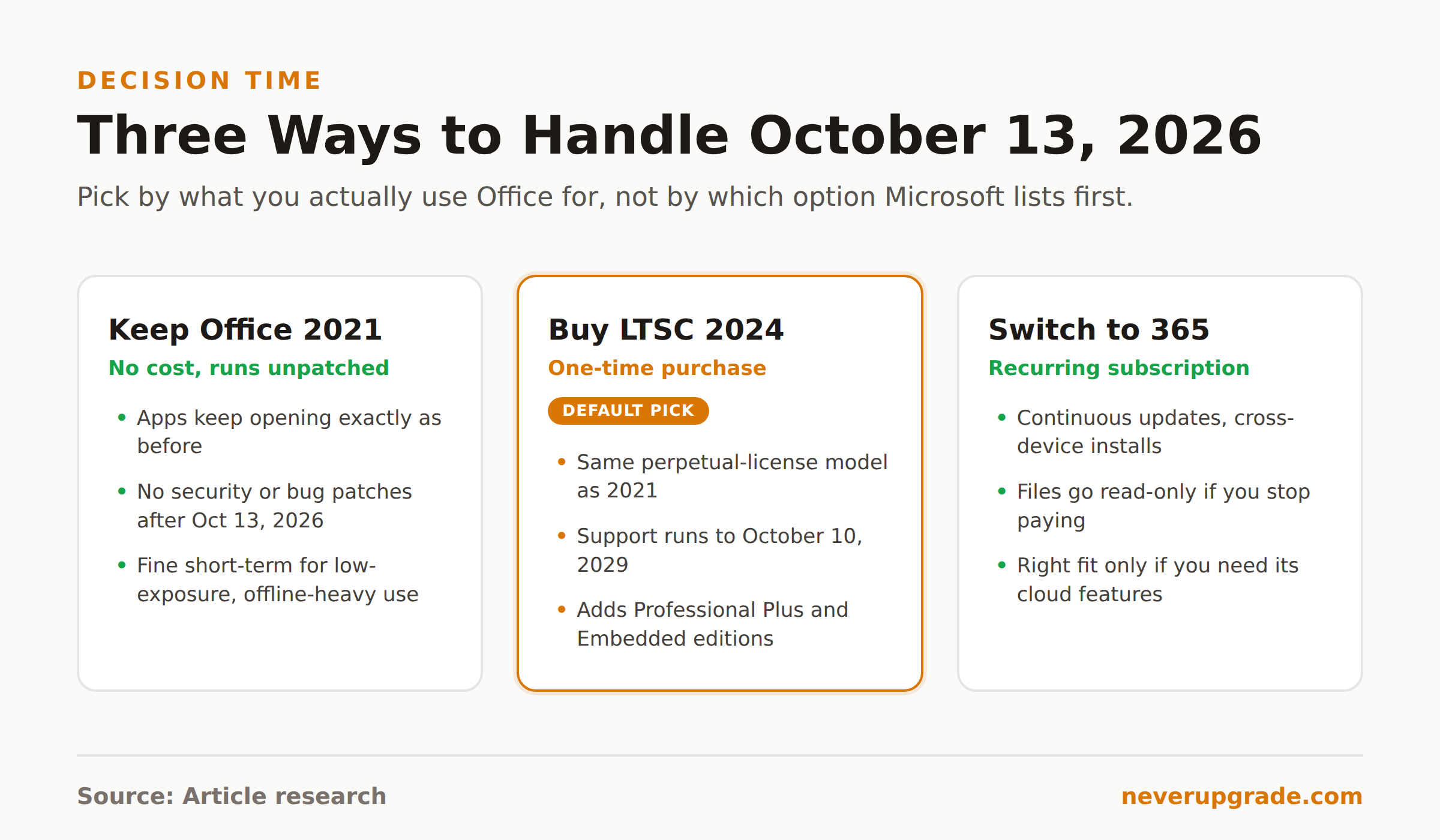
You have three real paths once the date passes, and only one of them involves opening your wallet immediately.
Keep running Office 2021 anyway. The apps do not stop working on October 13, 2026. Word, Excel, PowerPoint, Outlook: all of it keeps opening exactly as before. What you lose is patches for newly discovered vulnerabilities. For a machine that is offline most of the time, or that only opens files you created yourself, that risk is genuinely low. For a machine that receives email attachments from strangers or downloads files off the internet, it is not a risk worth carrying past a few months.
Buy Office LTSC 2024 instead. This is the closest thing to a like-for-like replacement: same one-time-purchase model, same no-cloud-features philosophy, and a support window that runs to October 10, 2029, about three years longer than what is left on 2021. It also unlocks Professional Plus and Embedded editions that were never offered on the retail 2021 line. If you were going to buy a perpetual license anyway, LTSC 2024 is a better three-years-longer version of the exact same deal.
Switch to Microsoft 365. The subscription gets you continuous security updates, new features as they ship, and cross-device installs. It also means the software stops being yours the moment you stop paying. We will get to why we are skeptical of jumping straight to this option in the next section.
Our take: if you actually need Office past 2026, LTSC 2024 is the play for most holdouts. You are not trading away the “own it outright” principle, you are just buying the same product with three extra years attached, for roughly the same one-time price bracket Office 2021 launched at.
The Microsoft 365 subscription pressure and how to resist it
Every article about Office end of support eventually funnels you toward Microsoft 365, usually before it has told you what LTSC 2024 even is. That is not an accident. Microsoft’s own end-of-support page recommends the subscription first and mentions the perpetual alternative, if at all, well down the page.
Here is what the subscription actually costs you beyond the monthly fee: the moment you stop paying, your files go read-only in the desktop apps until you either resubscribe or export everything to a format you can open elsewhere. You are also opted into Microsoft’s feature-update cadence whether you want the changes or not, and your admin center becomes one more account Microsoft can lock you out of over a billing dispute.
None of that makes Microsoft 365 a bad product. For a team of twelve people who need shared calendars, live co-authoring, and centrally managed licenses, it is the right tool and arguing otherwise is just stubbornness. But if your actual requirement is “Word and Excel that open my files reliably,” a subscription solves a problem you do not have, at a recurring cost a one-time purchase does not carry.
The resistance move is simple: write down what you actually use Office for before you compare prices. If the list is Word, Excel, PowerPoint, and occasionally Outlook for a mailbox that is not on Microsoft 365, LTSC 2024 covers every item on it for one payment.
Keeping old Office file formats working
The good news buried under all these dates: file format compatibility is not part of this end-of-support cliff. .docx, .xlsx, and .pptx are stable, published formats. Office 2021 documents open fine in Office LTSC 2024, in Microsoft 365, in LibreOffice, and in Google’s web apps. Nothing about October 13, 2026 changes what formats your files are saved in or who can open them.
Two things are worth watching regardless:
- Macro-enabled files (
.docm,.xlsm) are the actual risk vector after support ends, not the format itself. An unpatched Office running a malicious macro from an email attachment is the realistic attack path. Keep macro settings locked to “disable with notification” or tighter, the same guidance we walked through in detail for Office 2016 and 2019. - Legacy binary formats (
.doc,.xls,.pptfrom pre-2007 versions) still open in Office 2021 and will keep opening after support ends. If you are migrating away from those formats eventually, do it on your own schedule, not because of this deadline.
Before you touch any security settings or start migrating: back up your .pst files, templates, and any workbook with macros in it to external storage first. Some hardening steps below will break a badly written macro, and you want a clean rollback if that happens.
FAQ
Does Office 2021 stop working on October 13, 2026?
No. Word, Excel, PowerPoint, and Outlook keep opening and functioning exactly as before. What ends is Microsoft’s supply of security patches, bug fixes, and technical support. The software runs; it just runs unpatched.
Is Office LTSC 2021 the same end date as regular Office 2021?
For the Standard edition, yes: both retire at 6:59:59 AM Pacific Time on October 14, 2026, which is why everyone shorthands it as “October 13.” If you are on Office LTSC Professional Plus 2021 under a volume license, check your specific agreement, since that edition is not listed on Microsoft’s public fixed-lifecycle page.
Should I buy Office LTSC 2024 or switch to Microsoft 365?
If your needs are single-user desktop apps with no requirement for live co-authoring or centrally managed licenses, LTSC 2024 gets you the same one-time-purchase model with support through October 2029. Switch to Microsoft 365 only if you actually need its subscription-specific features: shared cloud storage, multi-device installs under one license, or continuous feature updates. Otherwise you are paying monthly for capabilities you will not use.
Whichever way you land, do not let October 13, 2026 catch you mid-decision. Make the call now, while you still have time to test the alternative before the patches actually stop.