Exchange Server 2019 reached end of life on October 14, 2025, and so did Exchange Server 2016. Microsoft now ships no security fixes, no bug fixes, and no technical support for either one. Your server still runs, and it will keep running for years. That is exactly the problem: an internet-facing mail server with no patch pipeline is the single worst box to leave sitting on an unsupported version, and this is one of the few “just stayed on it” situations where we tell you to actually move.
This is not a drill you can slow-walk the way you might with an offline QuickBooks install. Mail servers get attacked constantly and directly. Below is what the deadline actually means, the three paths out, and the one architectural mistake that traps more admins than any other.
The Exchange 2016 End of Life and 2019 Dates That Matter
Both versions crossed the same finish line on the same day. Per Microsoft’s end of support roadmap, support for Exchange Server 2019 and 2016 ended October 14, 2025. After that date Microsoft stopped providing:
- Technical support for problems you hit
- Bug fixes for stability and usability issues
- Security fixes for newly discovered vulnerabilities
- Time zone updates
There is no Extended Security Updates program for on-premises Exchange the way there is for Windows 10 or Windows Server 2012. When a new Exchange CVE lands, and they land regularly, you are on your own. That changes the math completely versus a legacy desktop app.
One nuance worth knowing: Exchange Server 2019 was the last “buy it once” version. Its replacement, Exchange Server Subscription Edition (SE), shipped in mid-2025 and is licensed by subscription with Software Assurance rather than sold as a perpetual box product. If you keep Exchange on-premises past this deadline, SE is the destination, not another standalone release.
Why an Unpatched Mail Server Is the Worst Box to Leave Exposed
We say “back up first, then decide how long you can sensibly wait” for most end-of-life software. Exchange is the exception where the second half of that sentence gets very short.
Three reasons a stale Exchange box is worse than almost anything else you run:
- It is exposed on purpose. A mail server has to accept connections from the internet to do its job. You cannot firewall it into a corner the way you can a legacy NAS or an offline accounting workstation.
- It is a credential goldmine. Exchange holds every mailbox, authenticates against Active Directory, and often runs with high privilege. A compromise here is rarely just email, it is a foothold into the whole domain.
- Its vulnerabilities get weaponized fast. The ProxyLogon and ProxyShell waves showed how quickly a fresh Exchange bug goes from advisory to mass exploitation. With no vendor patch coming, day one of a new CVE is the whole story.
If you run other unsupported infrastructure and want the honest framework for when isolation is enough and when it is not, we laid that out for server operating systems in our guide to Windows Server 2012 R2 end of life. The logic transfers, but Exchange sits at the far risky end of it.
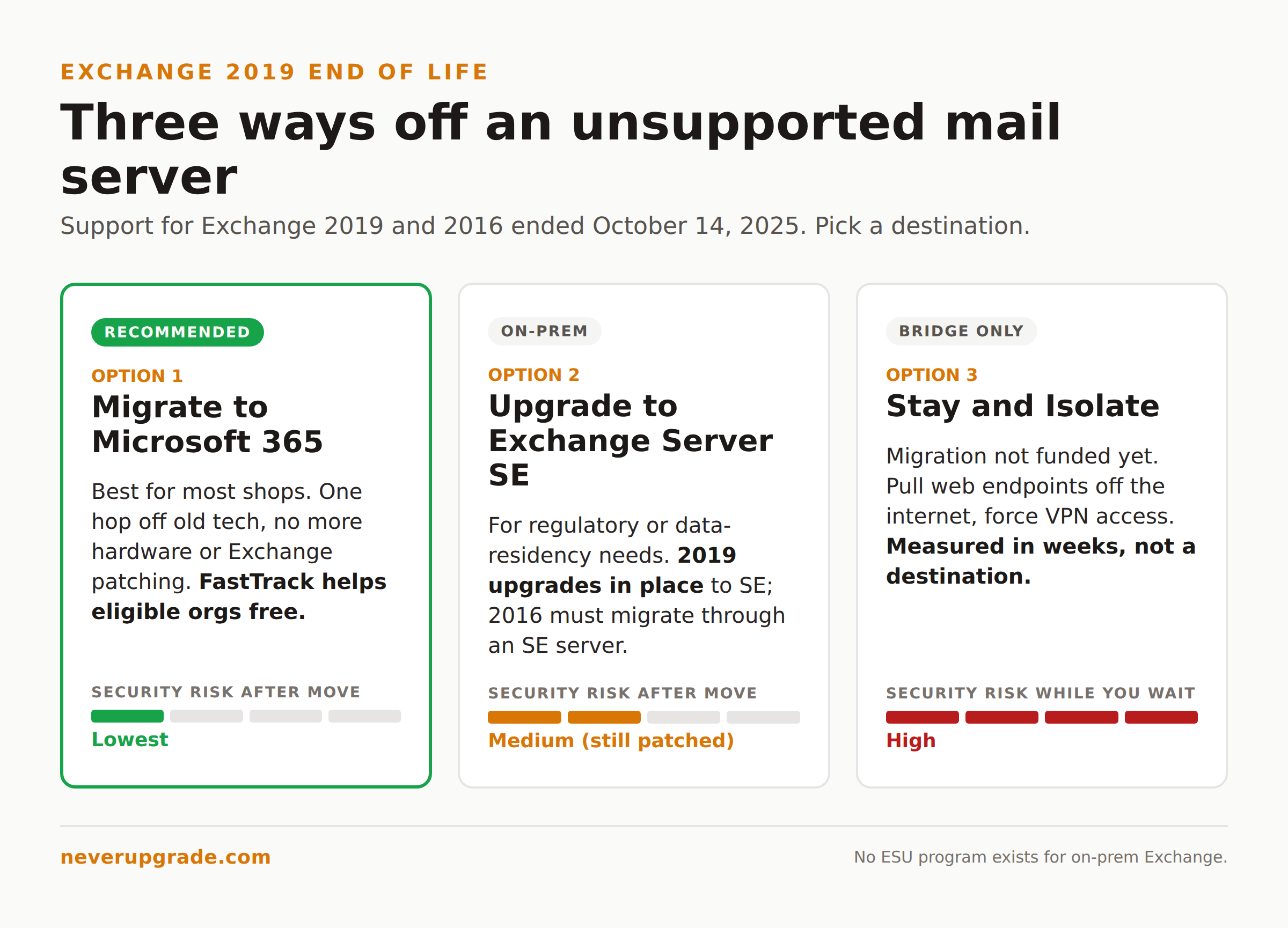
Your Three Real Options After Exchange Server 2019 End of Life
Microsoft’s roadmap gives you two supported destinations. In practice there is a third path plenty of admins take with eyes open. Here they are, honestly.
Option 1: Migrate to Microsoft 365
The cleanest exit. You move mailboxes, public folders, and other data to Exchange Online using a cutover, minimal hybrid, or full hybrid migration, then decommission the on-premises servers. Microsoft calls this “a single hop away from old technology,” and for most small and mid-size shops it is the right call. No more patching Exchange, no more hardware, no more being the one person who understands the transport rules.
If mailbox count and timeline are the deciding factors, Microsoft’s FastTrack service will walk eligible organizations through the migration at no extra cost. Worth a call before you pay a consultant.
Option 2: Upgrade in Place to Exchange Server SE
Regulatory rules, data residency requirements, or genuinely unusual configurations keep some of us on-premises. That is legitimate. If you have to stay, upgrade to Exchange Server SE.
The good news for 2019 shops: Microsoft describes the Exchange 2019 to SE move as an “in-place upgrade,” because SE is effectively a cumulative update to 2019 rather than a rip-and-replace. Their own team calls it low risk. Exchange 2016 does not get that luxury. You either introduce an SE server into the org and migrate, or you move mailboxes to Microsoft 365 first.
Option 3: Stay and Isolate (the honest unsupported path)
Some organizations will keep an unpatched Exchange box running because a migration is not funded this quarter. We will not pretend that is safe, but if it is your reality, reduce the blast radius: pull Outlook Web Access and other web endpoints off the public internet, force all external access through a VPN or a reverse proxy that does pre-authentication, tighten it to modern TLS only, and watch the logs like it is already compromised. This buys time. It does not buy safety, and it is not a destination. Treat it as a bridge measured in weeks.
The Hybrid Trap and How to Avoid It
Here is the mistake that catches careful admins. You migrate every mailbox to Microsoft 365, you feel done, you go to shut off the last Exchange server, and you cannot.
If you use Microsoft Entra Connect (formerly Azure AD Connect) to sync accounts from on-premises Active Directory, your AD remains the source of authority for those objects. That means you cannot cleanly manage Exchange recipient attributes from the cloud. Yank every Exchange server and you lose the supported way to edit mail attributes on synced users. Microsoft is explicit about this: keep at least one Exchange server for management, or move identity management fully to the cloud first.
The supported way out, straight from Microsoft’s guidance:
- Use your existing Exchange 2019 or 2016 server to migrate mailboxes to Microsoft 365.
- Upgrade that remaining server in place to Exchange Server SE.
- Decommission the old 2019 or 2016 boxes, keeping the single SE server for recipient management.
So even a “we went full cloud” plan usually ends with one licensed Exchange SE server standing, unless you are prepared to re-architect identity. Decide which of those two you are doing before you start pulling servers, not after.
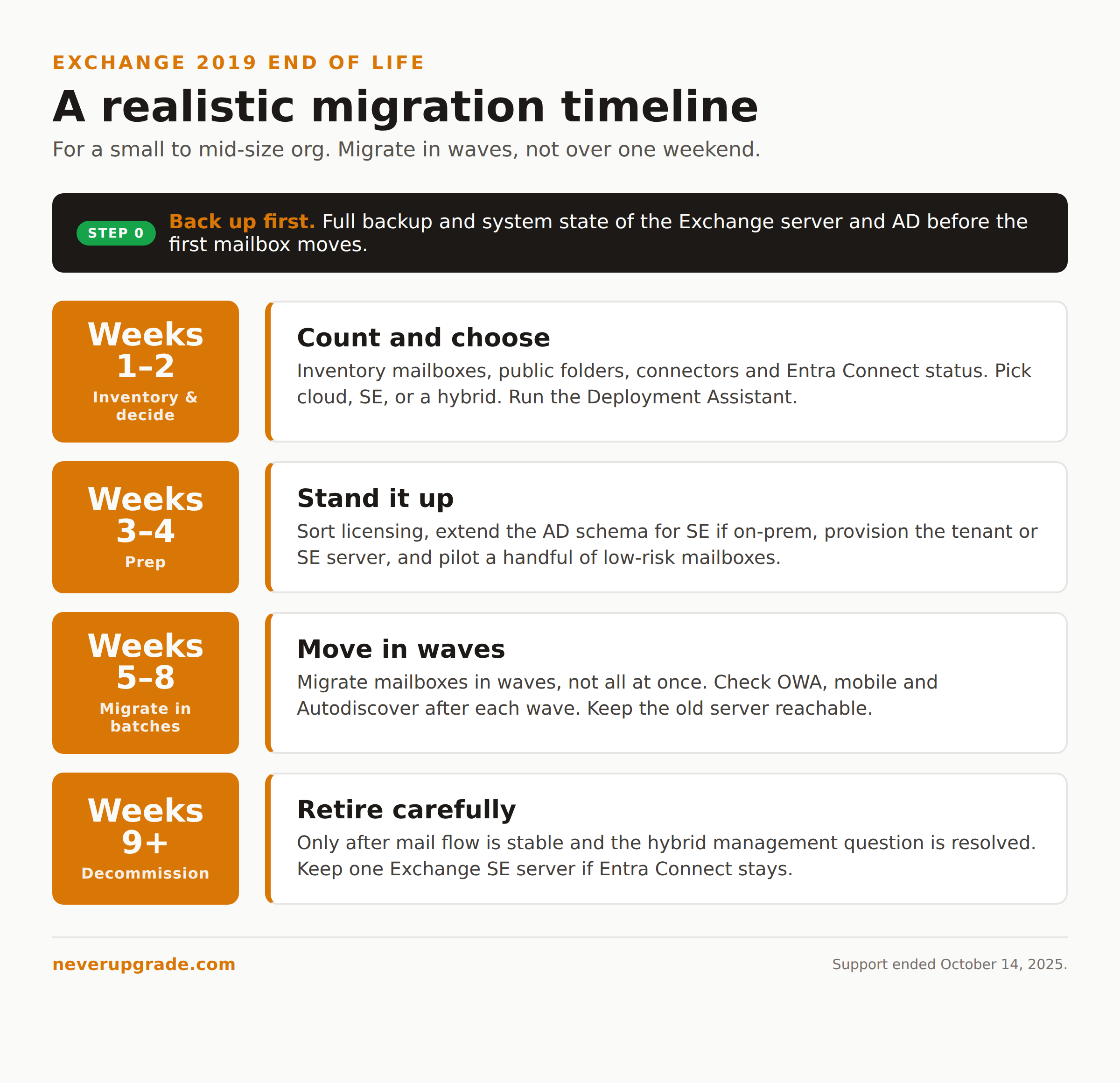
A Realistic Migration Timeline
Migration guides love to imply this is a weekend. For a real business it is not. Here is a timeline that survives contact with reality for a small to mid-size org.
- Weeks 1 to 2: Inventory and decide. Count mailboxes and public folders, document mail flow and every connector, confirm Entra Connect status, and pick your destination (cloud, SE, or a hybrid that keeps one SE server). Run the Exchange Deployment Assistant.
- Weeks 3 to 4: Prep. Sort out licensing, extend the AD schema for SE if you are going on-premises, stand up your SE server or provision the Microsoft 365 tenant, and pilot with a handful of low-risk mailboxes.
- Weeks 5 to 8: Migrate in batches. Move mailboxes in waves, not all at once. Watch OWA, mobile, and Autodiscover after each wave. Keep the old server reachable until every batch is confirmed.
- Weeks 9 onward: Decommission carefully. Only after mail flow is stable and, critically, after you have resolved the hybrid management question. Then retire the old boxes.
Back up before you touch anything. Take a full backup and a system state of the Exchange server and its AD before the first mailbox moves. This is table stakes, not paranoia.
FAQ
What is the replacement for Exchange 2019?
Exchange Server Subscription Edition (SE) is the on-premises successor, and Microsoft 365 (Exchange Online) is the cloud one. For most organizations Microsoft recommends Microsoft 365. If you must stay on-premises, Exchange SE is an in-place cumulative upgrade from Exchange 2019.
Is Exchange 2019 still safe to use after end of life?
It runs, but it no longer receives security patches, so every new vulnerability stays permanently open. For an internet-facing mail server that is a serious and growing risk. If you cannot migrate immediately, at minimum pull its web endpoints off the public internet and route access through a VPN or pre-authenticating proxy while you plan the move.
Can I upgrade Exchange 2016 directly to Exchange SE?
Not as a simple in-place upgrade the way Exchange 2019 can. Exchange 2016 needs you to either introduce an Exchange SE server into the organization and migrate to it, or move mailboxes to Microsoft 365 first. Only Exchange 2019 gets the low-risk in-place cumulative upgrade path to SE.
Bottom Line
Exchange is the box where our usual “keep what works” instinct runs out of road. The 2019 and 2016 end-of-support date has passed, no ESU lifeline exists for it, and an unpatched mail server is a standing invitation. Pick a destination, keep one Exchange SE server if your identity setup demands it, migrate in batches, and back up before every step. If you are weighing the same call for other aging server infrastructure, our breakdown of extended security updates for Windows Server 2012 in 2026 covers where paid patches still make sense and where they do not.