Windows 10 IoT Enterprise LTSC 2021 is a real, Microsoft-supported edition of Windows 10 that gets security updates until January 14, 2032, roughly five years after consumer Windows 10 stopped getting them for free. It is the same 21H2 code base underneath, stripped of the Store, Cortana, and forced feature updates, and licensed for a ten-year support life instead of the usual eighteen months. If you want to keep running Windows 10 without paying for Extended Security Updates or bypassing Windows 11’s hardware checks, this is the closest thing to a sanctioned path.
We say “closest thing” on purpose. LTSC was never meant for your laptop, and Microsoft would rather you not install it on one. But the updates are real, the support dates are published, and nothing about running it breaks a license you legitimately own. Here is what it is, what it costs you in features, and how to get it without buying a $12 key from a site that also sells Netflix logins.
What Windows 10 IoT Enterprise LTSC actually is
LTSC stands for Long-Term Servicing Channel. Most Windows 10 editions live on the General Availability channel, where Microsoft ships a feature update every year and retires each version about 18 to 30 months after release. LTSC throws that out. You pick a version, and it just gets monthly security patches for a decade. No new features get bolted on, no UI gets rearranged out from under you, and no “your PC will restart in 15 minutes” surprises during a client call.
Microsoft built this channel for machines that cannot tolerate change: MRI scanners, ATMs, factory-floor controllers, digital signage. Those devices ship a validated software image and are expected to run it untouched for years. The trade Microsoft offers is simple. You give up the consumer conveniences, and in return you get stability and a long, published support window.
There are two flavors of the 2021 release, and the difference matters more than the near-identical names suggest. Regular Windows 10 Enterprise LTSC 2021 gets a 5-year lifecycle. The IoT variant, Windows 10 IoT Enterprise LTSC 2021, gets 10 years. Same bits, double the runway, because the IoT licensing model assumes the software is glued to a specific device for its entire service life.
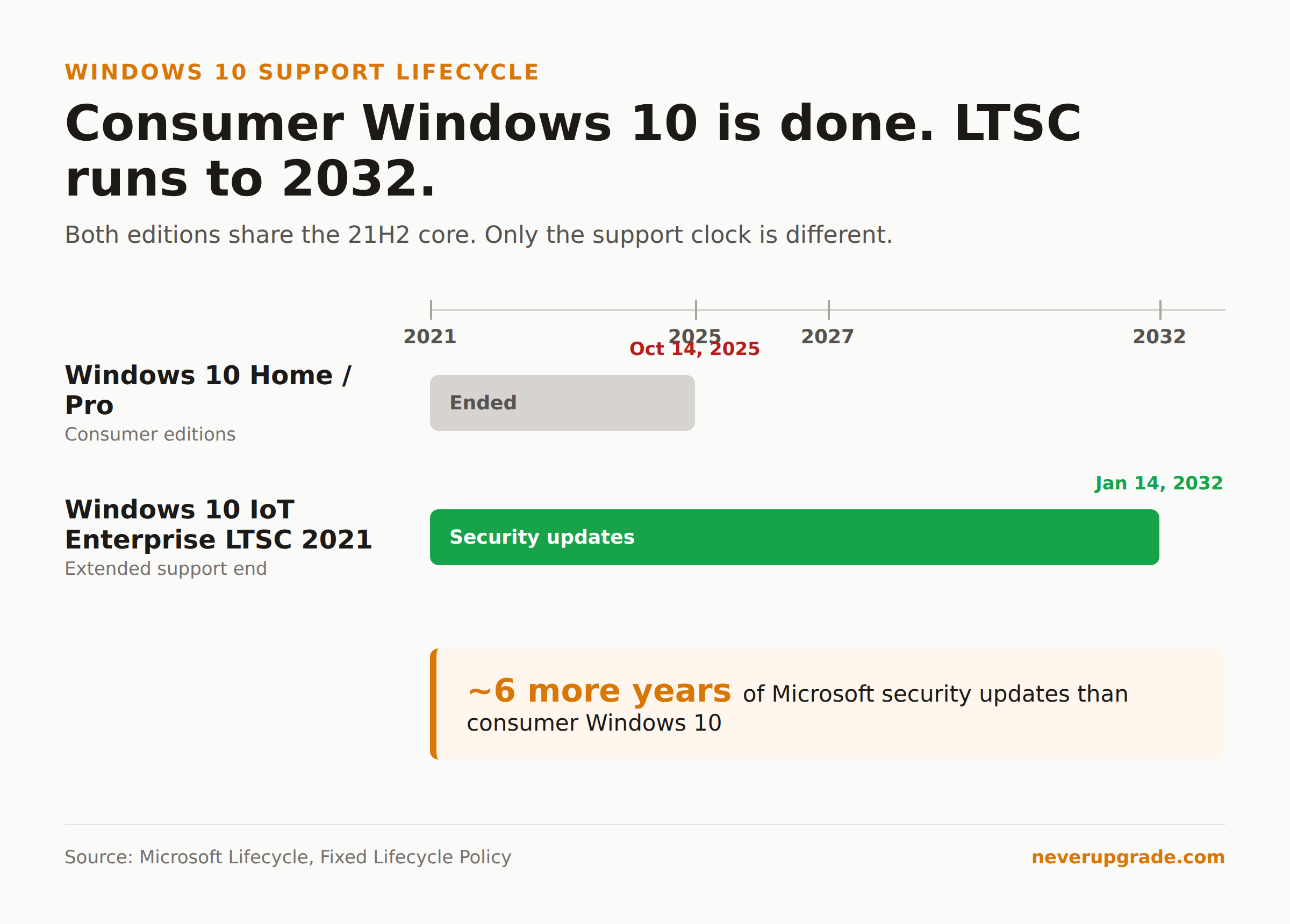
Windows 10 IoT Enterprise LTSC 2021 is supported until January 2032
Here are the dates straight from Microsoft’s Lifecycle page, no interpretation needed. Windows 10 IoT Enterprise LTSC 2021 started on November 16, 2021, hit its mainstream end date on January 13, 2027, and reaches extended end of support on January 14, 2032. It follows the Fixed Lifecycle Policy, which means those dates do not move.
Practically, that gives you monthly security updates through the entire window. The mainstream-to-extended transition in 2027 does not cut off patches the way it does for a server product; for LTSC, security updates run to the extended end date. So a machine on this edition keeps getting patched for more than six years from today.
Compare that to where consumer Windows 10 landed. Home and Pro reached end of support on October 14, 2025. After that your only sanctioned options were the paid Extended Security Updates program or a move to Windows 11. LTSC sidesteps that whole conversation because its support clock was set to 2032 from the day it shipped.
One honest caveat: 2032 is the ceiling, not a promise that the software will feel current. By 2030 you will be running a nine-year-old OS. Some modern apps will have dropped support, and some hardware drivers will not exist. The security updates protect the OS; they do not keep the ecosystem around it frozen in your favor.
How Windows 10 LTSC IoT differs from the Windows 10 on a normal PC
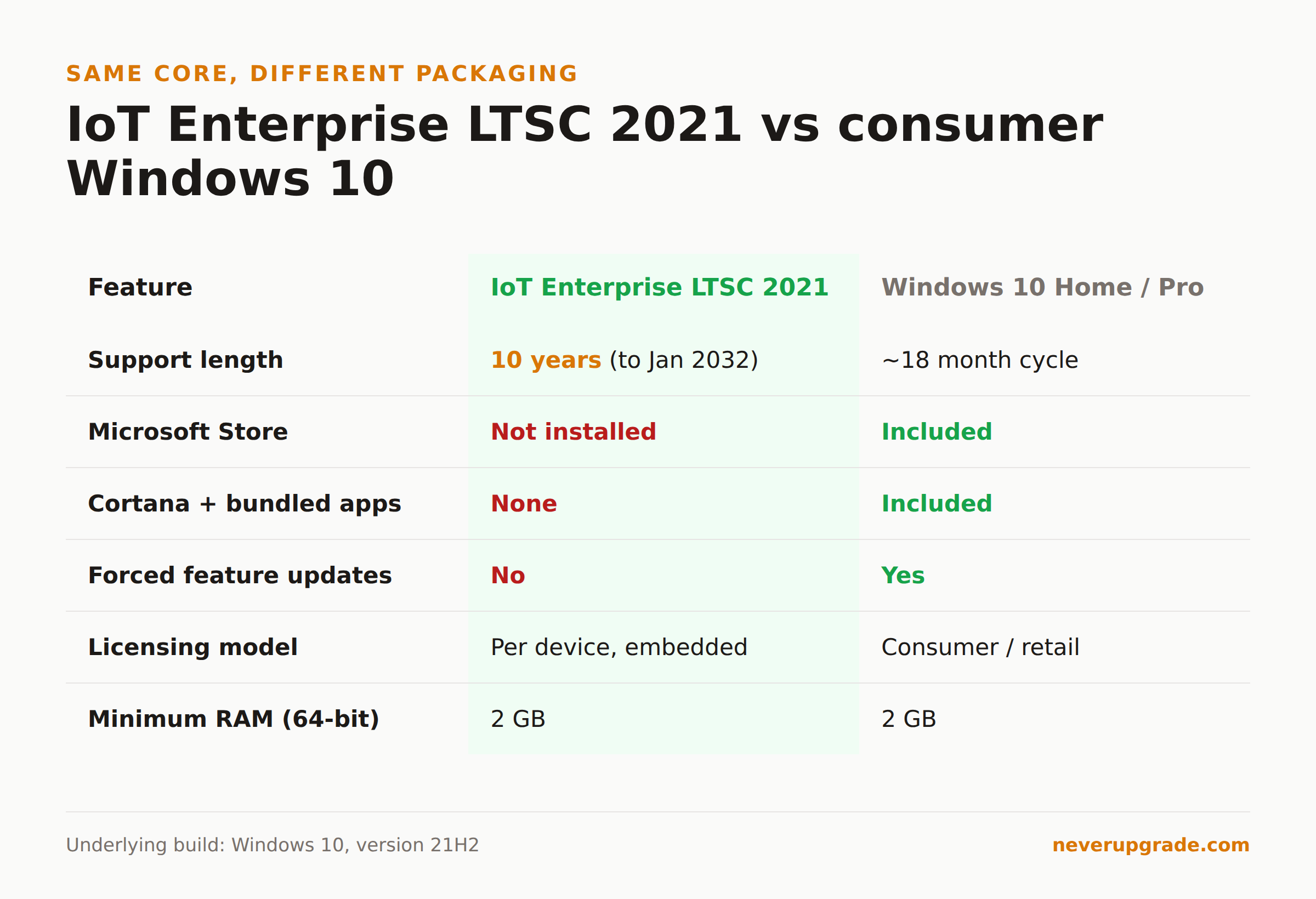
If you install this expecting your familiar Windows 10, you will notice the gaps within an hour. LTSC ships deliberately bare. Here is what is missing or different:
- No Microsoft Store. It is not just hidden, it is not installed. That also means no Store apps, and some third-party software that installs itself through the Store back end will complain.
- No Cortana, no bundled consumer apps. No Xbox app, no Solitaire, no Weather, no Your Phone. The desktop is close to empty on first boot.
- No forced feature updates. You will never be pushed from 21H2 to a newer version. Monthly cumulative security updates still install through Windows Update.
- Microsoft Edge is included. The 2021 IoT release ships Edge in-box, which the older 2019 LTSC did not. So you do get a modern, patched browser out of the gate.
- Licensed per device, for embedded use. The license assumes the OS is tied to one machine doing a defined job, not roaming across a fleet of user PCs.
The thing to understand is that none of this makes it a “lite” or “debloated” version of consumer Windows in the way the internet sometimes frames it. It is the Enterprise binaries with the consumer layer never added. Everything under the hood, the kernel, the driver model, the update mechanism, is standard Windows 10 21H2. Your line-of-business software, your printers, your QuickBooks Desktop install, all of it behaves the same. If you are already thinking through the risks of staying on Windows 10, our honest risk assessment of running Windows 10 past end of support covers the ground LTSC does not solve on its own.
How to license and install it legally
This is where the honesty tax comes due. Windows 10 IoT Enterprise is not a product you buy in a box or download from Microsoft with a credit card. It is an embedded license, sold through authorized distributors like Avnet, Arrow, and Advantech, usually to system builders who preinstall it on hardware. Legitimate pricing runs in the range of roughly $20 to $150 per license depending on the CPU tier and the distributor.
The gray market is loud here. Search results are full of $15 to $25 “lifetime” keys from marketplace sellers. Some of those are volume-license keys that were never meant for resale, and a key that activates today can get blocked later. If you are running a business on the machine, that risk is not worth the $100 you saved. The clean path is buying the license through an authorized embedded reseller, ideally with the device, or through a Microsoft partner who can sell you IoT Enterprise licensing properly.
Once you have a legitimate license, installation is ordinary Windows setup. Before you start: back up. Image the whole disk, not just your files, because this is a clean install and it will wipe the drive.
- Get the official Windows 10 IoT Enterprise LTSC 2021 ISO from your distributor or the Microsoft volume-licensing portal your reseller points you to. Verify the file hash against what they publish.
- Write it to an 8 GB or larger USB stick with Rufus or the Microsoft media tool.
- Boot from the USB and do a clean install. When prompted, choose the LTSC edition.
- Activate with your purchased key under Settings, System, Activation.
- Run Windows Update immediately and let it pull every pending security patch before you install anything else.
Minimum hardware is genuinely low: a 1 GHz processor, 2 GB of RAM on 64-bit, and about 20 GB of disk. This edition runs comfortably on machines Windows 11 rejected outright, which is a large part of its appeal.
Who it fits, and who should walk away
LTSC is a sharp tool, and sharp tools cut the careless. It fits you if you run a fixed-purpose machine: a point-of-sale terminal, a machine controlling a piece of equipment, a kiosk, a workstation running one critical legacy app that you never want disturbed. It also fits a technically confident holdout who wants a stable Windows 10 desktop through 2032 and understands the missing Store and app gaps going in.
Walk away if you want a normal daily-driver experience with Store apps and the latest consumer features, if you are not comfortable sourcing an ISO and a license carefully, or if you manage machines for non-technical users who will file a ticket the first time the Store is missing. For most home users staying on Windows 10, the paid Extended Security Updates route is simpler and less surprising; we broke down what Windows 10 ESU actually costs and how to pay nothing if that is the fork you are weighing.
And the one case where you actually should just upgrade: if the machine handles sensitive customer data, faces the internet directly, and you cannot commit to disciplined patching and network hygiene, a supported OS is the boring correct answer. LTSC buys you time, not immunity.
FAQ
Is Windows 10 IoT Enterprise LTSC 2021 still supported?
Yes. It receives monthly security updates through its extended end of support date of January 14, 2032, per Microsoft’s Fixed Lifecycle Policy. That is more than six years of remaining support from today.
What is the difference between Windows 10 IoT Enterprise LTSC 2021 and regular Windows 10?
Same 21H2 core, different packaging and support model. LTSC has no Microsoft Store, no Cortana, no bundled consumer apps, and no forced yearly feature updates. It is licensed per device for embedded or fixed-purpose use and gets a 10-year support life instead of the roughly 18-month cycle of consumer Windows 10.
Can I use Windows 10 IoT Enterprise LTSC 2021 as my daily driver?
Technically yes, and plenty of people do. Be ready for the missing Store and the manual app installs that come with it, and buy a legitimate license rather than a gray-market key. It is not what Microsoft designed the edition for, but nothing about it breaks when you use it that way.
The bottom line
Windows 10 IoT Enterprise LTSC 2021 is the one Windows 10 path that does not involve a workaround, a paid ESU subscription, or a hardware-check bypass. You give up the consumer polish, you do the work of sourcing a real license and ISO, and in exchange you get a genuine Microsoft edition patched to 2032. For a machine with a job to do, that is a fair trade. For a general-purpose family PC, it is probably more edge than you want to hold.