SharePoint Server 2019 hit its final end of life date on July 15, 2026, when Microsoft’s extended support phase closed for good. No more security patches, no more bug fixes, no more calling in a support ticket. Your farm keeps running. It just runs unprotected unless you decide what to do next, and “decide” is the part most vendors skip past on their way to selling you a migration.
The Real SharePoint Server 2019 Support Dates
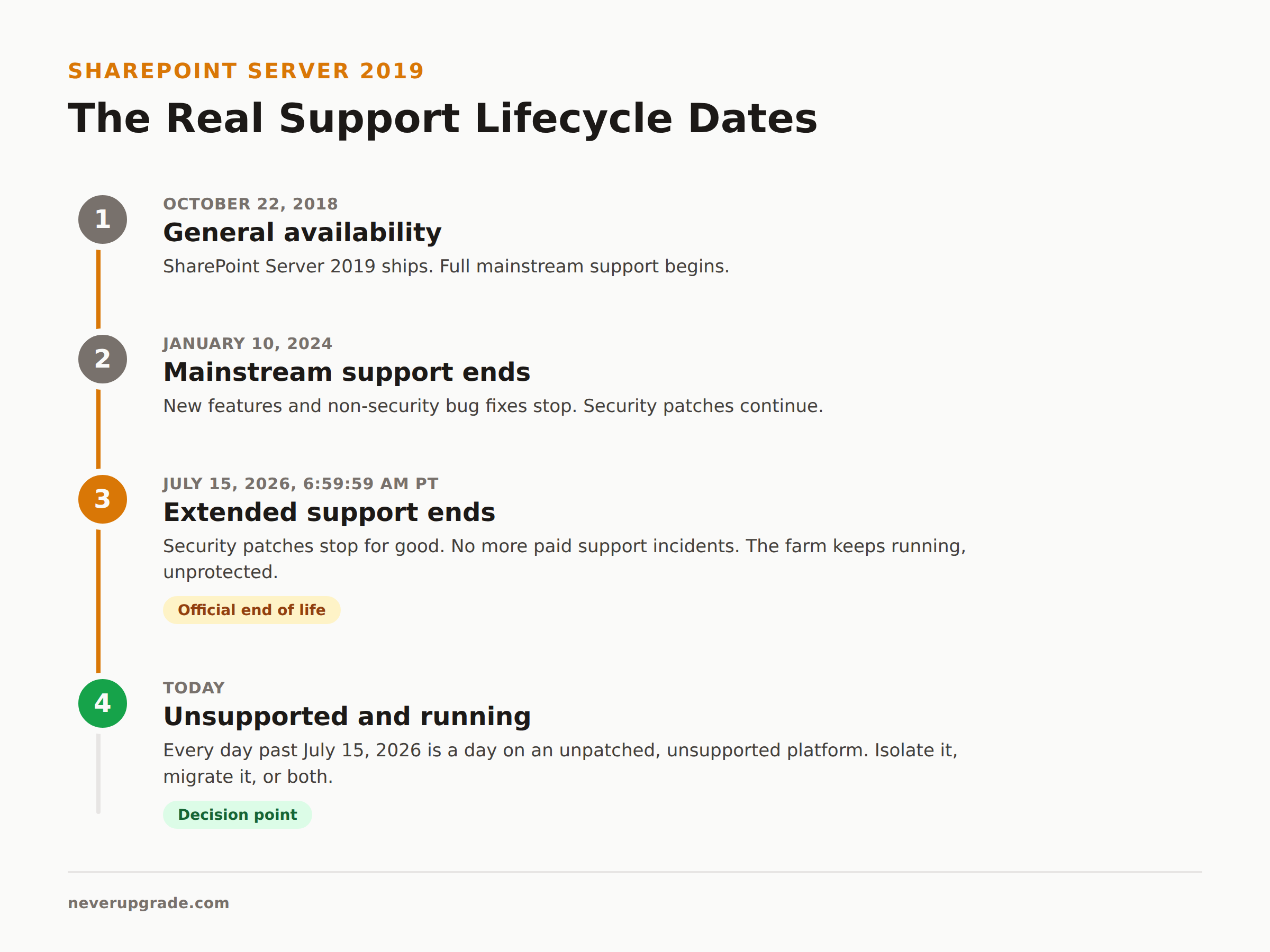
Two dates matter, and Microsoft’s own lifecycle page has them, not a vendor blog paraphrasing them:
- Mainstream support ended January 10, 2024. This is when Microsoft stopped shipping new features and non-security bug fixes. Most admins never noticed, because SharePoint 2019 had already stopped changing much by then.
- Extended support ended July 15, 2026. This is the one that counts. It closed the door on security patches, and it closed the door on paid support incidents too.
That’s it. Two dates, one product, no ambiguity. If you see a site quoting July 14 instead of July 15, they rounded from an AI summary instead of checking the source. The official cutoff, per Microsoft’s lifecycle listing, is 6:59:59 AM Pacific on July 15, 2026.
What Actually Stops Working Day One vs. What Quietly Degrades
Nothing breaks on July 16. That’s the trap. SharePoint Server 2019 does not have a kill switch, and Microsoft has never shipped one for on-prem products. Your farm serves pages, indexes content, and runs workflows exactly the way it did the day before.
What changes is what happens behind that stability:
Stops immediately:
– New CVEs affecting SharePoint 2019 will not get patched, ever, by anyone but you.
– Microsoft support will not open a ticket for a 2019 farm issue. If you call, they will tell you to upgrade.
– Any compliance framework that requires “vendor-supported software” (HIPAA risk assessments, PCI-DSS, SOC 2 audits, NIST SP 800-53 control SA-22) now flags you by name.
Degrades over months, not days:
– Browser vendors keep shipping changes. Old SharePoint UI components (some still leaning on legacy rendering behavior) start rendering oddly in Chrome and Edge updates nobody at Microsoft is testing against anymore.
– Third-party connectors and add-ins stop getting compatibility updates, so integrations quietly rot.
– Your own staff’s SharePoint skills age out faster than the software does, because nobody wants to specialize in a platform with a closed roadmap.
None of this is catastrophic on its own. Stacked together over 12 to 18 months, it’s how a “stable” farm becomes a liability nobody wants to touch.
Is It Safe to Keep Running On-Prem SharePoint 2019 Today
Safe is doing a lot of work in that question, so let’s split it in two: safe from a breach, and safe from an audit.
Breach risk depends almost entirely on exposure. A SharePoint 2019 farm that’s fully internal, behind a real firewall, with no anonymous access and no internet-facing endpoint, is a meaningfully different risk than one sitting on a DMZ with extranet access turned on. Unsupported does not mean unprotected if you were already running it correctly. It means the clock on any newly discovered vulnerability now runs forever instead of until the next Patch Tuesday.
Vendors selling migrations love to cite aggregate stats here, and one is worth knowing: AvePoint’s research puts organizations running end-of-life infrastructure at 62% more likely to hit a multisystem failure during a critical incident, with data recovery from outdated systems taking roughly 3x longer than on modern platforms. Read that as “unpatched systems fail worse when they fail,” not as “your farm will fail tomorrow.” It’s directionally true and worth taking seriously, not a countdown timer.
Audit risk is more binary. If your industry has a compliance framework that explicitly requires supported software, an EOL SharePoint farm is now a documented finding, full stop. That’s true even if the farm has never had an incident. Auditors don’t grade on vibes.
If you’re not in a regulated industry and your farm is properly isolated, staying put a while longer is a defensible decision, not recklessness. Just say so in writing, with a real isolation plan attached, so it reads as a decision instead of neglect.
Migration Options Ranked: Subscription Edition, SharePoint Online, Do Nothing and Isolate
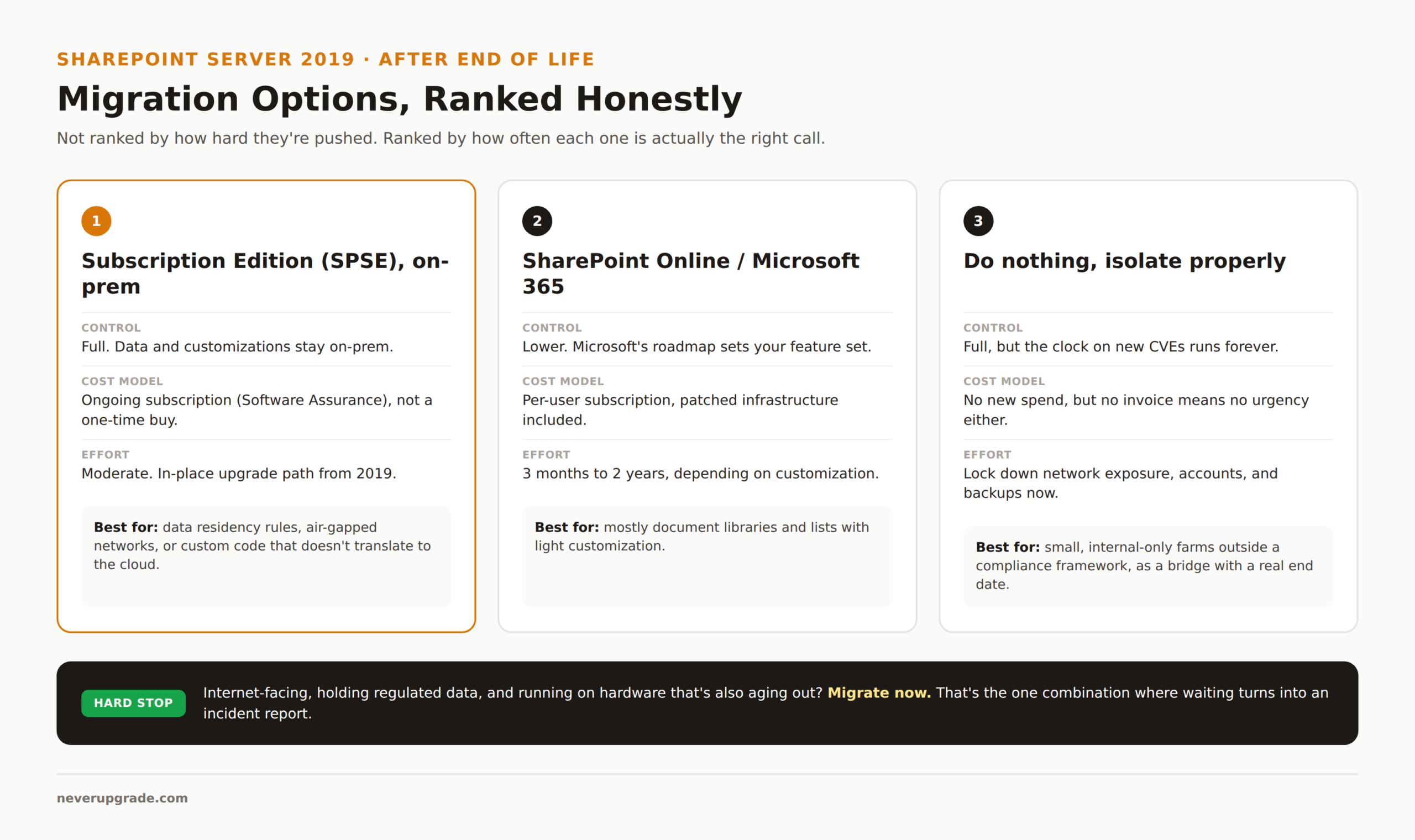
In order of how often they’re actually the right call, not how hard they’re pushed:
1. SharePoint Server Subscription Edition (SPSE), on-prem. This is the direct successor and the option every vendor blog buries under three paragraphs of cloud enthusiasm. SPSE keeps your data on-prem, keeps your customizations mostly intact, and gets you back under active support. The catch: it’s licensed as a subscription (Software Assurance or an equivalent agreement), not a one-time purchase like 2019 was, so budget for it as an ongoing line item, not a capital expense. If your organization has a real reason to stay on-prem (data residency rules, an air-gapped network, custom code that doesn’t translate to the cloud), this is usually the honest answer, not SharePoint Online.
2. SharePoint Online / Microsoft 365. The default recommendation from basically every consultant, and it’s not wrong for a lot of organizations. You get patched infrastructure forever, at the cost of Microsoft’s roadmap deciding your feature set instead of you. Migration timelines run anywhere from three months for a small, clean farm to two years for anything with heavy customization, InfoPath forms, or workflow sprawl. If your farm is mostly document libraries and lists with light customization, this is genuinely the path of least resistance. If you’ve got fifteen years of nobody-remembers-why workflows, budget the long end of that estimate.
3. Do nothing, and isolate properly. This is the option nobody sells you, because there’s no invoice attached to it. If your farm is small, internal-only, not subject to a compliance framework that bars unsupported software, and you have someone who can actually lock it down (no internet exposure, segmented network, strict account hygiene, a real backup you’ve tested), running it a while longer while you plan a proper migration is a legitimate bridge, not a mistake. Just put a real end date on it. “Isolate and reassess in 2027” is a plan. “We’ll get to it eventually” is not.
The One Case Where Migrating Now Is Worth It
If your SharePoint 2019 farm is internet-facing, or touches a regulated data type, or your hardware is also approaching end of life so you’re rebuilding a server anyway, migrate now. Don’t wait, don’t isolate, don’t split the difference. Stacking an EOL application on top of aging hardware, exposed to the internet, holding regulated data, is the one combination where “wait and see” turns into an incident report with your name on it. Everything else on this list is a judgment call. That one isn’t.
FAQ
What is replacing SharePoint 2019?
Microsoft’s direct successor is SharePoint Server Subscription Edition (SPSE) for organizations staying on-prem, and SharePoint Online (part of Microsoft 365) for organizations moving to the cloud. There is no “SharePoint 2022” or “2025” on-prem release; SPSE is a rolling subscription product, not a version with its own end-of-life date the way 2019 had.
How long will SharePoint Server 2019 be supported?
It isn’t anymore. Mainstream support ended January 10, 2024, and extended support (the last phase that included security patches) ended July 15, 2026. There is no paid extended security update program for SharePoint Server the way there was for Windows 10, so July 15, 2026 is a hard stop, not a soft one you can pay to extend.
Can I still install or reinstall SharePoint Server 2019 after end of life?
Yes, technically. If you already own a license, installation media still works and Microsoft hasn’t revoked it. What you won’t get is any patch released after July 15, 2026, so a fresh install is immediately as exposed as an old one. There’s no reason to stand up a new 2019 farm today; if you’re building anything new, build it on SPSE instead.
If you’re running the same era of Microsoft on-prem software elsewhere in your stack, the math looks similar: see our breakdown of Windows Server 2019 end of life and what Exchange Server 2019 and 2016 end of life means for mail admins running the same generation of infrastructure.