Sage 50 2026 is out, and it adds AI-driven invoice capture, embedded payment collection, and single sign-on across the Sage ecosystem. None of that means you have to install it today. If your current Sage 50 version still processes payroll and closes your books without errors, the honest answer is: probably not yet, and here is how to tell the difference.
What Actually Changed in Sage 50 2026
The 2026.0 release, which began rolling out in November 2025, and the 2026.1 update that followed both focus on cutting manual data entry rather than reinventing the product. The concrete changes:
- AI Document Capture. Extracts, classifies, and enters purchase invoices and credit memos automatically. This is the headline feature, and it is genuinely useful if your bookkeeper is still hand-keying vendor bills.
- Integrated Invoice Payments (Fortis). Send a payment request with an embedded link, accept credit card or ACH, and have the ledger update itself. Skips the manual reconciliation step that trips up a lot of shops.
- Single sign-on. One set of Sage account credentials across the Sage platform instead of separate logins per product.
- Payroll updates. Employee eligibility fields for Secure Act 2.0 catch-up contributions (ages 60 and 63), plus expanded custom fields for allowances and tax withholding.
- Banking integration. Direct browser-based authentication with major institutions, including Capital One, BMO, J.P. Morgan Access, and Goldman Sachs, replacing older screen-scraping connections.
Sage counts 34 new features in the release notes, but most shops will only notice four or five of them. (Source: Sage 50 2026.1 What’s New, Sage community announcement.)
Sage 50 2026 Pricing: Pro, Premium, or Quantum
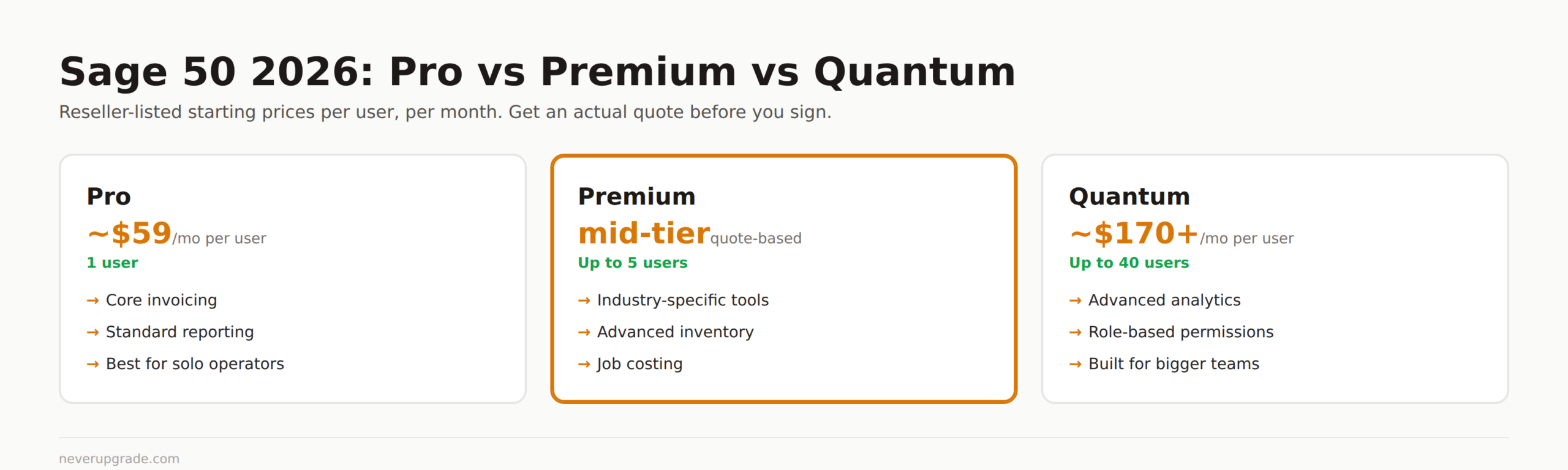
Sage does not publish a single sticker price. It sells through partners and quotes by seat count and add-ons, which is exactly the kind of pricing opacity that makes people search for a number in the first place. Based on current reseller listings, expect roughly:
- Pro: single user, core invoicing and reporting. Reseller pricing starts around $59/month per user.
- Premium: up to 5 users, adds industry-specific tools, advanced inventory, and job costing.
- Quantum: up to 40 users, adds advanced analytics and role-based permissions. Reseller pricing runs around $170+/month per user.
Treat those numbers as a starting point, not a quote. Your actual bill depends on user count, the payroll add-on, and whatever discount your reseller negotiates. Call two resellers and compare before you sign anything. (Source: Sage 50 Pro vs Premium vs Quantum pricing comparison.)
Where to Get the Legitimate Sage 50 2026 Download
There is exactly one place to get a legitimate Sage 50 2026 download: the Sage customer portal at support1.na.sage.com, logged in with your Sage Account and an active Business Care plan. If you are already running Sage 50, you do not need to hunt for a download at all. Go to Services > Check for Updates > Check Now inside the application and let it pull the update directly.
How to spot a stale or fake mirror:
- If a download page does not require you to log in with a Sage Business Care account, it is not the real Sage 50 accounting 2026 installer. Sage gates this behind an active support contract, full stop.
- Third-party “download” sites that predate the actual release date, or that list version numbers Sage never shipped, are either scraped junk or bundled with something you did not ask for.
- Retail resellers (Dell, CDW, and similar) sell legitimate licenses with activation keys tied back to Sage’s own servers. That is different from a bare installer file floating around a forum.
Before you install anything: back up your company file. Sage 50 upgrades are a one-way door on the data file format, and there is no clean rollback once a 2026 file has been converted.
Is Upgrading Worth It If Your Current Version Still Works?
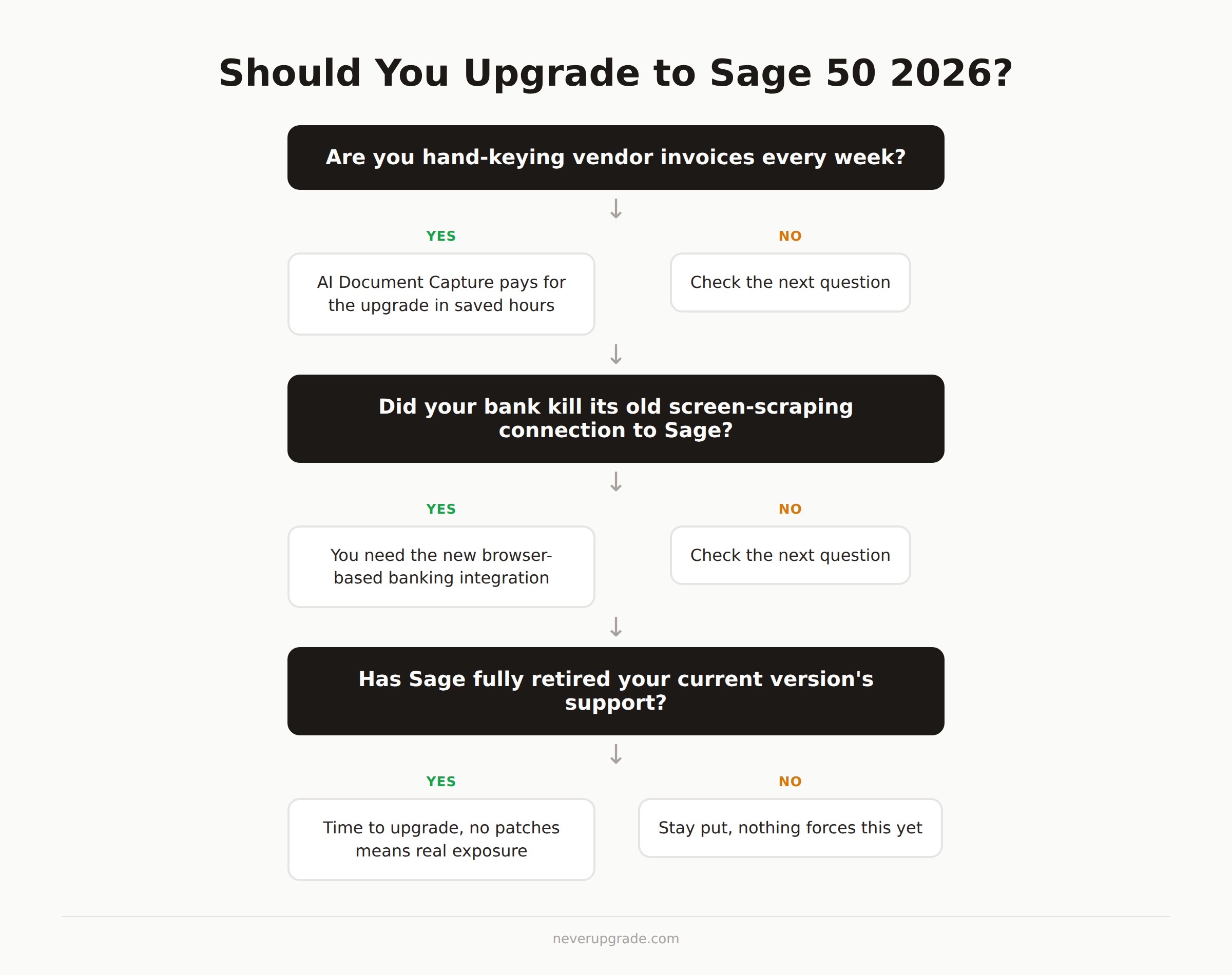
Usually not, unless one of these applies to you:
- You are still hand-entering vendor invoices and AI Document Capture would save real hours every week.
- Your bank recently killed the old screen-scraping connection Sage used to pull transactions, and you need the new browser-based banking integration to reconnect.
- You are running a version old enough that Sage has stopped supporting it entirely, which means no security patches and no help desk if something breaks.
If none of those match, staying put costs you nothing but a slightly older feature set. The real risk with any accounting software is running an unsupported version with no patches, not running last year’s version of a supported one. Sage 50 2025 is still fully supported; there is no security cliff forcing your hand this year.
Sage 50 vs QuickBooks Desktop for Holdouts
If you are evaluating Sage 50 2026 because you are also weighing a jump away from QuickBooks Desktop, the comparison is not close to as clean as either vendor’s marketing suggests. Sage 50 uses more traditional double-entry bookkeeping conventions that accountants tend to prefer, while QuickBooks Desktop has the larger ecosystem of bookkeepers and integrations who already know it. Neither one is going anywhere in 2026, so this is not a forced decision. We cover the actual QuickBooks Desktop cost breakdown and where it still wins for holdouts in our QuickBooks Desktop pricing guide and our Desktop vs Online comparison.
FAQ
Is Sage 50 2026 a paid upgrade or included with my subscription?
If you are on an active Sage Business Care plan, the 2026 update is included and installs through Check for Updates. If your support plan lapsed, you will need to reinstate it or buy a new license before you can install the 2026 release.
Can I skip Sage 50 2026 and stay on my current version?
Yes, as long as your current version is still within Sage’s supported lifecycle. Skipping a release does not put you at risk by itself. Running a version Sage has fully retired does.
Does upgrading to Sage 50 2026 convert my company file permanently?
Yes. Once a company file opens in Sage 50 2026, it is upgraded to the new format and will not open in an older version. Back up the file before you upgrade, and keep that backup somewhere untouched in case you need to restore the pre-upgrade state.
If you are still deciding between staying on Desktop software at all versus moving to a subscription model, our breakdown of QuickBooks Desktop without a subscription walks through the same tradeoff from the other side of the aisle.