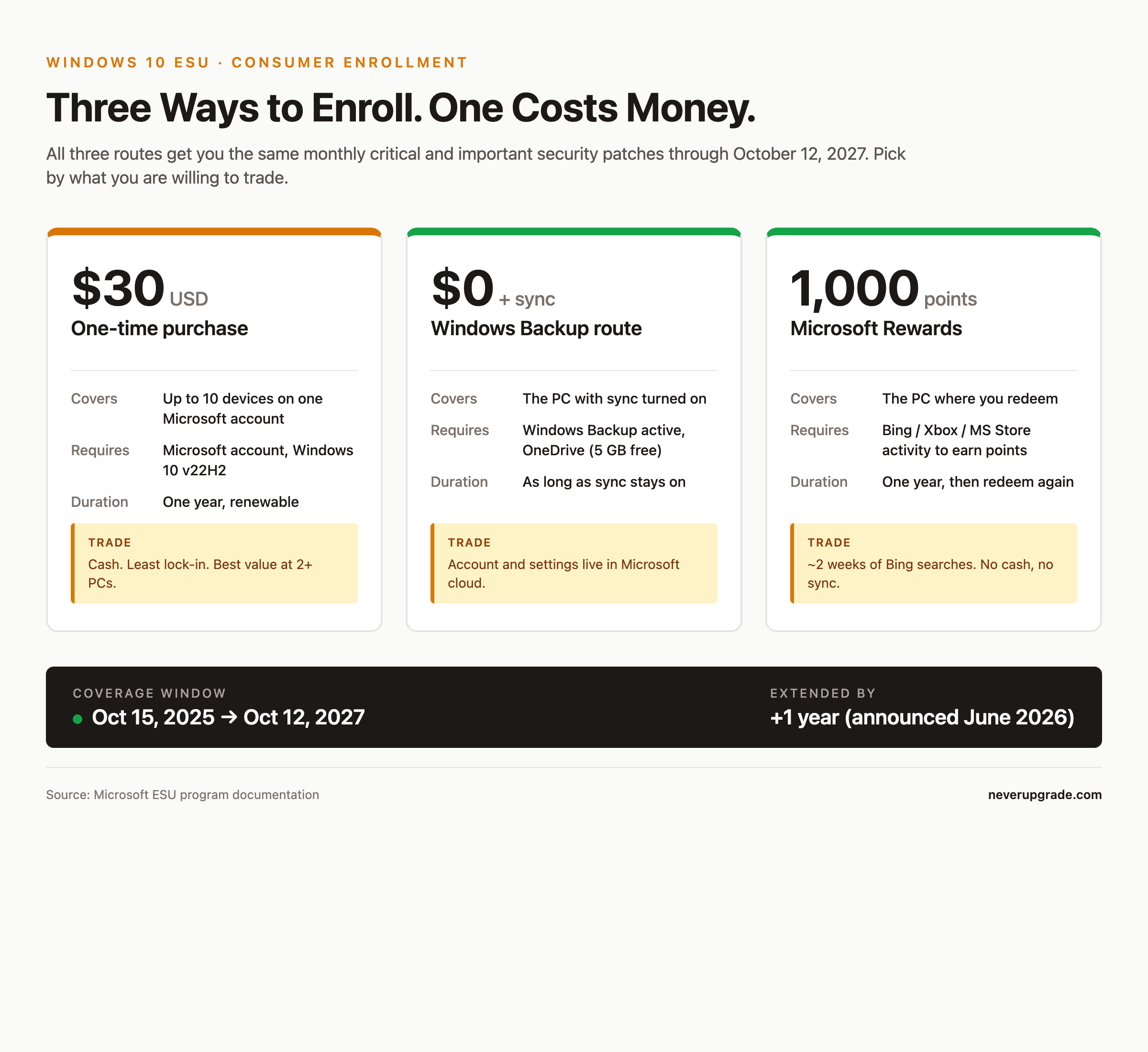
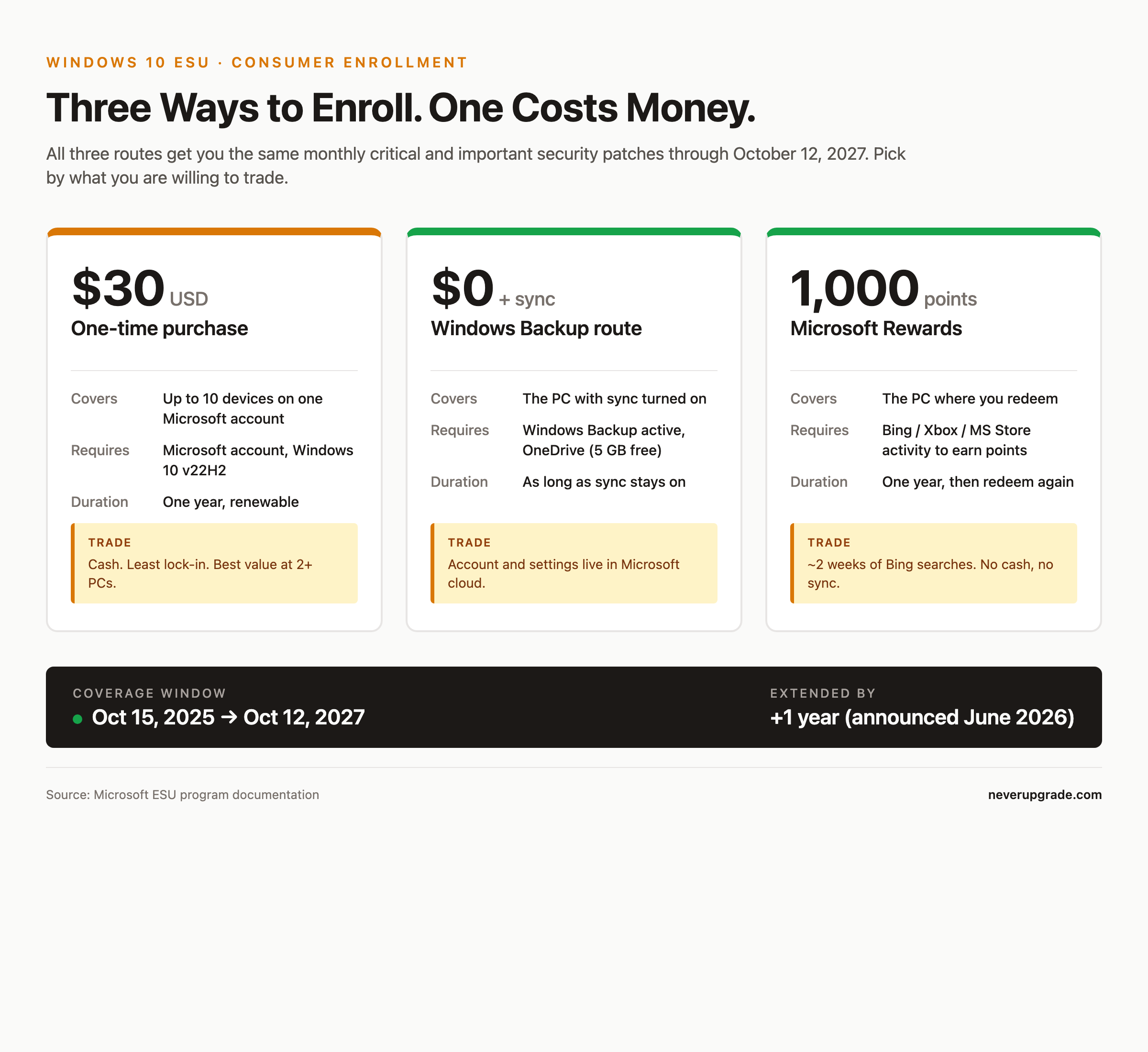
The Windows 10 extended security updates cost for a consumer PC is $30 for one year, one-time. That is the sticker Microsoft eventually settled on after the internet yelled at it. What Microsoft does not put in the marketing copy: there are three legitimate ways to enroll and pay zero dollars, and coverage now runs all the way through October 12, 2027, not October 2026 like the original plan.
We track this because most of the small shops we talk to have three or four Windows 10 boxes that still do exactly what they were bought to do. Nobody is going to buy new hardware to run the same POS software. So the real question is not “should I pay Microsoft?” It is “which enrollment route has the least strings attached?”
The $30 sticker price, explained
For Windows 10 Home and Pro on personal devices, the paid route works like this:
- Your PC must be running Windows 10, version 22H2. Earlier builds are not eligible.
- You sign in with a Microsoft account (yes, even for the paid path).
- You hit the “Enroll now” link in Settings > Update & Security > Windows Update.
- You pay $30 USD plus local tax. One purchase covers up to 10 Windows 10 devices tied to the same Microsoft account.
What that $30 actually buys: monthly critical and important security updates, per the Microsoft Security Response Center severity ratings. That is it. No feature updates, no non-security bug fixes, no product support if something breaks. If your printer driver eats itself in month seven, you are on your own.
The enrollment wizard began rolling out to Windows Insiders in July 2025 and expanded to everyone in mid-August 2025. If you do not see the enroll link, you are almost certainly not on 22H2 yet, or you are signed into a local account instead of a Microsoft account.
Free route 1: Windows Backup sync
This is the option Microsoft wants you to pick, because it drags you deeper into their account ecosystem.
Turn on Windows Backup and sync your PC settings to OneDrive under your Microsoft account. Once sync is active, the ESU enrollment wizard offers “at no additional cost” as one of the buttons. Click it, you are enrolled, you owe nothing.
The catch nobody talks about loudly: the free tier of OneDrive is 5 GB. Settings sync itself uses almost none of that, so you will not blow past the cap from ESU alone. But if you already use OneDrive for actual files, or if you signed up for Microsoft 365 for the mailbox, this route effectively assumes you are staying inside that account for a year. Sign out, delete the Microsoft account, or turn Backup off, and Microsoft can revoke the free enrollment.
The other cost is not measured in dollars. Every device on that Microsoft account is now telemetry-linked, and the sync itself is a small, real footprint you probably would not otherwise create. If you were the sort of admin who kept these boxes on local accounts on purpose, this trade matters.
Free route 2: Redeem 1,000 Microsoft Rewards points
This is the option almost no one uses, and it is easily the funniest one.
Microsoft Rewards points come from Bing searches, Xbox game activity, and Microsoft Store purchases. You earn about 5 points per Bing search on desktop (capped around 90 points per day), meaning you can grind out 1,000 points in roughly two weeks of half-hearted Bing usage.
In the ESU enrollment wizard, you pick “Redeem Microsoft Rewards points,” it takes 1,000 points off your account, and you are covered for the year.
The real cost: your search history for two weeks lives in Microsoft’s ad-modeling systems. If that does not bother you and you already have points sitting around from Xbox or an old Bing habit, this is genuinely free with almost no lock-in. When the year is up, you can walk away without having handed Microsoft a dollar or a synced settings file.
Business vs consumer pricing: the numbers get ugly fast
This is where the “$30” headline stops being useful. Consumer ESU is a subsidized rounding error compared to what Microsoft charges commercial customers through Volume Licensing.
For a commercial or educational organization, one year of Windows 10 ESU costs $61 USD per device for Year One. The price doubles every consecutive year, up to a three-year maximum:
- Year One (2025 to 2026): $61 per device
- Year Two (2026 to 2027): $122 per device
- Year Three (2027 to 2028): $244 per device
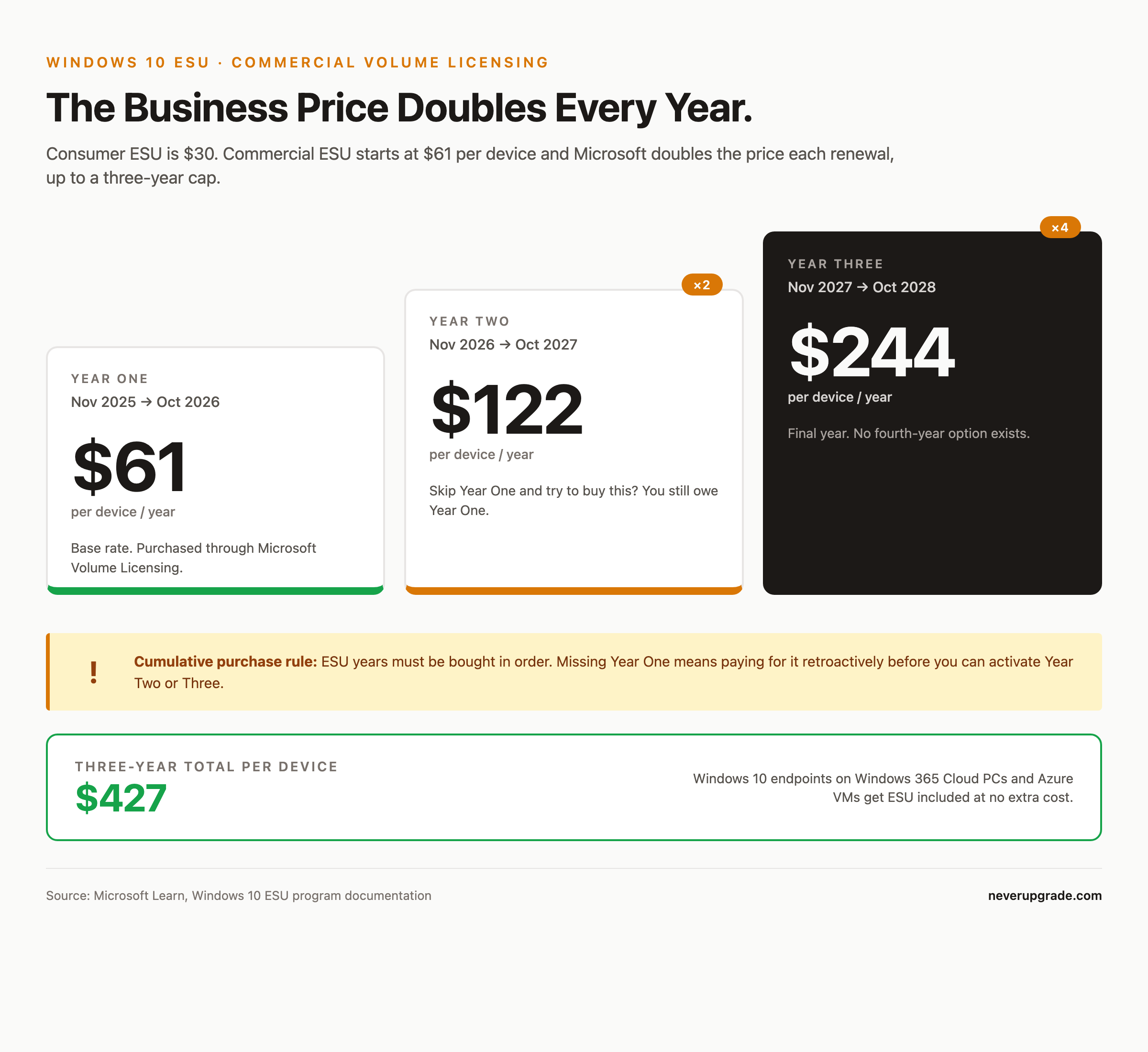
The purchases are cumulative. If you skip Year One and try to buy Year Two, you still owe for Year One first. That is Microsoft’s soft way of saying “please stop making us do this.”
Exceptions where business ESU is included at no charge: Windows 10 endpoints connecting to Windows 365 Cloud PCs (with an active subscription), and Windows 10 VMs running on Azure, Azure Virtual Desktop, Azure Local, and a few other listed cloud surfaces. If your users are already RDP’d into a Cloud PC all day, ESU on the physical thin client on their desk is free.
One quirk small businesses trip on: the consumer ESU route (the $30 one) is technically only for personal devices, not domain-joined machines. If your workstations are joined to Active Directory or Entra, you are supposed to be on the commercial track. In practice, plenty of five-person shops with an unmanaged workgroup will use the consumer path and be fine, but that is you choosing to interpret Microsoft’s terms generously.
Is one year of patches worth $30?
The honest answer, for a personal PC on 22H2 that still does what you need: yes, easily. $30 for twelve months of security patches on hardware that would otherwise be a slow security liability is a good trade, and you get through October 12, 2027 if you enroll now.
But do not skip the free routes reflexively. The Windows Backup path is fine for anyone already inside the Microsoft 365 ecosystem. The Rewards points path is fine for anyone allergic to sync. The $30 path is really only worth paying when both of the free routes require you to change how you use your PC, or when you want zero account entanglement and the $30 is cheaper than the friction.
Where we would spend the $30 without thinking: the second and third PCs on the same Microsoft account. One purchase covers up to 10 devices. If a family has four Windows 10 machines, $30 total works out to $7.50 per PC for a year of security patches. There is no meaningful cheaper option at that scale.
Where we would not pay $30: a single, lightly used home laptop that already has a Microsoft account and OneDrive turned on. Just take the free sync route. Microsoft is not going to send you a nicer patch because you paid.
Before you enroll, back up. Not because ESU will break anything, but because “back up first” is the correct answer to every question involving Windows Update. Full image backup to an external drive, verified, then click the button.
FAQ
How long do I actually get Windows 10 security updates through ESU?
Consumer ESU coverage now runs from October 15, 2025 through October 12, 2027, after Microsoft quietly extended the program by a year in June 2026. Commercial ESU customers can buy up to three years of coverage, ending in October 2028.
Do I need a Microsoft account to enroll in ESU?
Yes, for consumer ESU, all three enrollment paths (paid, sync, Rewards points) require signing into Windows with a Microsoft account. Local-account holdouts have to switch, at least on the enrolled device. Commercial ESU is licensed per device through Volume Licensing and uses a Multiple Activation Key instead.
Can I stop paying after one year and keep the updates?
No. ESU is a subscription. Once the year ends, you either renew (paid or free route) for the next year, or the updates stop. Any patches you received before the end date stay installed, but you will not get October 2027 patches on a plan that ended in October 2026.
Sources: Microsoft Learn: Extended Security Updates (ESU) program for Windows 10, Microsoft Consumer ESU page, CNET on the 2027 extension, PCMag on the free enrollment routes.