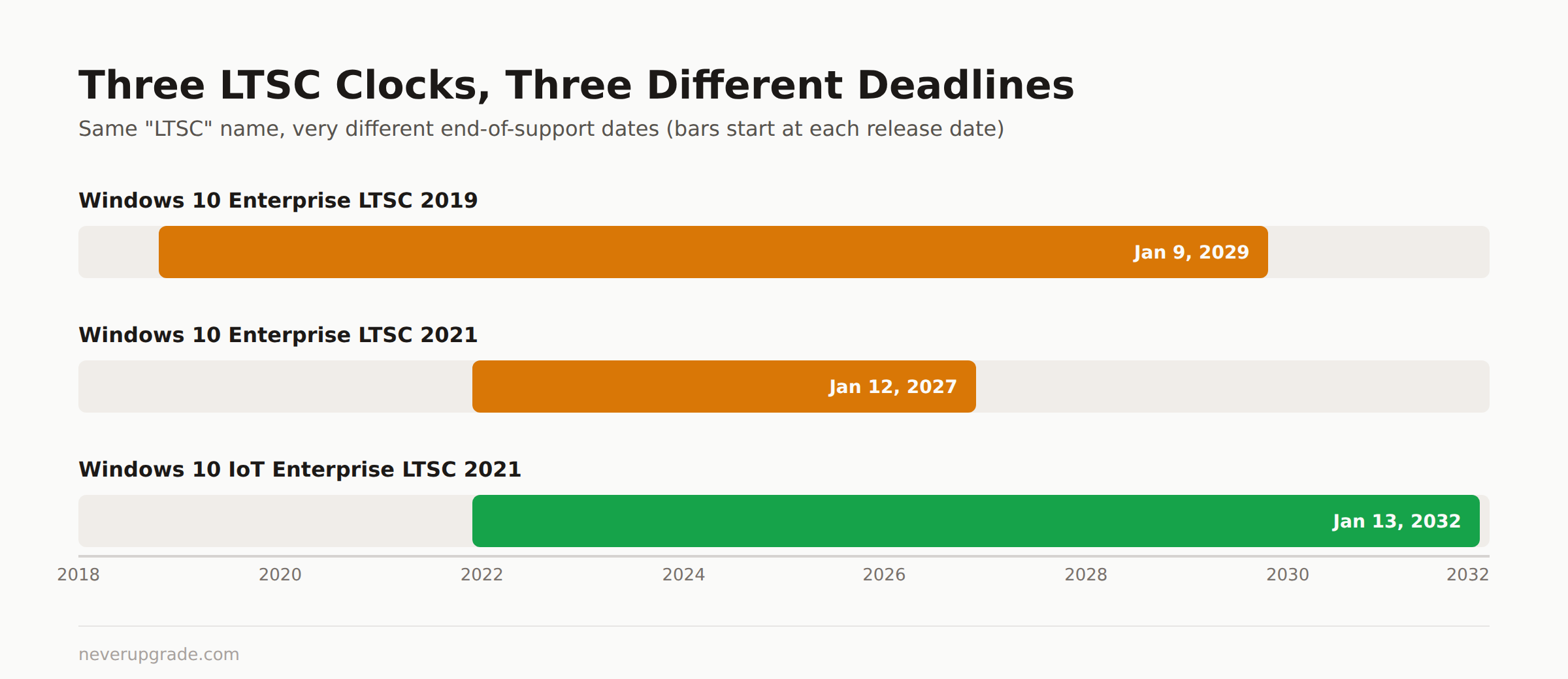
Windows 10 Enterprise LTSC 2021 reaches end of support on January 12, 2027. Windows 10 Enterprise LTSC 2019 gets until January 9, 2029. If you are running the IoT variant instead of plain Enterprise LTSC, your dates are different again, and that mismatch is exactly what tripped up a lot of admins in the fall of 2025.
Before you touch anything based on this article: back up your golden image or master VHD first. LTSC boxes are usually the ones nobody has re-imaged in three years, and that’s not the week to find out your backup job silently failed.
LTSC naming is a minefield, and Microsoft built it that way
“LTSC” alone tells you almost nothing. There are at least four products that share the acronym and get confused constantly:
- Windows 10 Enterprise LTSC 2019 (version 1809), 10-year lifecycle
- Windows 10 Enterprise LTSC 2021 (version 21H2), 5-year lifecycle
- Windows 10 IoT Enterprise LTSC 2021, 10-year lifecycle, same underlying bits as regular Enterprise LTSC 2021 but a different SKU with double the support runway
- Windows 11 Enterprise LTSC 2024, the current release Microsoft wants you to land on
If you’ve already read our guide to Windows 10 IoT Enterprise LTSC 2021, you know the trick: IoT Enterprise LTSC and plain Enterprise LTSC 2021 are the same code, licensed differently, with the IoT SKU getting a full decade of updates instead of five years. Mixing them up is the single most common LTSC support question we see, and it’s not admins being careless. Microsoft’s own documentation and support forums use “Windows 10 LTSC” as a catchall for all four products, so unless you check your specific SKU, you’re guessing at your own deadline.
This article covers Windows 10 Enterprise LTSC, meaning the 2019 and 2021 releases. If you’re on the IoT edition, your numbers are better than what’s below.
The real end-of-support dates, straight from Microsoft’s lifecycle pages
Here’s what Microsoft’s own Lifecycle documentation says, not a summary of a summary:
| Release | Version | Start Date | End of Support |
|---|---|---|---|
| Windows 10 Enterprise LTSC 2019 | 1809 | Nov 13, 2018 | January 9, 2029 |
| Windows 10 Enterprise LTSC 2021 | 21H2 | Nov 16, 2021 | January 12, 2027 |
| Windows 10 IoT Enterprise LTSC 2021 (for comparison) | 21H2 | Nov 16, 2021 | January 13, 2032 |
Two things worth flagging. First, LTSC 2019 already passed its mainstream end date back in January 2024; what’s left is extended support, which for a Fixed Lifecycle product like this one just means “still getting security patches,” and that runs out January 9, 2029. Second, Microsoft’s own lifecycle table lists LTSC 2021’s cutoff as 1/13/2027 at 6:59 AM Pacific, which crosses midnight into January 13 depending on your time zone, while Microsoft’s IT Pro blog and most secondary sources round it to “January 12, 2027.” Both are technically correct depending on where you’re standing. We’d plan for January 12 and treat the extra few hours as margin, not a deadline you can lean on.
After the end-of-support date, Enterprise LTSC 2021 devices get one final monthly security update and then nothing: no security patches, no bug fixes, no technical support, no online technical content updates. Standard end-of-life terms, no surprises there.
What happened in October 2025: when Microsoft’s own tooling jumped the gun
If you were running LTSC 2021 machines last fall and Windows Update suddenly started throwing ESU enrollment messages at you, you weren’t imagining it and you weren’t alone. A widely-shared Reddit thread from that period (r/sysadmin, “Windows 10 LTSC 2021 End of life? What the hell, Microsoft?”) describes admins walking in to find some of their LTSC 2021 machines displaying ESU-required messaging in Windows Update, more than a year before the actual January 2027 cutoff.
The practical lesson isn’t “Microsoft lied about the date.” The lifecycle page never moved. It’s that Microsoft’s own update tooling and messaging pipeline can get ahead of, or simply misfire against, the documented lifecycle dates, and it hit LTSC 2021 machines specifically because LTSC’s whole appeal, no feature updates, minimal telemetry chatter, “set it and forget it” servicing, means admins aren’t in Windows Update as often to catch this kind of thing early. If your LTSC fleet is large, the honest move is to check actual support status against the Microsoft Lifecycle page directly rather than trusting whatever Windows Update tells you on a given Tuesday.
How to check which LTSC edition and build you’re actually running
Don’t guess. Two ways to confirm, in order of speed:
- winver. Press Win+R, type
winver, hit enter. It shows your exact version (1809, 21H2, etc.) and build number, though it won’t explicitly say “LTSC” versus “IoT LTSC” on the label. - Registry key. Open
regeditand go toHKEY_LOCAL_MACHINE\SOFTWARE\Microsoft\Windows NT\CurrentVersion. Check theProductNamevalue (it’ll say something like “Windows 10 Enterprise LTSC” or “Windows 10 IoT Enterprise LTSC”) andReleaseIdorDisplayVersionfor the specific build (1809 vs 21H2).
On a fleet, script the registry check instead of RDPing into every box. A one-line PowerShell query against that same registry path across all your machines beats a spreadsheet full of guesses, and it’s the only way to know for certain whether you’re staring down a 2027 deadline or a 2032 one.
Your options once support genuinely ends
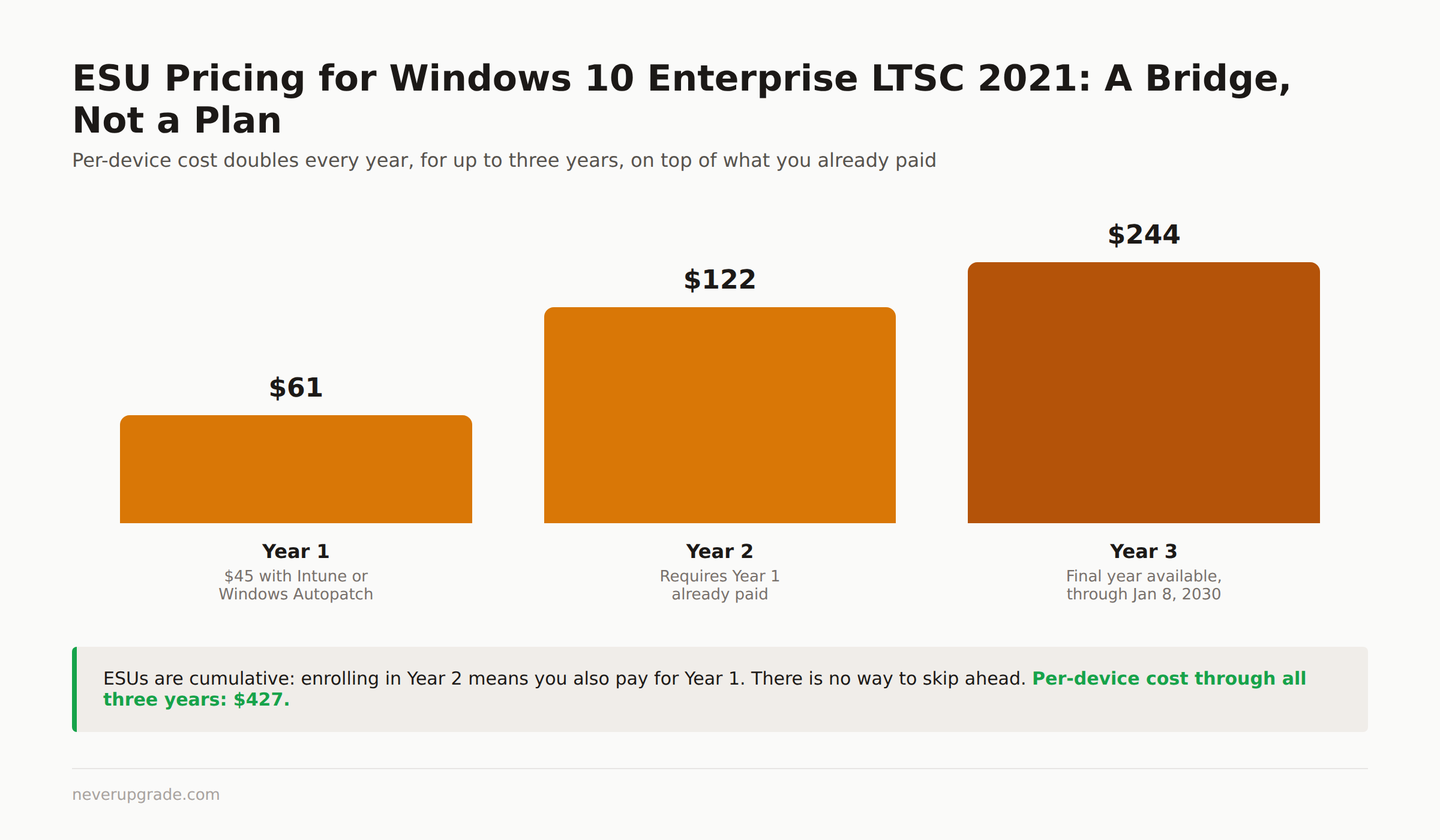
Extended Security Updates (ESU). LTSC 2021 is eligible. Per Microsoft’s own IT Pro blog, ESU coverage becomes available for purchase starting September 1, 2026, through Volume Licensing or a Cloud Solution Provider, and can be extended for up to three years past end of support, meaning coverage can run through January 8, 2030 at the latest. Year 1 pricing is $61 per device, or $45 per device if you’re managing updates through Intune or Windows Autopatch (roughly a 25% discount). The catch: pricing doubles every consecutive year, and ESUs are cumulative, meaning you can’t skip ahead, you have to have paid for every prior year to enroll in the next one. That puts Year 2 at $122 per device and Year 3 at $244, for a three-year cumulative total of $427 per device if you ride it all the way to the January 2030 cutoff. This is a bridge, not a plan. Microsoft is explicit that ESU doesn’t include new features, quality fixes, or extended technical support beyond activation and installation help.
In-place upgrade to Windows 11 Enterprise LTSC 2024. This is Microsoft’s stated recommendation, and it’s the right call if your hardware meets Windows 11’s requirements and your locked-down applications tolerate a major OS version bump. LTSC-to-LTSC upgrades preserve the “no feature update churn” property that got you onto LTSC in the first place.
Stay put with mitigations. If you’re not eligible for or interested in ESU, and Windows 11 isn’t happening on that hardware, the honest answer is: network-isolate those machines, kill any exposed services you don’t need, and treat every unpatched CVE against Windows 10 as live risk from day one of end of support. This is viable for genuinely air-gapped or single-purpose machines. It is not viable for anything touching a business network with real data on it.
This is the one case where you actually should upgrade if you can. LTSC’s whole selling point is that it doesn’t nag you with feature updates, which is also exactly why its end-of-life sneaks up on people. Nobody’s been prompted about it for years. If your LTSC 2021 fleet is on hardware that supports Windows 11 LTSC 2024, don’t wait for January 2027 to start that project. ESU buys time; it doesn’t buy indefinitely, and the price schedule is designed to make you feel that every year you wait.
FAQ
Is Windows 10 Enterprise LTSC 2021 still supported in 2026?
Yes. Mainstream support already ended, but security updates continue under Fixed Lifecycle terms until January 12, 2027 (Microsoft’s lifecycle table lists 1/13/2027 6:59 AM Pacific as the precise cutoff).
What’s the difference between Windows 10 Enterprise LTSC and Windows 10 IoT Enterprise LTSC?
Same underlying code, different licensing and support windows. Enterprise LTSC 2021 gets 5 years (through January 2027); IoT Enterprise LTSC 2021 gets 10 years (through January 2032). See our full breakdown in the IoT Enterprise LTSC 2021 guide.
Can I buy ESU for Windows 10 Enterprise LTSC 2021 right now?
Not yet as of this writing. Microsoft’s stated availability date is September 1, 2026, sold through Volume Licensing or a Cloud Solution Provider, at $61 per device for Year 1 ($45 with Intune or Windows Autopatch management).