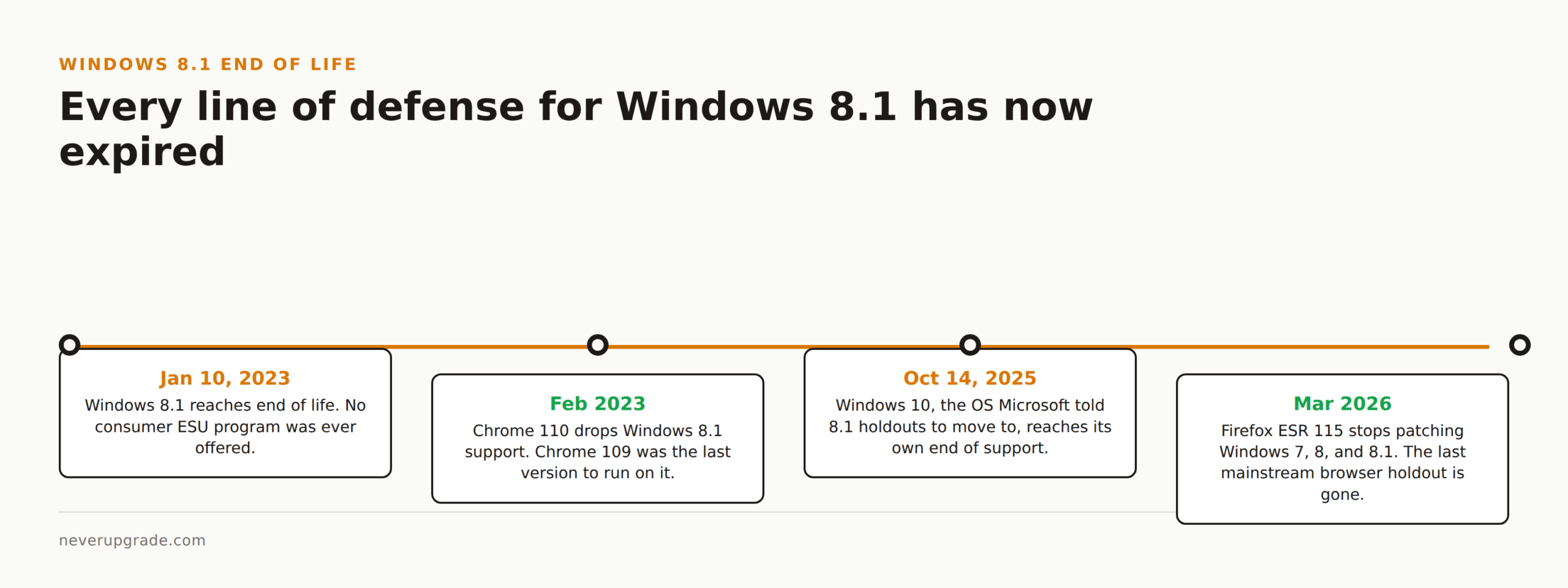
Windows 8.1 reached end of life on January 10, 2023, and unlike Windows 7 or Windows 10, Microsoft never offered a paid Extended Security Update program to buy more time. If you are still on it in 2026, the machine will boot and run your programs fine, but every major browser has now cut it off too, which changes the calculus. Here is what that actually means and how to keep a holdout machine running without it becoming the thing that gets you breached.
What “end of life” actually cut off
Microsoft’s own support page is blunt about what stopped on January 10, 2023: no more technical support, no more software updates, no more security fixes. Full stop. Store app updates for whatever built in apps you still had lingered a little longer, through June 30, 2023, and then those went dark too.
We get asked a lot whether this is the same as Windows 7’s situation, where you could pay for ESU and buy a few extra years. It is not. Windows 7 got a consumer ESU program. Windows 10 got one in 2025. Windows 8.1 got nothing. Microsoft’s position has been consistent: upgrade the hardware, or accept the risk. There is no official on ramp to extend the clock.
The exposure of running it online in 2026
Three and a half years of unpatched vulnerabilities is a long time, and the browser situation is where this stopped being theoretical.
Chrome cut the cord first: Chrome 109 was the last version that ran on Windows 8.1, and Chrome 110, which shipped in February 2023, required Windows 10 or newer. If you have been quietly running an old Chrome install since then, it has had zero security patches for over three years while being the single most common attack surface on the machine.
Firefox held out the longest, and this is the part that changes right around now. Mozilla kept extending Firefox ESR 115 for Windows 7, 8, and 8.1 users well past its original cutoff, pushing the deadline back more than once. That grace period ends in March 2026. If you are reading this in the second half of 2026, Firefox is done patching for your OS too. That was genuinely the last mainstream browser holding the line, and now it is not.
Put plainly: any Windows 8.1 machine connected to the open internet today is running an OS with three and a half years of unpatched holes, and a browser with no vendor still shipping it security fixes. That is not fearmongering, it is just where the timeline landed.
There is a decent irony here worth naming, since NeverUpgrade does not pretend Microsoft’s own upgrade advice aged well: the “just move to Windows 10” recommendation Microsoft gave 8.1 holdouts back in 2023 is itself now sitting past its own end of support date, which landed October 14, 2025. Windows 10 does have a real ESU bridge (we cover how to enroll elsewhere), but it is worth knowing before you spend a weekend migrating that “the supported version” is a moving target, not a permanent state.
What still works and what has been cut off
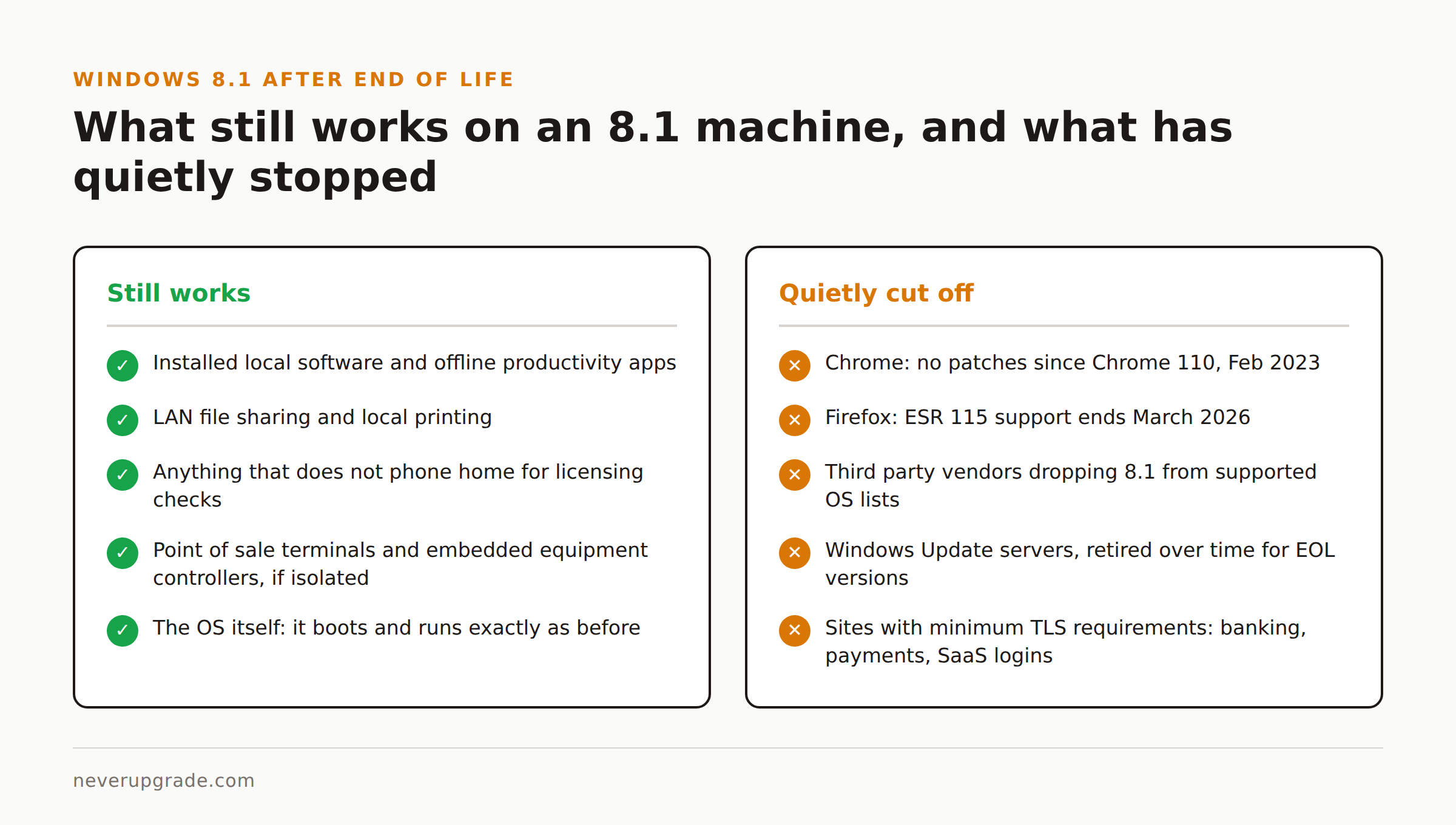
The operating system itself does not stop functioning. Installed local software, offline productivity apps, LAN file sharing, and anything that does not phone home for licensing checks will generally keep running exactly as it did the day support ended. We have seen 8.1 boxes running dedicated point of sale terminals, embedded lab equipment controllers, and old accounting software with zero issues years past EOL, precisely because they are air gapped or firewalled off from anything that matters.
What has quietly broken or is breaking:
- Modern browsers, as covered above. Old Chrome and (soon) old Firefox builds will keep loading pages but with no patches and increasingly broken TLS/certificate handling as the web moves on.
- Third party software vendors dropping 8.1 from their supported OS list, meaning new versions of your antivirus, backup client, or line of business app may simply refuse to install.
- Windows Update itself. Microsoft has been known to quietly retire update servers for EOL versions over time, so even the handful of driver updates that used to trickle through can stop.
- Any cloud service with a minimum TLS version requirement. Legacy 8.1 machines with old root certificate stores can start failing to connect to banking sites, payment processors, or SaaS logins that have moved to stricter TLS policies.
None of this means the PC is a brick. It means the PC’s job needs to shrink to match what it can still do safely.
Locking down or air gapping an 8.1 machine
If the hardware still earns its keep, here is the actual playbook, not the “just upgrade” hand wave.
Before you touch anything: back up. Full disk image, not just documents, before you change network configuration or install anything. An 8.1 box that has been stable for years is exactly the kind of machine where a “quick fix” goes sideways.
- Cut internet access entirely if the machine does not need it. Pull the Ethernet cable or remove it from Wi-Fi. If it only needs to talk to a local printer or a specific server on your LAN, a firewall rule scoped to that single destination beats a general purpose connection every time.
- If it must stay online, put it behind a dedicated firewall segment. A cheap VLAN or a second router doing NAT isolation keeps a compromised 8.1 box from being a stepping stone to the rest of your network. Treat it like an IoT device, not a trusted workstation.
- Disable anything that phones out you do not use. Turn off file sharing, Remote Desktop, and any background services you are not actively relying on. Fewer open ports means fewer things an unpatched vulnerability can reach.
- Run a real endpoint product that still supports 8.1, and confirm it still gets signature updates. Not every antivirus vendor still ships definitions for EOL Windows versions, check before you assume you are covered.
- Stop using it for anything involving passwords, banking, or personal data. This is the one that people skip and regret. An unpatched browser plus a login form is a bad combination. Move sensitive browsing to any other device.
- Keep local admin accounts locked down with strong, unique passwords, and disable the guest account if it is still enabled by default.
None of this makes the machine “safe” in the way a patched OS is safe. It makes the blast radius small enough that a compromise costs you a single isolated box, not your whole network or your bank account.
Upgrade and Linux alternatives for old 8.1 hardware
If the box needs to rejoin the regular network, or you are done babysitting it, here are the real options in order of effort.
Windows 10. Cheapest lift if the hardware meets the (much lower than Windows 11) minimum requirements: 1 GHz CPU, 2 GB RAM, 20 GB free disk. Most 8.1 era machines clear that bar easily. The catch: Windows 10 hit its own end of support in October 2025, so you would be trading one EOL OS for a slightly newer one that is also unsupported unless you enroll in Windows 10 ESU. Worth doing anyway if you plan to enroll in ESU or migrate again within the ESU window, since it buys compatibility with current software in the meantime.
Windows 11. Technically possible on some 8.1 hardware, but you will almost certainly hit the TPM 2.0 and Secure Boot requirements, since 8.1 shipped before those were standard on most consumer boards. There are bypass methods (we walk through the full process here), but Microsoft can and has changed how forgiving those bypasses are, and unsupported installs do not get the same guarantee of future updates.
A lightweight Linux distro. Genuinely the best option for hardware built for 8.1, which usually means somewhere between 8 and 13 years old at this point. Distros like Linux Mint, Xubuntu, or MX Linux run comfortably on specs that would choke on Windows 11, get real ongoing security patches, and cost nothing. The learning curve is real if you have never left Windows, but for a machine that mainly does browsing, email, and office documents, it is a smaller adjustment than people expect. We cover the actual install steps, including how to keep Windows around as a fallback, in our Linux on old hardware guide.
Retire it. Sometimes the honest answer is that a 10+ year old machine has done its job. If it is not worth the labor of migrating or hardening, recycling it responsibly (most manufacturers and many electronics retailers take old PCs for free) is a legitimate outcome, not a failure.
FAQ
Can I still use Windows 8.1 safely in 2026?
Only if it is offline or tightly network isolated. Connected to the open internet, you are running an OS with no security patches since January 2023 and, as of March 2026, no browser vendor still patching it either. Isolated and firewalled for a single offline task, it can keep working indefinitely.
Is there a way to get Extended Security Updates for Windows 8.1?
No. Unlike Windows 7 and Windows 10, Microsoft never offered a consumer or business ESU program for Windows 8.1. There is no official path to extend patch support on this version.
Can I upgrade from Windows 8.1 straight to Windows 11?
Yes, technically, though Microsoft does not offer a free upgrade path and most 8.1 era hardware lacks the TPM 2.0 chip Windows 11 requires. You would either need to buy new hardware or use one of the unofficial bypass methods, which carries its own tradeoffs.
If your 8.1 machine is doing real work and you want it patched again without buying new hardware, our guide to installing Linux on old Windows hardware is the fastest way to get there.